FCA APPLICATIONS & REPORTING · AUTHORISATIONS, VARIATIONS & RETURNS

Every FCA application and return, tracked.
From authorisation to the next deadline.

Prepare an FCA authorisation or variation with an Otto-drafted blueprint and document checklist — then keep every ongoing regulatory return on one deadline calendar, with owners, evidence and reminders. Your whole FCA relationship, in one place.

Trusted by 250+ UK-regulated firms · A premium RegTechPRO module.

Book a Consultation
Every FCA Regulated Activity
8-Section Otto Blueprint
RAO Articles & Scope Qualifiers
Live FCA Web Search
180-Day FCA Countdown
Every FCA Return

A blank page and a 180-day clock.

A blank-page Regulatory Business Plan, RAO Articles you can’t decode, a fee schedule you can’t find and no clear list of what the FCA actually wants to see. This is where every new firm — and every Variation of Permission — gets stuck.

Full Auth Takes 6 to 12 Months

Business plan drafting, RAO permission scoping, SMF structuring, Form A / C / E assembly, fee calculations. Then you wait. The FCA warns: “if your application isn't complete, it could take up to 12 months.” Most firms get there by accident.

Business_Plan_draft_v9.docx
RAO_Permissions_TBC.xlsx
SMF_Matrix_WIP.xlsx

Incomplete Submissions Stall

Miss a Connect Form. Under-scope your RAO Articles. Under-capitalise. Understate SMF responsibilities. The FCA doesn't reject. They come back with queries, and the 180-day clock resets. Months disappear to correspondence.

Form A missing sections +6 wks
RAO scope query +8 wks
Financial projections re-ask +4 wks

A Whole Programme, From Scratch

The FCA doesn’t just want a form. It wants policies, a monitoring plan, an SM&CR structure, a financial-crime framework and a risk register — all in place before you’re authorised. Most firms build that from a blank page, document by document, while the clock runs.

Months lost
Building the evidence pack from scratch.

VoPs Get Lost in a Tab

Adding a permission? Removing one? Swapping SMFs? Applying for a new AR? Most firms track these in a scattered email thread. No live status, no 180-day counter, no FCA case officer record. No audit trail when the board asks.

Add Art. 60B: ?
New SMF17 MLRO: ?
FCA acknowledgement: ?

If your authorisation currently lives in a blank Word document, a half-remembered list of requirements and a 180-day anxiety spiral — this is for you.

Built around your application volume

One application or forty. Same Otto engine.

A first-time applicant and a compliance consultancy running 40 client authorisations get the same engine. Each client’s data stays walled off in its own workspace — one fixed monthly fee, no per-application or per-client charge.

Firms and consultants alike

Always on. One fixed monthly fee.

One engine for everyone — first-time applicant or consultancy running forty applications at once. Otto writes the report and the document checklist; the 180-day countdown starts the moment you submit.

  • One fixed monthly fee — no per-application or per-client cost
  • Pre-populated from People Compliance & Admin — your SMFs and firm details, ready to use
  • For consultants: each client gets a walled-off workspace — client A’s record is never visible in client B’s view
  • Otto re-generations are free — baked into the subscription, no per-click cost
What you actually get

Otto maps the application. You work the list and watch the clock.

Three things you actually get: Otto’s requirements report, a document checklist (most of it already built across your platform), and a live 180-day tracker.

The analysis you’d pay a consultant for. Eight sections, in seconds.

Otto writes your Application Requirements Report against live FCA guidance: what the regulator expects for your exact activity, your RAO Articles with scope qualifiers, the Senior Managers your SM&CR category requires and the current application fee — every claim quoted from the handbook, not paraphrased.

8
Report sections
RAO
Article-precise
<30s
To generate
£0
Per regeneration
1
Executive Summary
SUP 6.3
2
Regulatory Business Plan Requirements
COND 2
3
Governance & Responsible Individuals
SUP 10C
4
Permissions & Regulatory Scope
RAO / PERG 2
5
Capital & Financial Requirements
COND 2.4
6
Application Fees & Ongoing Costs
FEES 3 Annex 1
7
Compliance Framework Requirements
SYSC 6.1
8
Common Pitfalls & FCA Expectations
SUP 6
Credit Broking (Full) · 42 FCA-referenced items

Otto builds the checklist. You build the pack.

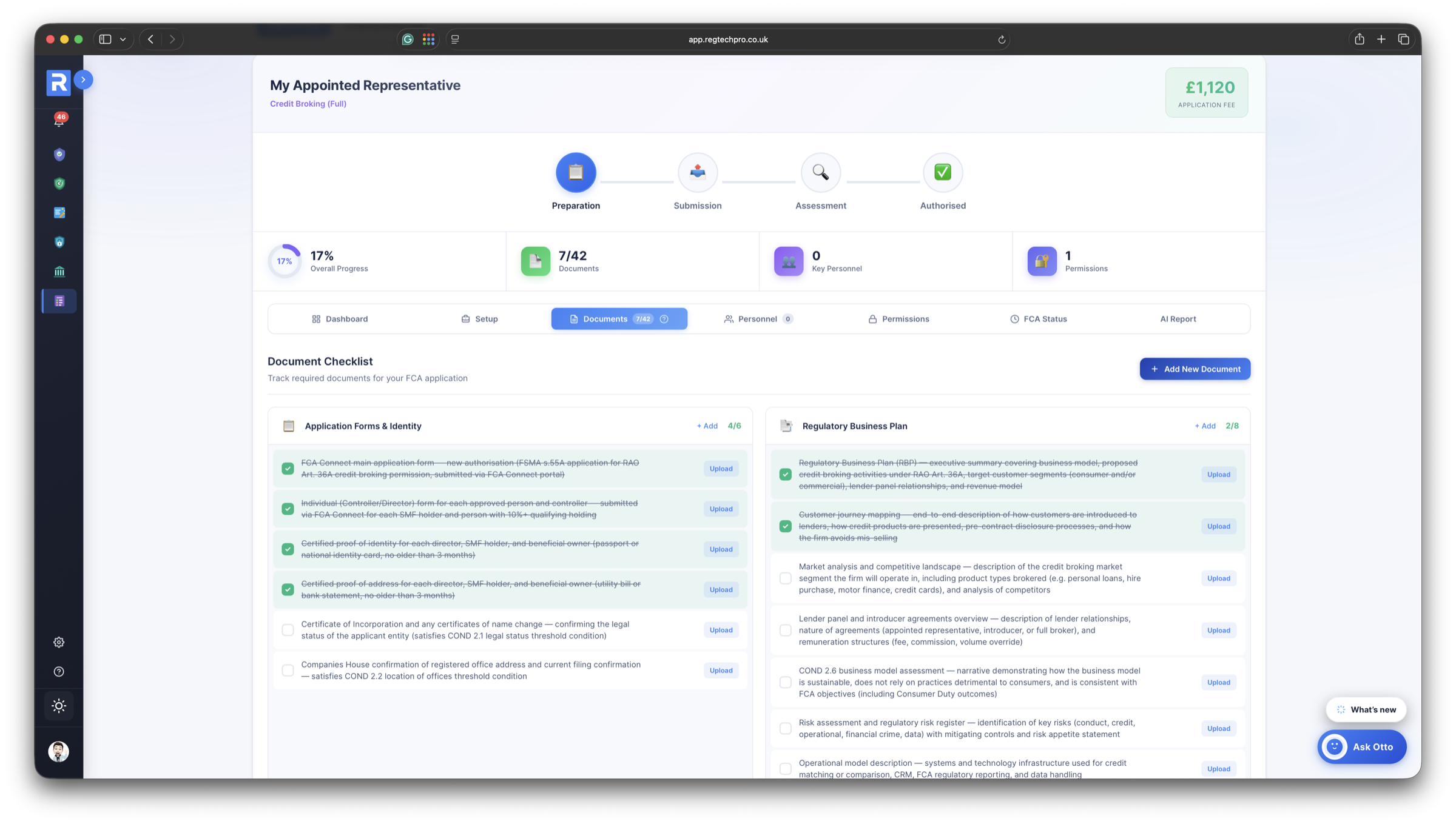
Every document the FCA expects for your activity — generated, Handbook-referenced, grouped into categories. Tick each off, upload the evidence, watch the count climb. Already on RegTechPRO? Much of the pack is ready to attach.

Document category What Otto includes Progress
Application Forms & Identity
COND 2.1–2.2
FCA Connect application · certified ID & address · Certificate of Incorporation 0 / 6
Regulatory Business Plan
COND 2.6
Business model · customer journey · market analysis · risk register 0 / 8
Financial Documentation
COND 2.4
3-year projections · opening balance sheet · capital adequacy 0 / 6
Policies & Procedures
CONC · SYSC
Responsible lending · disclosure · financial-crime controls · Consumer Duty 0 / 13
Governance, Personnel & Fit & Proper
SUP 10C · FIT
Statements of Responsibility · SMF Form As · DBS & credit checks 0 / 9

The board sentence, generated for you.

The moment you submit, the tracker captures the regulator-facing record — submission date, FCA case reference, named case officer, acknowledgement and expected decision date — and counts down the statutory 180-day assessment window. No spreadsheet, no diarised reminders.

Day 73
Elapsed
107
Days remaining
A-2026-1847
FCA case reference
12 Aug
Decision expected
Submitted · 03 Feb 2026 Statutory 180-day window Decision · 12 Aug 2026
The sentence your board wants — ready every month “We’re 73 days into the FCA’s 180-day window, decision expected 12 August, case officer assigned.” Captured automatically, straight into your board pack.
The Solution

Pick your activity. Otto maps the whole application.

From any FCA authorisation or MLR registration to a live 180-day countdown — the three views that run your application.
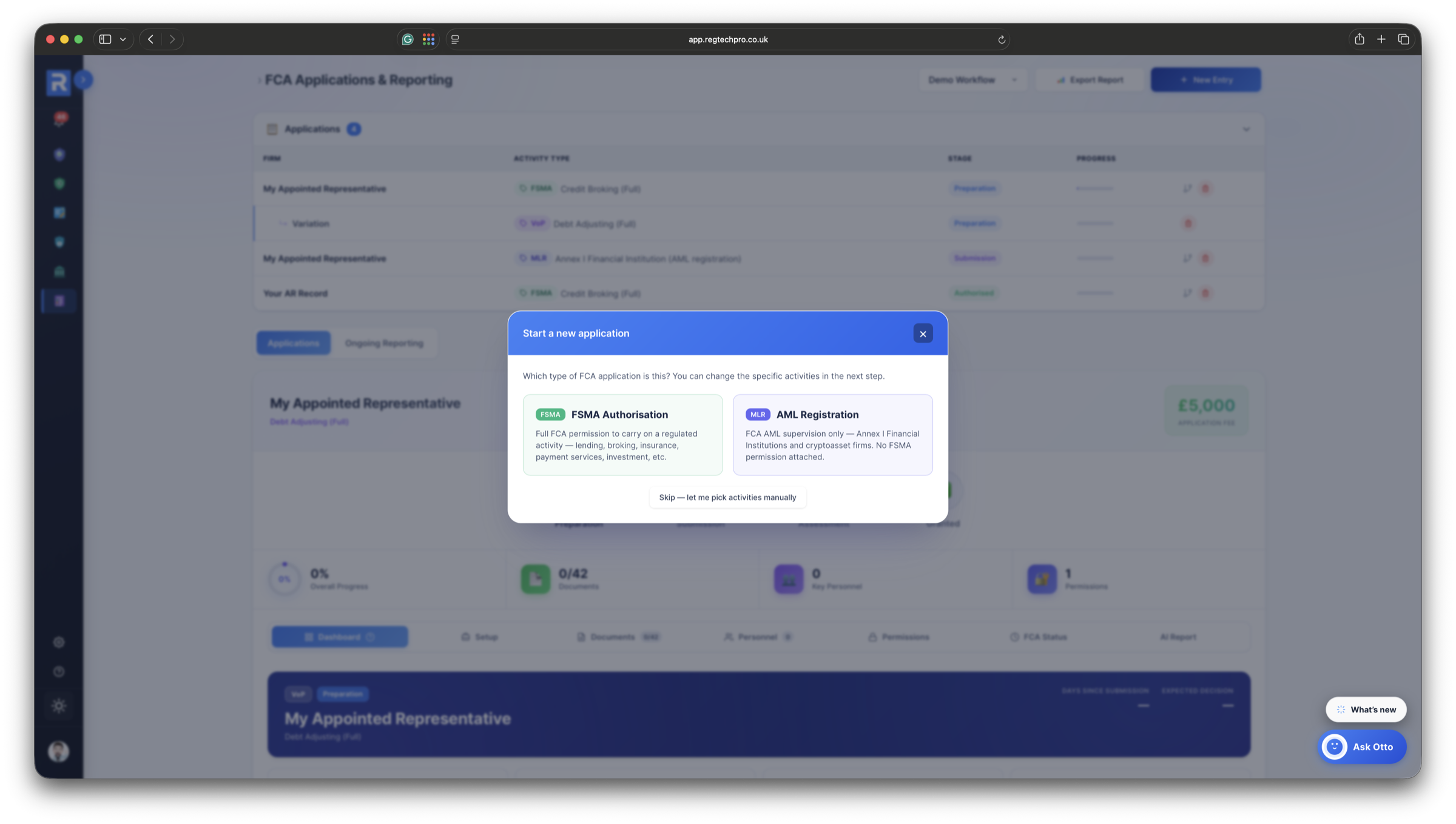
FCA Applications & Reporting Lifecycle Dashboard with KPI strip, applications register, 4-stage lifecycle

One dashboard for every live application. 5-tile KPI strip across Total, Preparation, Submission, Assessment and Authorised, colour-coded by lifecycle stage. Each row shows firm, activity type, stage chip and progress bar. Click a row, see the full application record inline.
Otto AI Application Requirements Report. 8 sections, RAO Articles, SM&CR, verbatim FCA citations

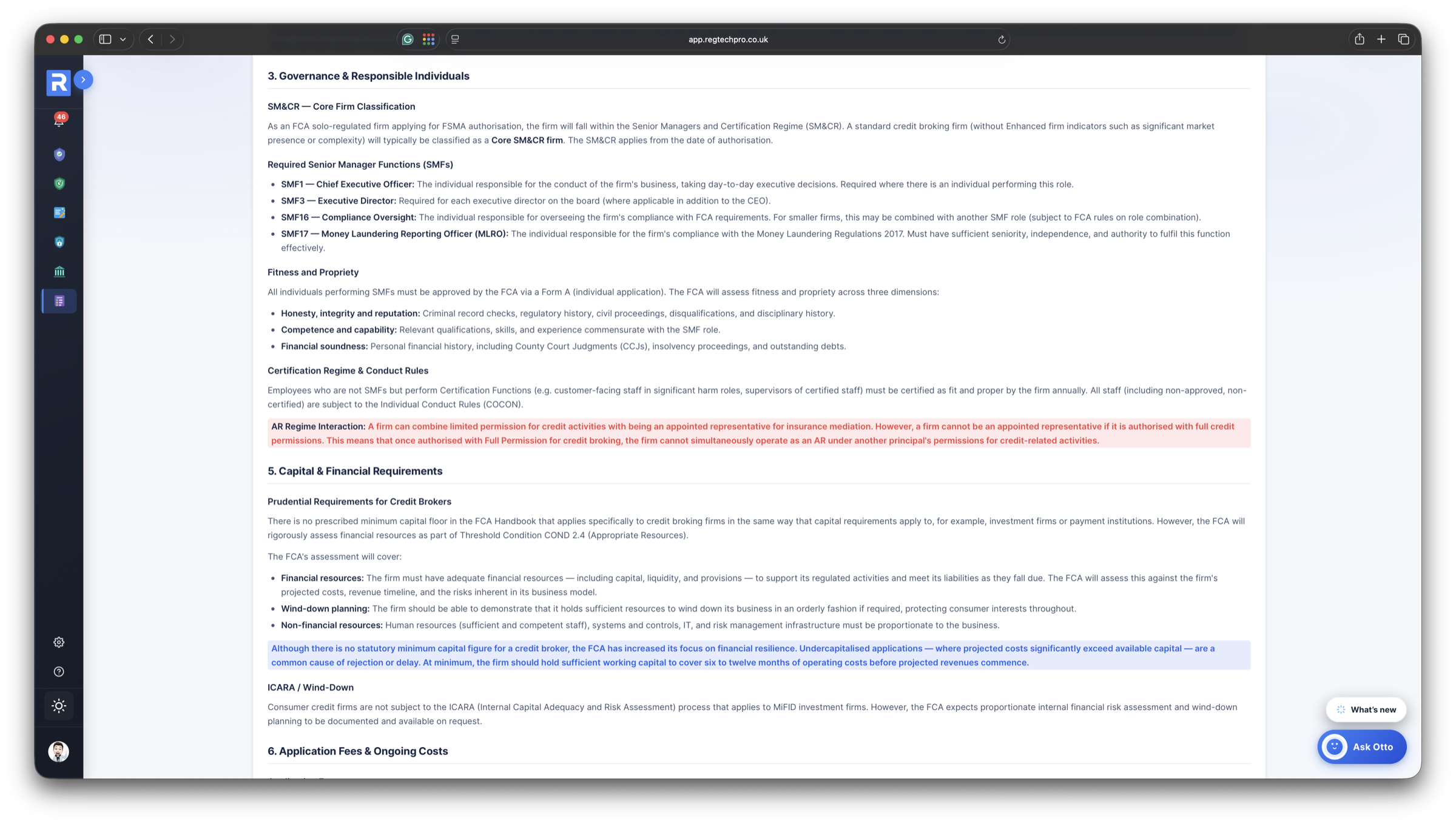
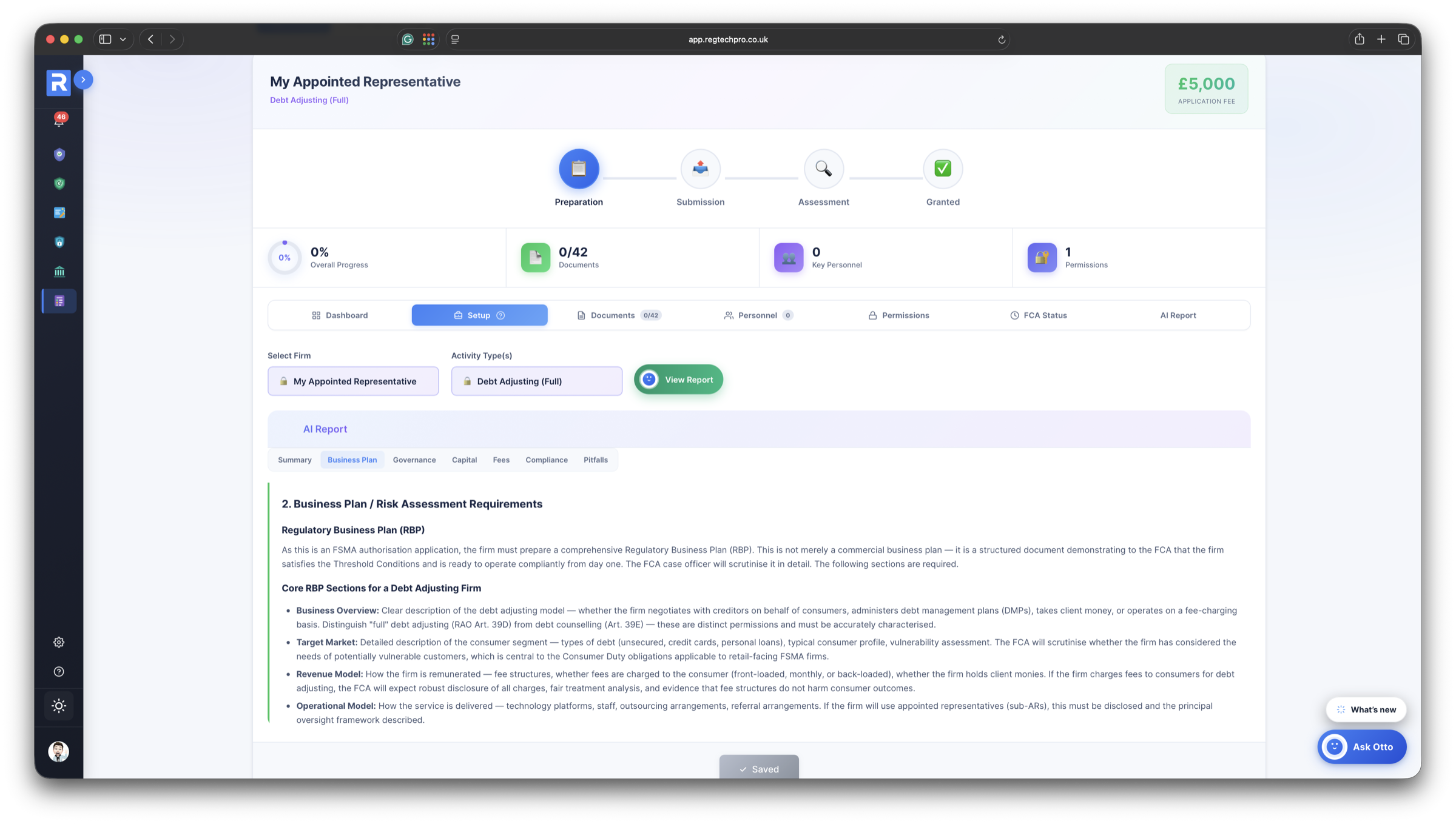
Otto's 8-section Application Requirements Report: Executive Summary, Regulatory Business Plan, Governance & Responsible Individuals, Permissions & RAO Scope, Capital & Financial Requirements, Fees, Compliance Framework, Common Pitfalls. Every section cites the FCA handbook verbatim, with RAO Article precision (36A, 39D, 39E, 60B) and SM&CR role mapping.
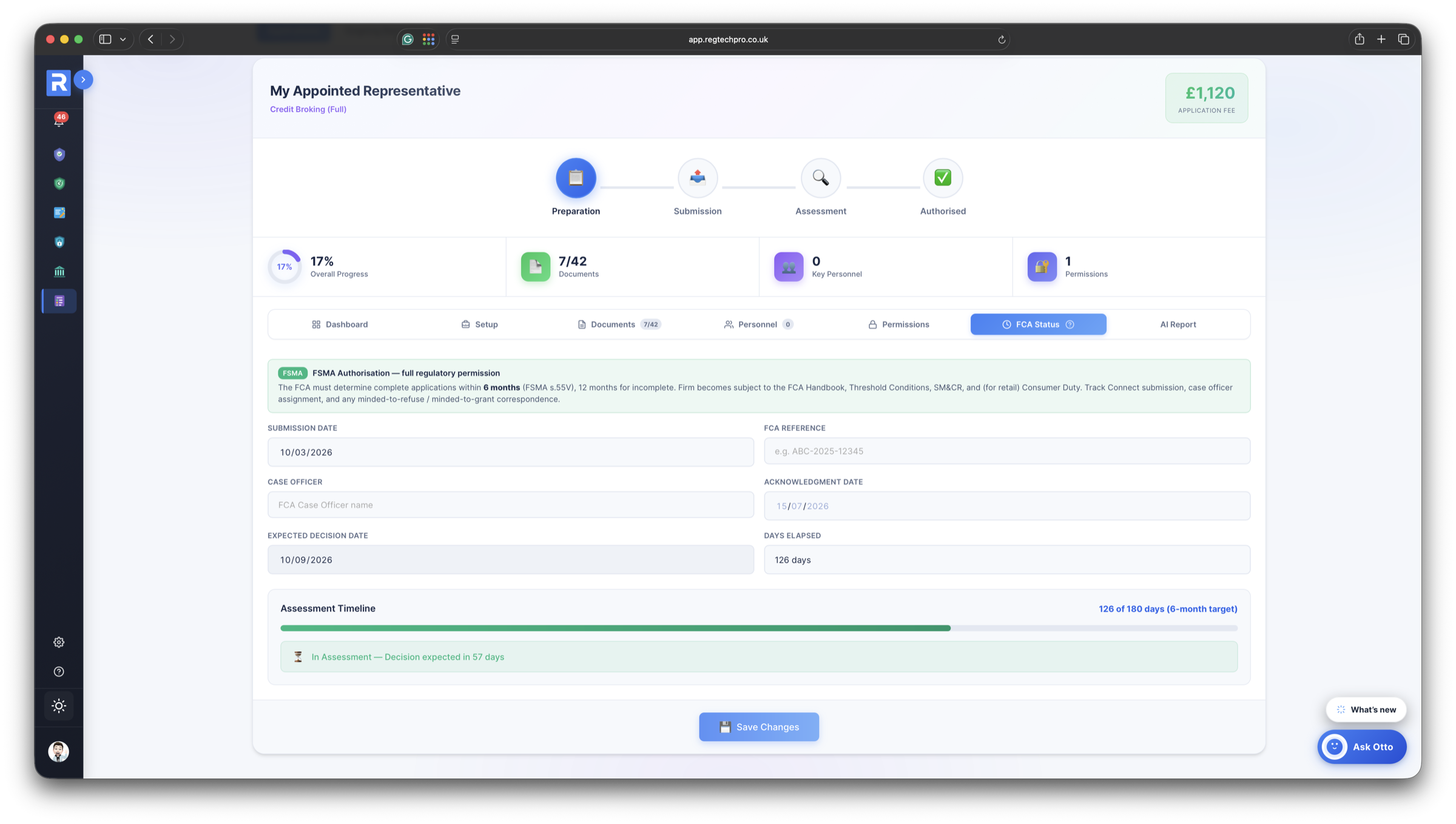
FCA Status sub-tab. 180-day assessment window, case officer, acknowledgement date

The FCA Status sub-tab. Submission date, case officer, acknowledgement date, expected decision date, days elapsed. All live. A full-width Assessment Timeline progress bar against the statutory 180-day window. The sentence your board wants: “73 days in, decision expected in 107.”

Generates your blueprint. Drafts your business plan. Answers your authorisation questions.

Otto is trained on FSMA, RAO, COND, SUP 6, PERG, SM&CR and FEES 3 Annex 1. It generates an 8-section Application Requirements Report for any FCA regulated activity, drafts every Regulatory Business Plan section from your firm data, and answers your authorisation questions with handbook-cited answers.

RAO EXPERT · FCA-HANDBOOK GROUNDED

Your application blueprint generator and business-plan drafter, in one.

Otto does three things for FCA applications — generates your 8-section requirements report the moment you pick an activity, drafts each Business Plan section from your firm data, and answers any authorisation question, handbook-cited, in seconds.

  • Generates Application Requirements Reports for every FCA regulated activity
  • Drafts each Regulatory Business Plan section from your firm data
  • Answers your authorisation questions with cited handbook responses
  • Credit-free. Every regeneration included in the subscription
Your FCA application research desk

Ask Otto anything about authorisation. Get a cited answer.

“Which RAO Article covers debt counselling?” “What's the Category 3 fee?” “Which SMFs does a Core firm need?” Otto answers from FSMA, the RAO, SUP 6, PERG, COND and live FCA guidance — in seconds, with citations.

  • FSMA, RAO, SUP 6, PERG & COND grounded
  • Web-search backed against the live FCA site
  • Cites RAO Articles, FEES 3 Annex 1 categories, SM&CR roles
  • Available on every application record
Otto AI
Online · AI Compliance Advisor
We're applying for Credit Broking Full Permission. What RAO Articles should we apply for and what will the fee be?

For Credit Broking (Full) you'll need:

  • Art. 36A RAO: core credit broking permission
  • Art. 39D RAO: if you assist with debt arrangements
  • Art. 39E RAO: if you provide debt advice
  • Art. 60N RAO: if you introduce consumer hire agreements

Application fee is £1,120 (Category 3 under FEES 3 Annex 1) — verify the exact category before you submit. Required SMFs for Core SM&CR: SMF1 CEO, SMF16 Compliance, SMF17 MLRO minimum.

Drawn from: RAO Art. 36A · FEES 3 Annex 1 · SM&CR Guide
Ask Otto anything about FCA authorisation…

FCA authorisation, Otto-drafted.

It generates your 8-section Application Requirements Report, drafts your Regulatory Business Plan, maps your RAO Article scope, and answers any authorisation question your team has. See it map your live application in a demo.

After Authorisation

Authorisation is day one. The returns never stop.

Once you’re authorised, the FCA expects a steady stream of returns — for the life of the firm. The tracker turns that open-ended obligation into one calendar you actually stay on top of.

Every FCA return

RMAR, REP-CRIM, the CMAR, the annual complaints return (DISP), MIFIDPRU and more — ready-made templates you add in a click, plus anything bespoke.

One deadline calendar

Every return gets a due date, an owner and a status. A deadlines bar surfaces anything overdue or due soon the moment you open the module — so nothing slips.

Evidence attached

Upload the filed return against its task and mark it submitted — the next one schedules itself. A complete, dated audit trail you can show you keep.

Variations & permissions

Adding or changing a permission later runs as a path off the original application — full history kept, not a fresh start — with an effective date on every permission.

FCA authorisation, on our own terms.

From a first-time applicant to a consultant running multiple client applications. Here is how firms are using an Otto-authored blueprint to get authorised.

5.0

As a new credit broker facing a blank-page Business Plan, we used FCA Applications & Reporting. Otto generated the 8-section blueprint in under a minute — right RAO Articles, the £1,120 Cat 3 fee, the exact SMFs. The 42-item checklist saved three weeks of guessing. Authorised in five months.

Erin Murphy
Erin Murphy Founder & CEO, New Credit Broking Firm
4.7

I run authorisations for a book of 14 clients. Otto produces each blueprint — activity-correct, handbook-cited, fee right every time — so I focus on the bespoke 10% that needs my hands. The 180-day tracker gives every client the same “73 days in, decision expected in 107” board line. Worth the subscription twice over.

Hans Bakker
Hans Bakker Principal, Authorisation Consultancy (14-firm book)

FCA Applications & Reporting. Questions Answered.

Everything you need to know about the 8-section Otto blueprint, the FCA applications and variations it covers, the 180-day assessment countdown and how the tracker keeps every ongoing FCA return on schedule.

What's in Otto's 8-section Application Requirements Report?
Pick an activity, click View Report. In under 30 seconds Otto returns all eight sections — from Executive Summary to Common Pitfalls & FCA Expectations — each citing the FCA Handbook verbatim, with your required SMFs, RAO Articles and FEES 3 Annex 1 fee. (Full section list above.)
Are Otto's answers actually FCA-correct, or does it hallucinate?
Otto's rails are the strictest in the platform. RAO Articles are hardcoded (36A Credit Broking, 39D Adjusting, 39E Counselling, 60B Entering Agreements), SMF mappings are constrained to the FCA register, and fee Categories are referenced from FEES 3 Annex 1, not guessed. Live web search against fca.org.uk keeps fees and guidance current.
Does Otto draft my actual Regulatory Business Plan?
Yes — section by section from your firm data, from business model and target market through to three-year financials and stress testing. Each section carries the verbatim FCA expectation. Edit, regenerate or accept. Otto drafts; you sign and stay accountable.
Is regeneration expensive or credit-gated?
No. Every Otto call in FCA Applications & Reporting runs at zero credit cost. Regenerate as many times as you like. Otto usage is baked into the subscription. Once generated, the full report is saved to the application record. Re-opening it later renders the same report instantly — no wait.
Which FCA regulated activities are supported?
74 regulated activities across 10 areas — Consumer Credit & Debt, Investments & Capital Markets, Insurance, Mortgages, Payments, E-Money, Banking, Benchmarks, Funeral Plans, Claims Management and Crowdfunding. Each carries its own RAO Articles, SM&CR requirement, fee Category and checklist. MLR 2017 registrations (cryptoasset and Annex I firms) are covered too — the lifecycle simply ends in “Registered”.
Does it cover Variations of Permission and individual SMF applications?
Yes. The same 4-stage lifecycle (Preparation, Submission, Assessment, Authorised) and the same Otto blueprint generator cover Full Authorisations, VoPs (adding, removing or modifying permissions), individual SMF Form A / D / E applications, Appointed Representative registrations and MLR 2017 registrations. One module, every FCA paperwork event your firm will ever file.
How does the 42-item document checklist work?
Otto generates the document checklist per activity. Credit Broking Full produces 42 items across 8 canonical categories (Application Forms, Regulatory Business Plan, Financial Documentation, Governance, Policies, plus activity-specifics like Affordability/Creditworthiness for credit, Safeguarding for payment firms, Best Execution for investment firms). Each row tracks upload state; files attach directly to the checklist item. Switch activity, and Otto regenerates the whole checklist.
How does the RAO Article map work?
Otto's guidance panel shows the RAO Articles you might need, with scope qualifiers. Credit Broking: “36A, plus 39D if you assist with debt arrangements, 39E if you provide debt advice, 60N if you introduce consumer hire.” Your right-hand Selected Permissions panel holds the Articles you're actually applying for. A clear separation between Otto's guidance (what might apply) and your firm's declared scope (what you're asking the FCA for). Each chip is removable, each add opens a picker.
How accurate are the application fees?
Otto maps each activity to its FEES 3 Annex 1 Category and cites the current fee — credit broking full sits in Category 3 (£1,120 at current rates), though some brokers fall higher, so Otto flags the category to verify. Live web search against the FEES 3 Annex 1 page means fee updates flow through without a platform release, and all fees are labelled non-refundable per FCA guidance.
How much does FCA Applications & Reporting cost?
It’s a premium RegTechPRO module — one fixed monthly fee, with no per-application or per-return charge and Otto usage included (regenerations credit-free). Add it to any subscription alongside the always-free foundation modules and whichever others you need. See regtechpro.co.uk/pricing for current module pricing.
Do I need other RegTechPRO modules for this to work?
It works on its own, but it’s far stronger inside the platform. SMFs come from People Compliance, firm details from Admin, and the policies, monitoring plan, financial-crime framework and risk register the FCA wants are already built across your other modules. The Tracker says what’s required; the platform means most of it is already done.
How long does setup take?
Under an hour. Pick your firm, pick your activity type, let Otto generate the Application Requirements Report, then work through the documents, people, permissions and FCA-status views. No migration, no framework to design from a blank page. The first Otto generation is your working blueprint. From there it’s execution.
I'm a compliance consultant. Can I run this across multiple clients?
Yes. It's one of the module's strongest use cases. Each client has its own workspace with its own applications, its own document checklists, its own 180-day trackers. You run the production line; each client retains accountability. The cross-module reads from People Compliance and Admin mean your “3 SMFs, firm details, AR network” setup is a one-time job per client, reused on every application they file.
Does it track ongoing FCA returns, or only applications?
Both. Beyond authorisations and variations, the tracker carries a library of recurring FCA returns — RMAR, REP-CRIM, the CMAR, the annual complaints return (DISP), MIFIDPRU and more — that you add to a single deadline calendar. Each gets a due date, an owner, a status and a reminder; you attach the filed return as evidence; and marking one submitted schedules the next automatically. The deadlines bar surfaces anything overdue or due soon the moment you open the module.
How does the 180-day FCA Status tracker work?
On submission, the FCA Status tab captures the regulator-facing record — submission date, case reference, named case officer, acknowledgement and expected-decision date (submission + 180), days elapsed — with a progress bar against the statutory 180-day SUP 6 window. The result is the board line most firms assemble by hand: “73 days in, decision expected in 107, case officer assigned.”
Does the SMF Holders list integrate with People Compliance?
Yes. The “Select person to add” dropdown reads directly from People Compliance. If Matt, Amy and John are already set up as SMFs there — Fit & Proper green, Statements of Responsibility complete, CPD tracked — they drop into the application in one click. No re-entry, one source of truth across every module that references them. Admin feeds the Select Firm dropdown the same way.
What happens to the Otto report after I've opened it once?
The full generated report is saved to the application record. Re-opening the application a week later renders the same report instantly — no wait. If you switch activity or explicitly regenerate, Otto re-runs both calls in parallel and overwrites. Generate once, view freely forever.
What does the Export Report button produce?
Today: a structured export of the application data covering firm, activity, stage, permissions, checklist, SMF holders and notes — useful for backup, handoff to your consultant, or re-importing into a future application. A polished PDF preparation pack (Otto report + checklist + SMF table + RAO Articles + uploaded-document index) is on the roadmap for a forthcoming release.

Book a consultation

See how RegTechPRO can simplify your FCA authorisation and registration — and prove you’re ready.

Book a Consultation

Message Us

Thank you!

We've received your enquiry and will be in touch shortly.