HOW IT WORKS

See exactly how RegTechPRO works.

Pick the plan that fits your firm, capture and evidence the work in one place, sign it off, and let Otto draft the reports the regulator expects — from your own live data. Here's the whole platform, step by step.

Book a Consultation

14-day free trial · Take the tour

The platform, screen by screen.

Ten stops, in the order a supervisor follows the evidence. Every one is a real screen, full size. Click a stop to jump to it, or click any screen to look closer.

1 Flight Deck

Nothing slips through

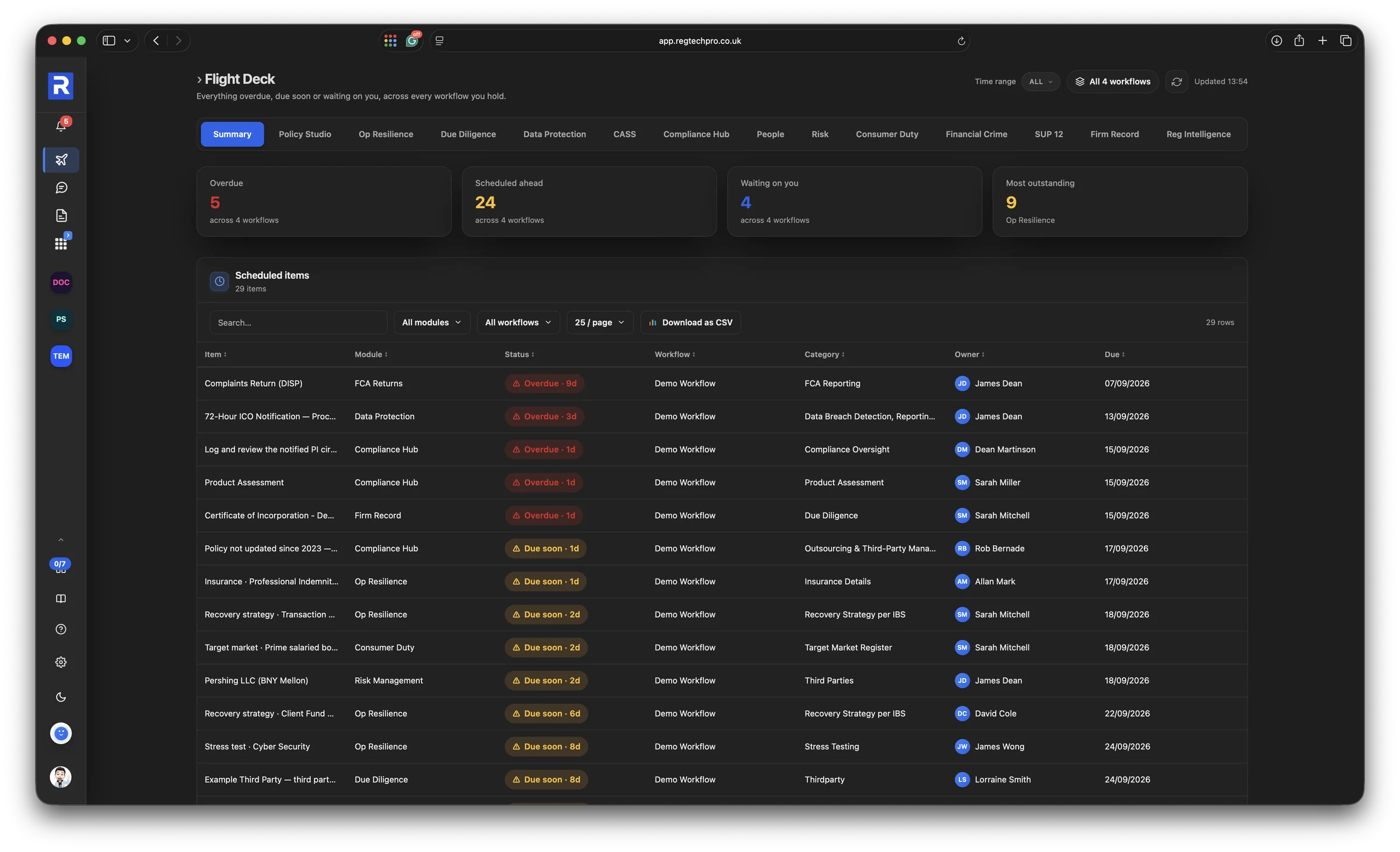
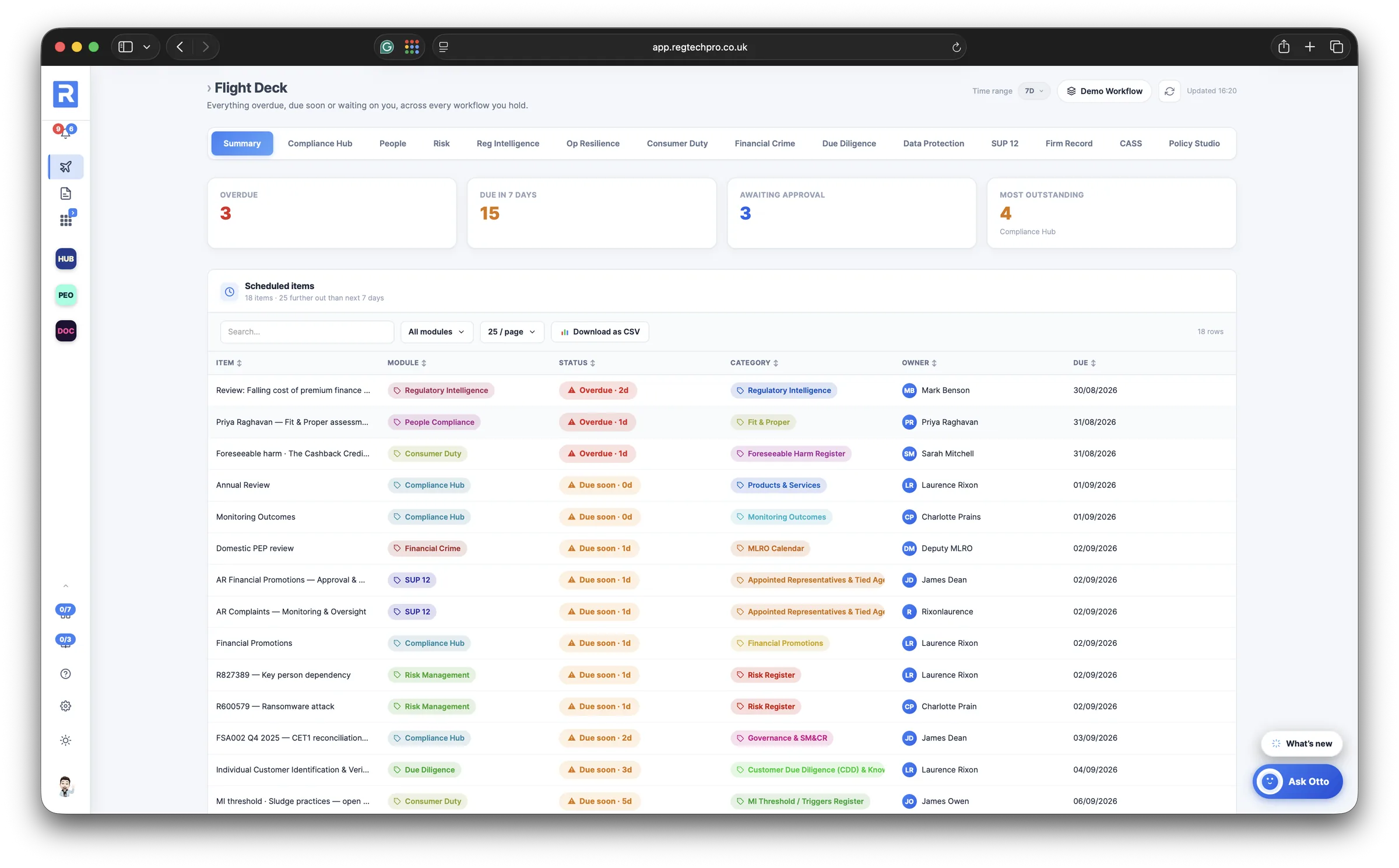
The Flight Deck is your Homepage. It gathers everything overdue, due or waiting on you from every module and every workflow you can reach: monitoring tasks, attestations, register reviews, fit and proper dates, approvals. Every row opens the real record in its home module, and brings you back when you are done.

A supervisor's first question is whether the firm knows what it has not done. This is the screen that answers it, in one place, before anyone has to ask.
Every module, every workflow Opens the real record Notifications and a weekly digest
The RegTechPRO Flight Deck: every overdue, due and waiting item across every module and workflow, each row opening the underlying record

The Flight Deck. Everything overdue, due or waiting on you, across every module and workflow, each row opening the record.
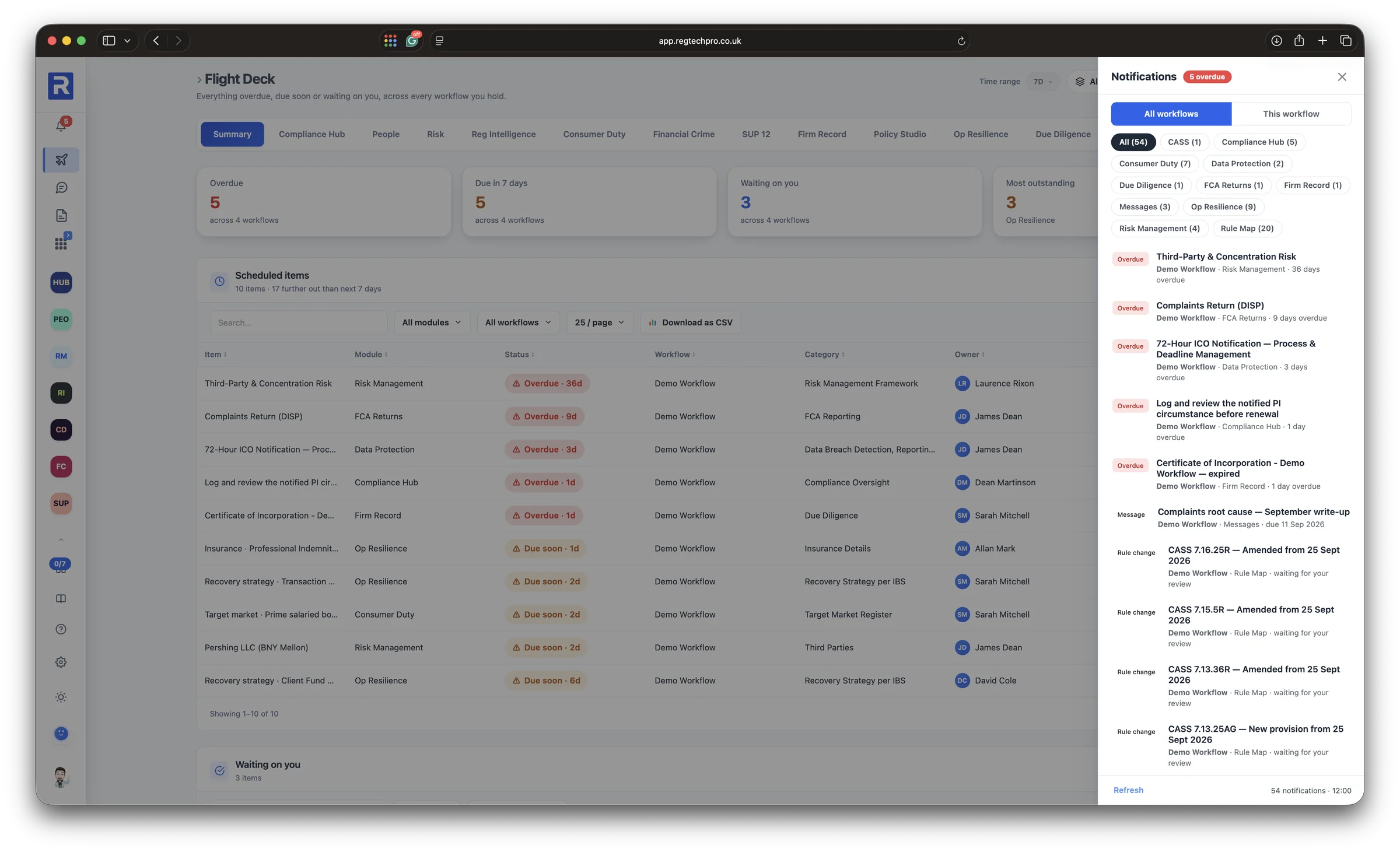
The notifications drawer: overdue and due items grouped by module and workflow, with the same list sent as an email digest
Notifications. The same list in the bell, grouped by module and workflow, and in a weekly email digest.
2 Monitoring plan

A monitoring plan that runs itself, with the judgement built in

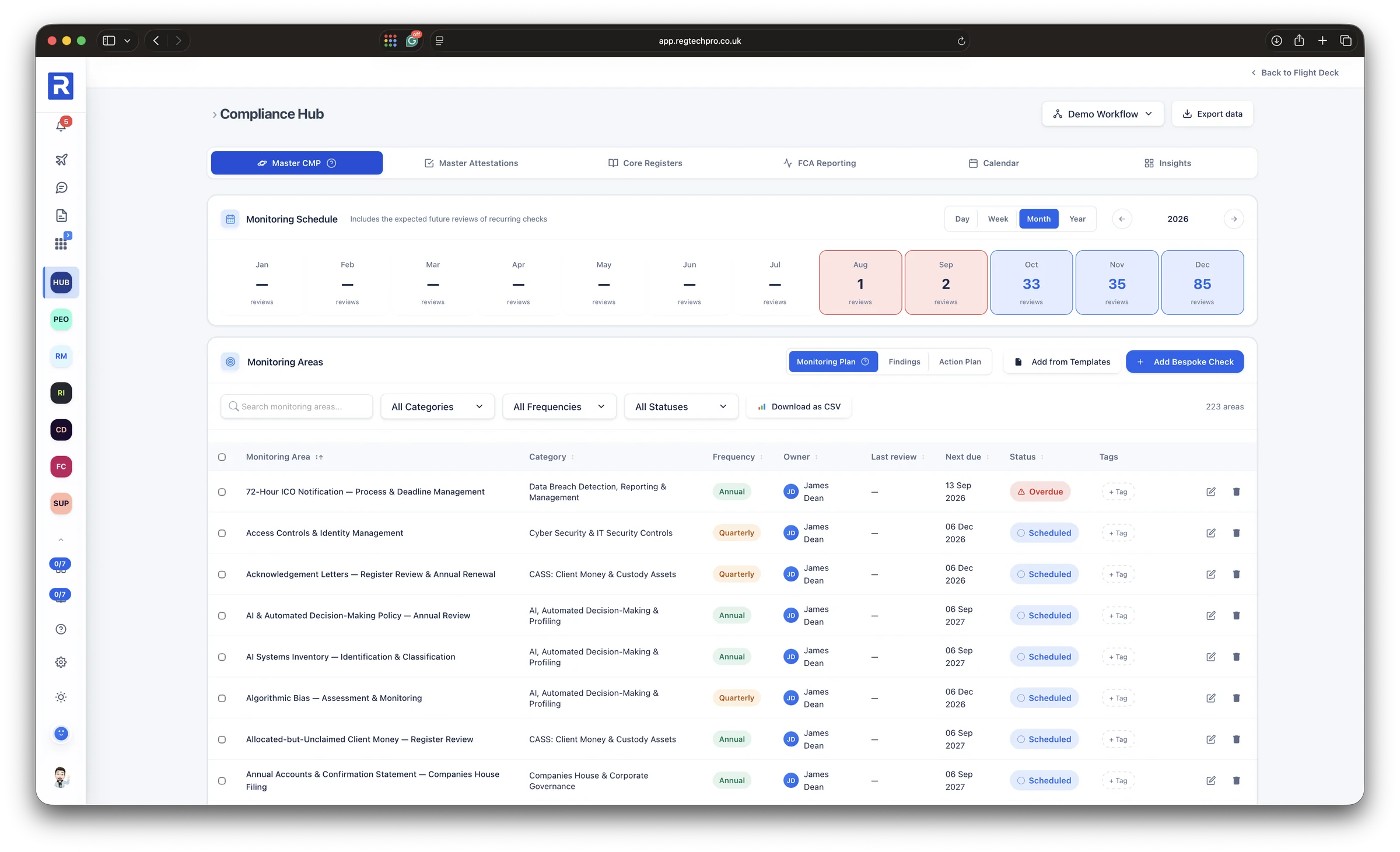
The Compliance Monitoring Plan is a schedule, not a document. Each monitoring area carries its category, frequency, owner, last review and next due date, and the year is laid out as a heat grid so the busy weeks are visible months ahead.

The library behind it holds 1,139 expert-built templates across seven regulators, organised by chapter. Add a chapter and its checks arrive with the guidance already written, so the plan is defensible from the day it is adopted.

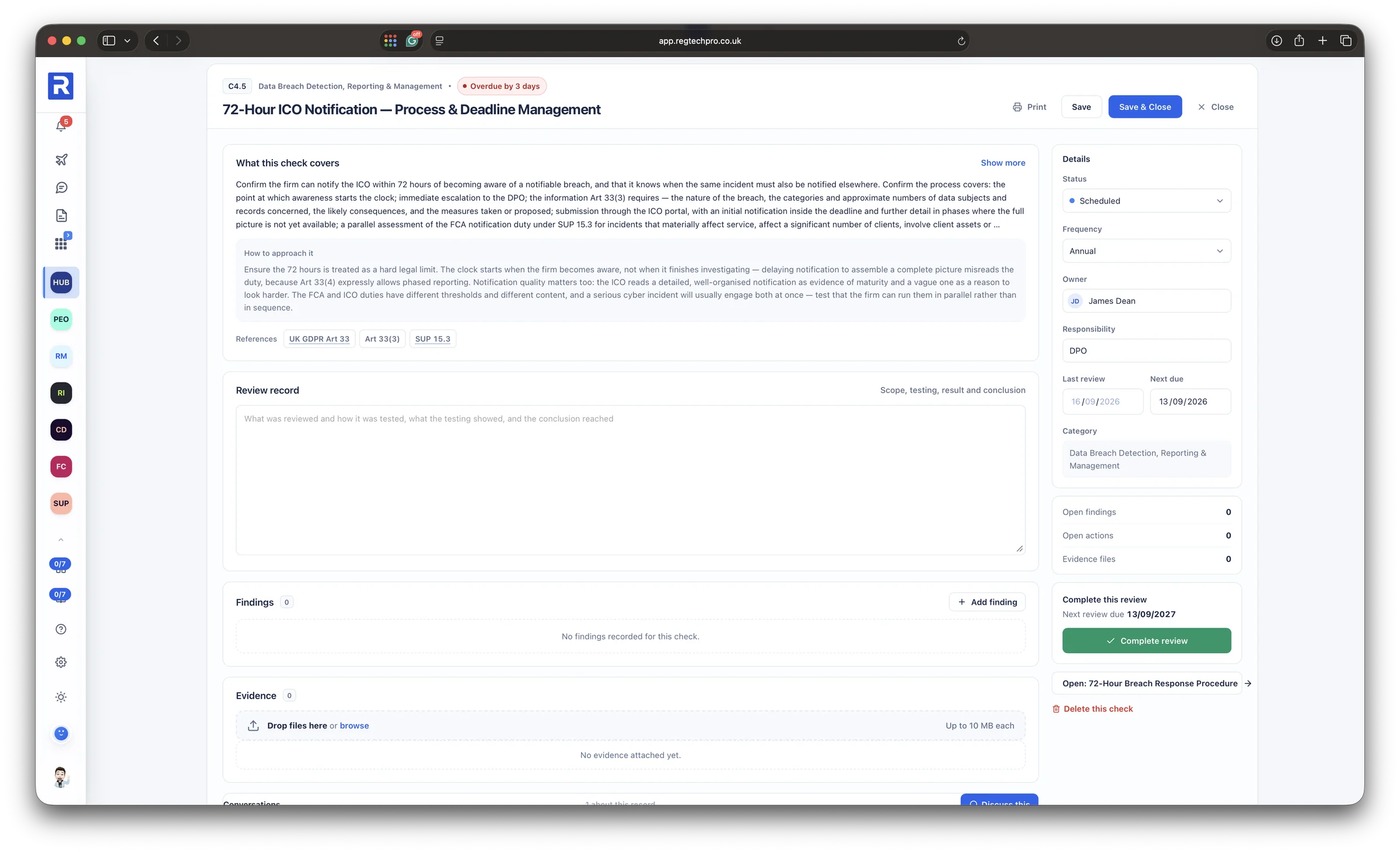
Open a check and the guidance is complete before you start: what the check covers, how to approach it and the pitfalls a supervisor would look for, written by senior compliance practitioners, not generated. Every check cites the rules it tests, and each FCA Handbook citation links straight to the live FCA Handbook.

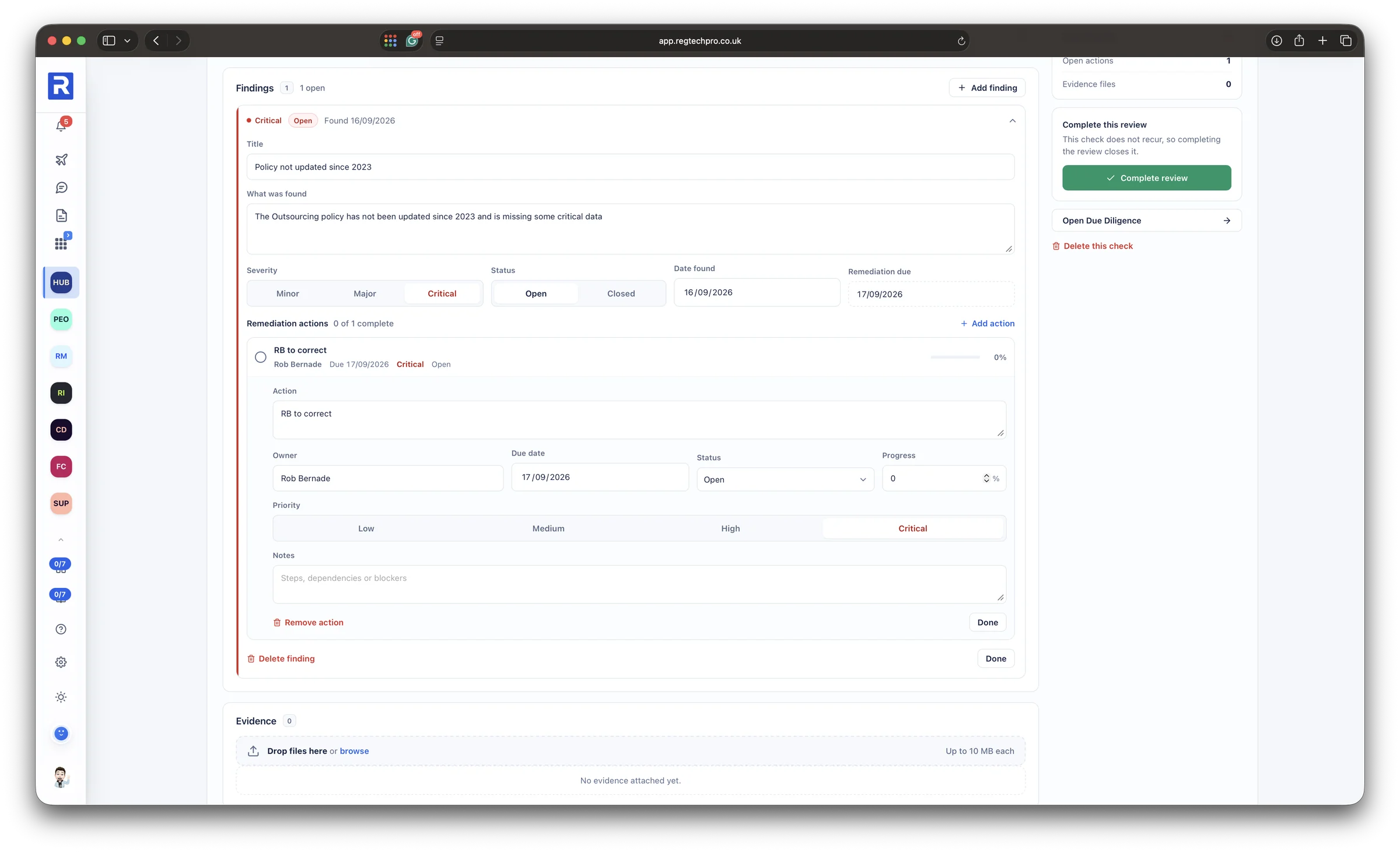
Log a finding and it carries a severity, a root cause and remediation actions, each with an owner and a due date. That is the chain a supervisor looks for: the check, what it found, who is fixing it and by when.
Owner, frequency and next due on every area Guidance linked to the live FCA Handbook Findings and remediation with owners and dates
The Compliance Monitoring Plan: a twelve-month schedule heat grid above the list of monitoring areas with category, frequency, owner, last review and next due date

The monitoring plan. A twelve-month schedule above every monitoring area, with its owner, frequency and next due date.
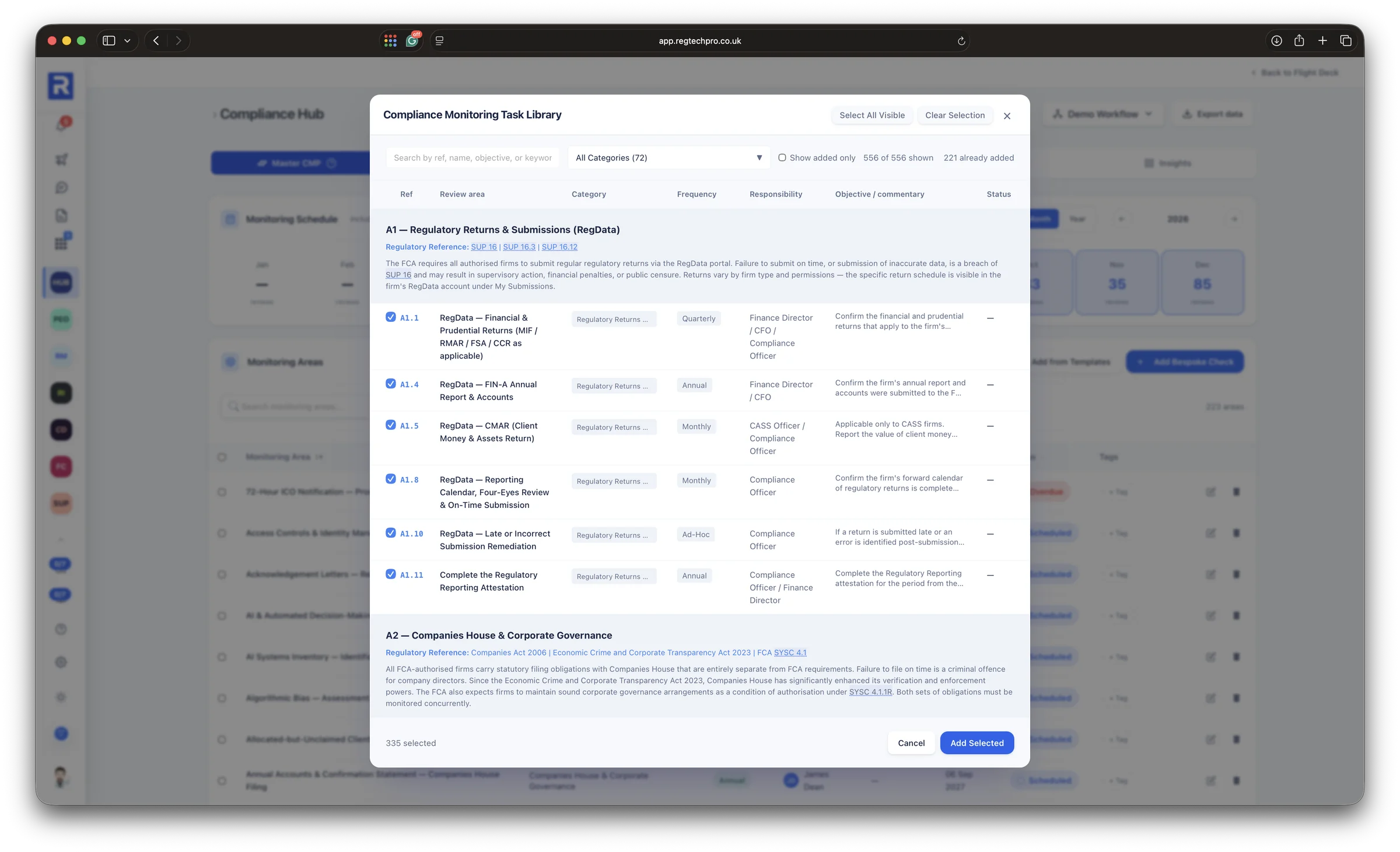
The monitoring task library: expert-built checks organised by chapter, added to the plan in a click
The library. Checks organised by chapter, from regulatory returns to Consumer Duty, added to the plan in a click.
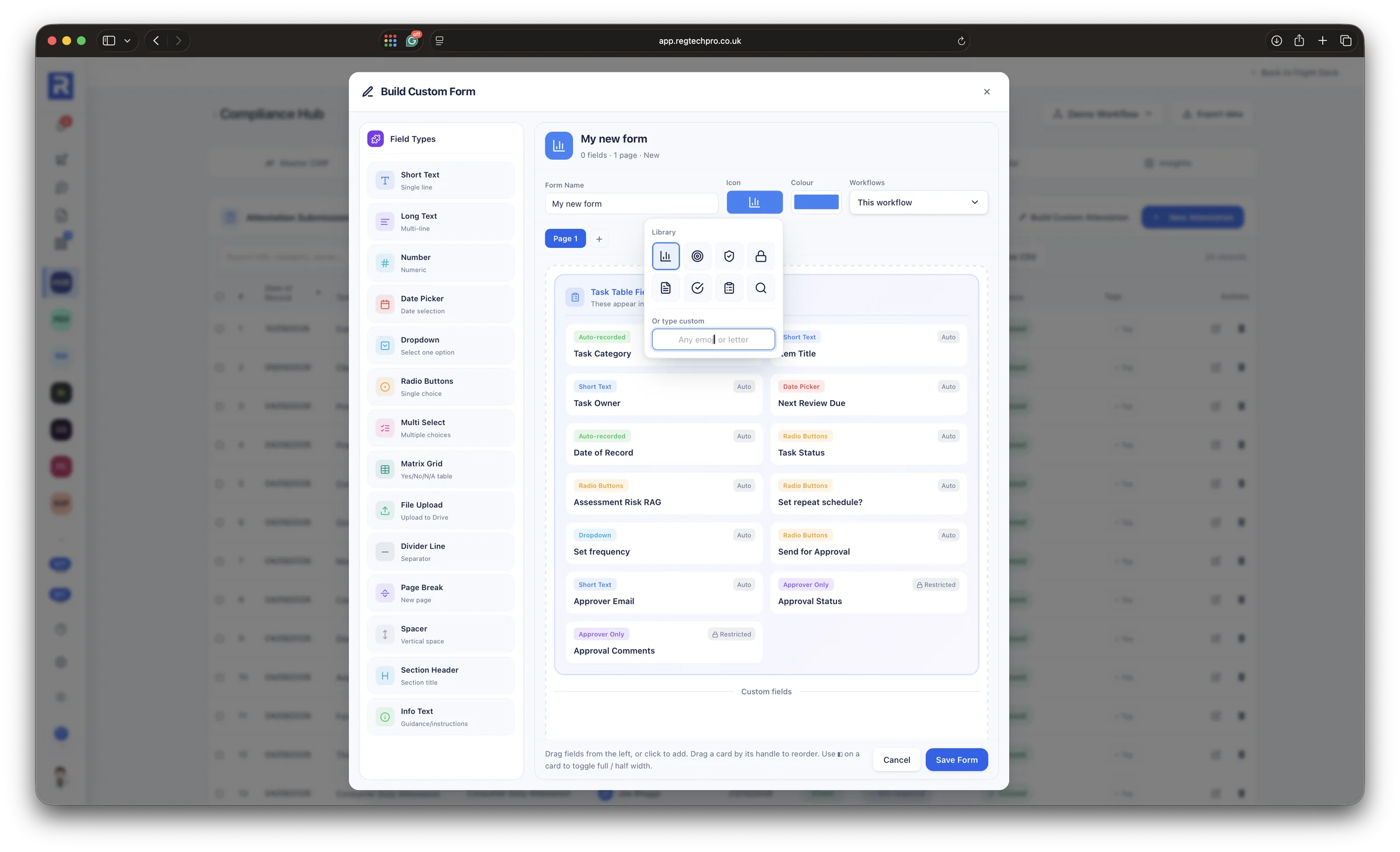
The custom form builder: a field palette and a form being assembled on the canvas
Build your own. A register, attestation or checklist your firm needs and the library does not have, built without code.
A monitoring check open in the Compliance Hub: what the check covers, how to approach it, its FCA Handbook and legislation references, the review record, findings and evidence, with status, owner and next due date alongside
Guidance on every check. What the check covers, how to approach it and the rules it tests, each linked to the live FCA Handbook.
A finding open on a monitoring task: title, description, severity, status, date found and the remediation actions with owners and due dates
A finding. Severity, root cause and three remediation actions, each owned and dated, traced back to the task that raised it.
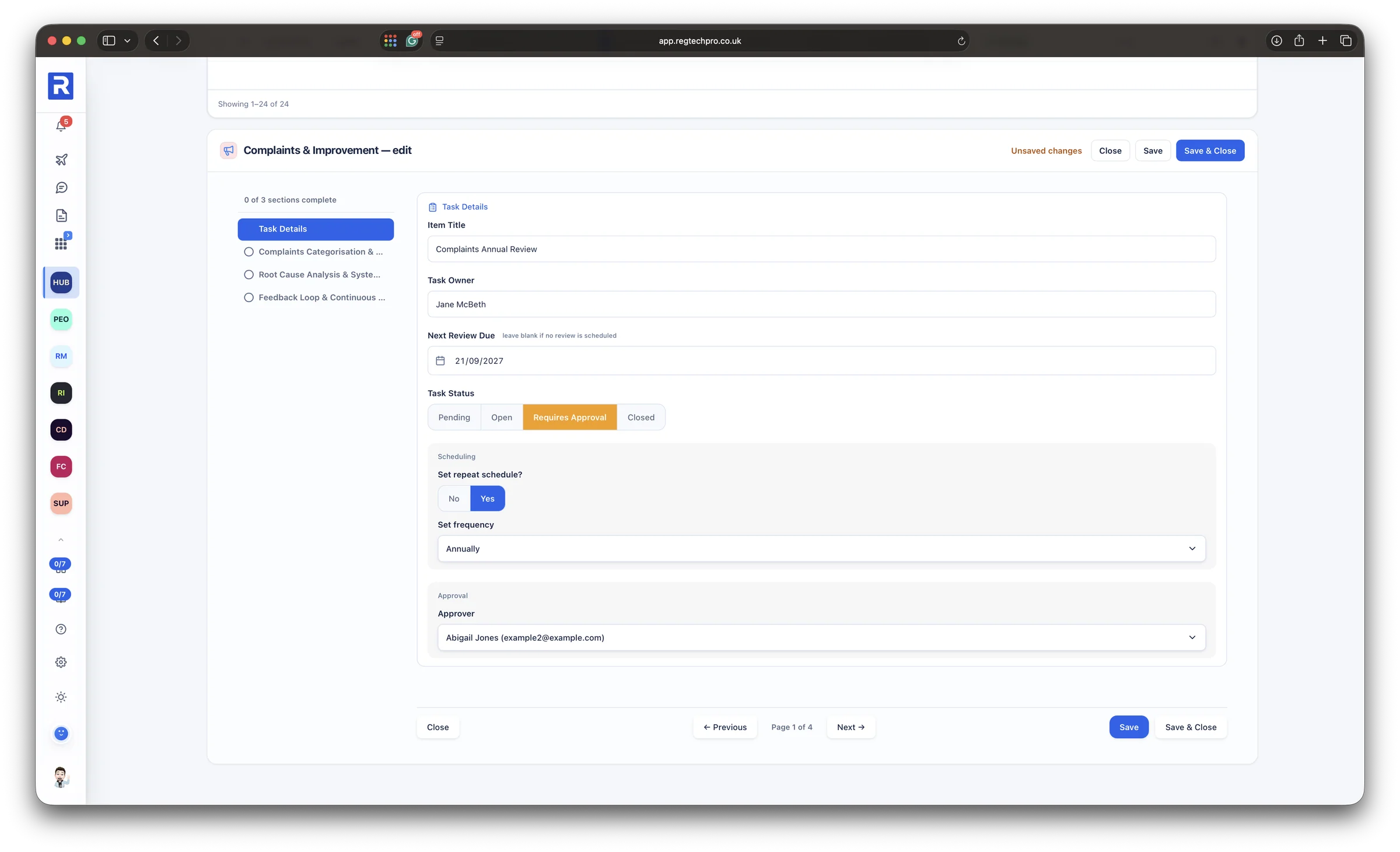
An attestation record with its approver section: the sign-off required before the record is closed
Approval process. Records can require an approver, so the person who did the work is never the person who closed it.
3 Attestations

Every attestation dated, rated and approved

Each app carries its own attestation, built around that app’s work, beside the firm-wide ones every firm files, from general FCA compliance and SM&CR to training and competence and whistleblowing. The Handbook attestations cover eight FCA sourcebooks, one tab per chapter, every question answered Yes, No or Not applicable, where Yes always means the firm complied. Exceptions and evidence sit with the answers, and each submission is dated, rated and carries an approval status.

The attestations table is the firm’s record of what it has confirmed and when: who approved it, how it was rated and where it stands, without opening a single document.
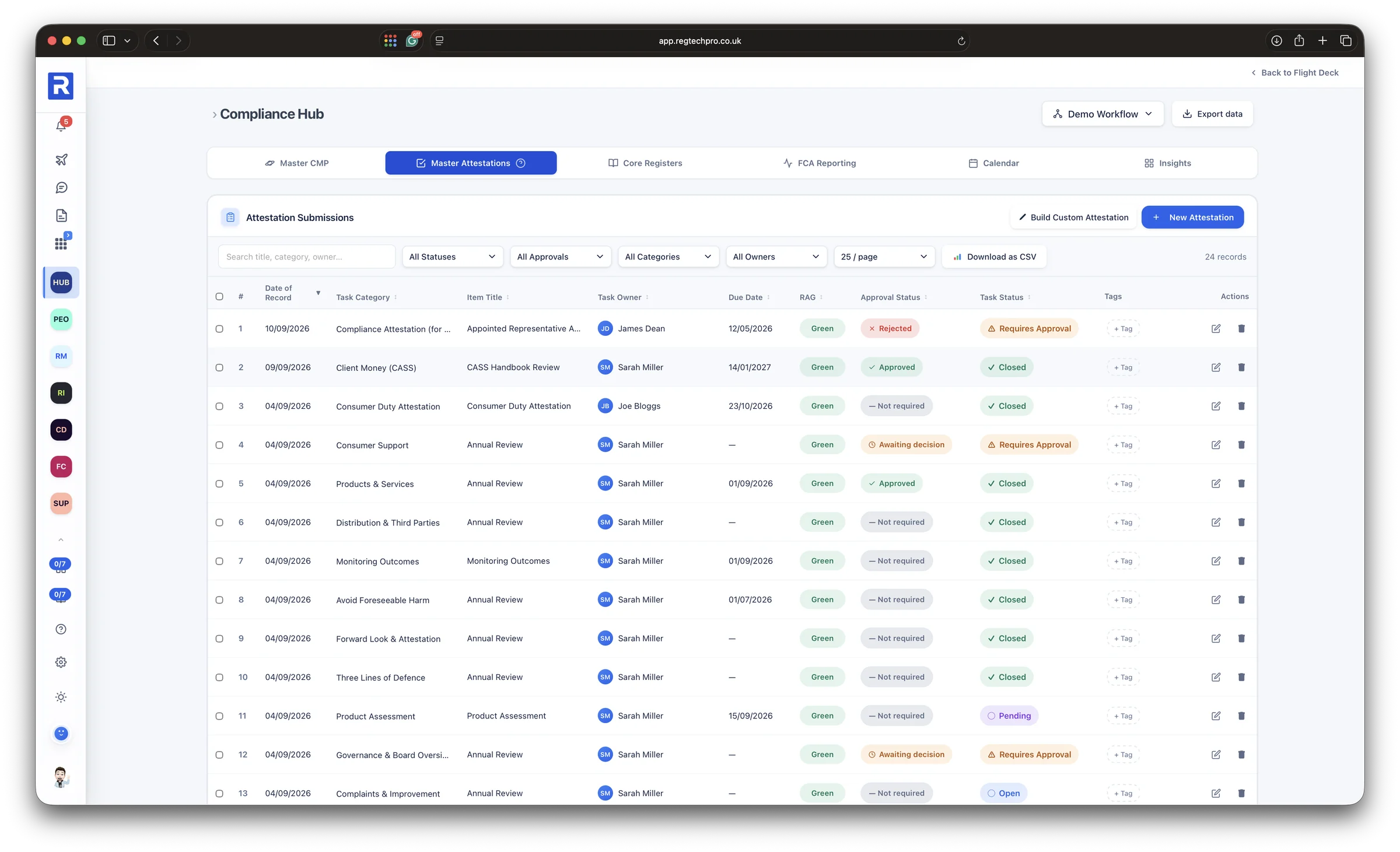
Built around each app’s work Eight sourcebooks, every chapter Exceptions and evidence with the answers Approval status on every submission
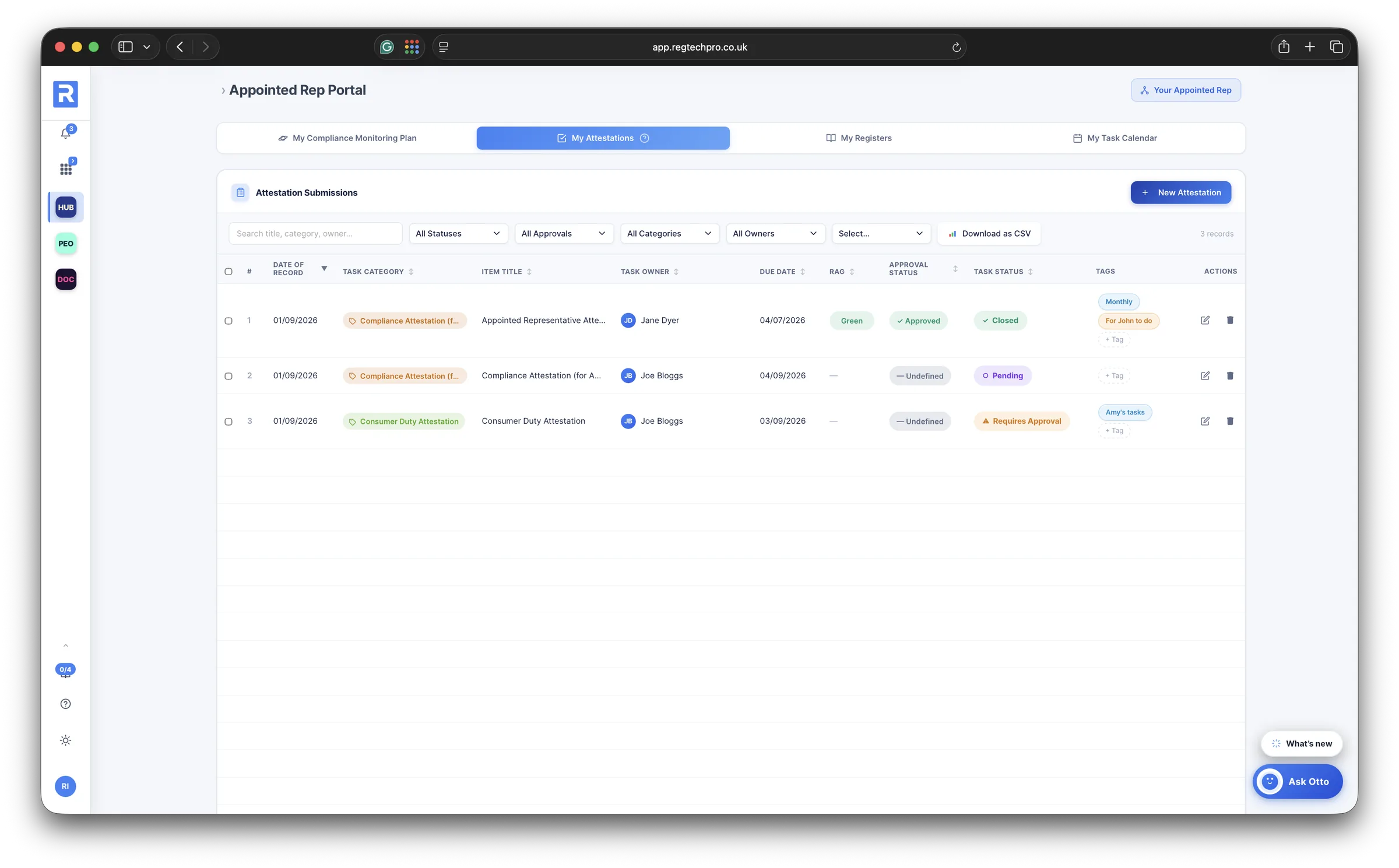
The attestation submissions table: date of record, category, title, owner, due date, RAG, approval status and task status for every attestation the firm has filed

Attestations. Every attestation filed, with its date, RAG, approval status and how complete it is.
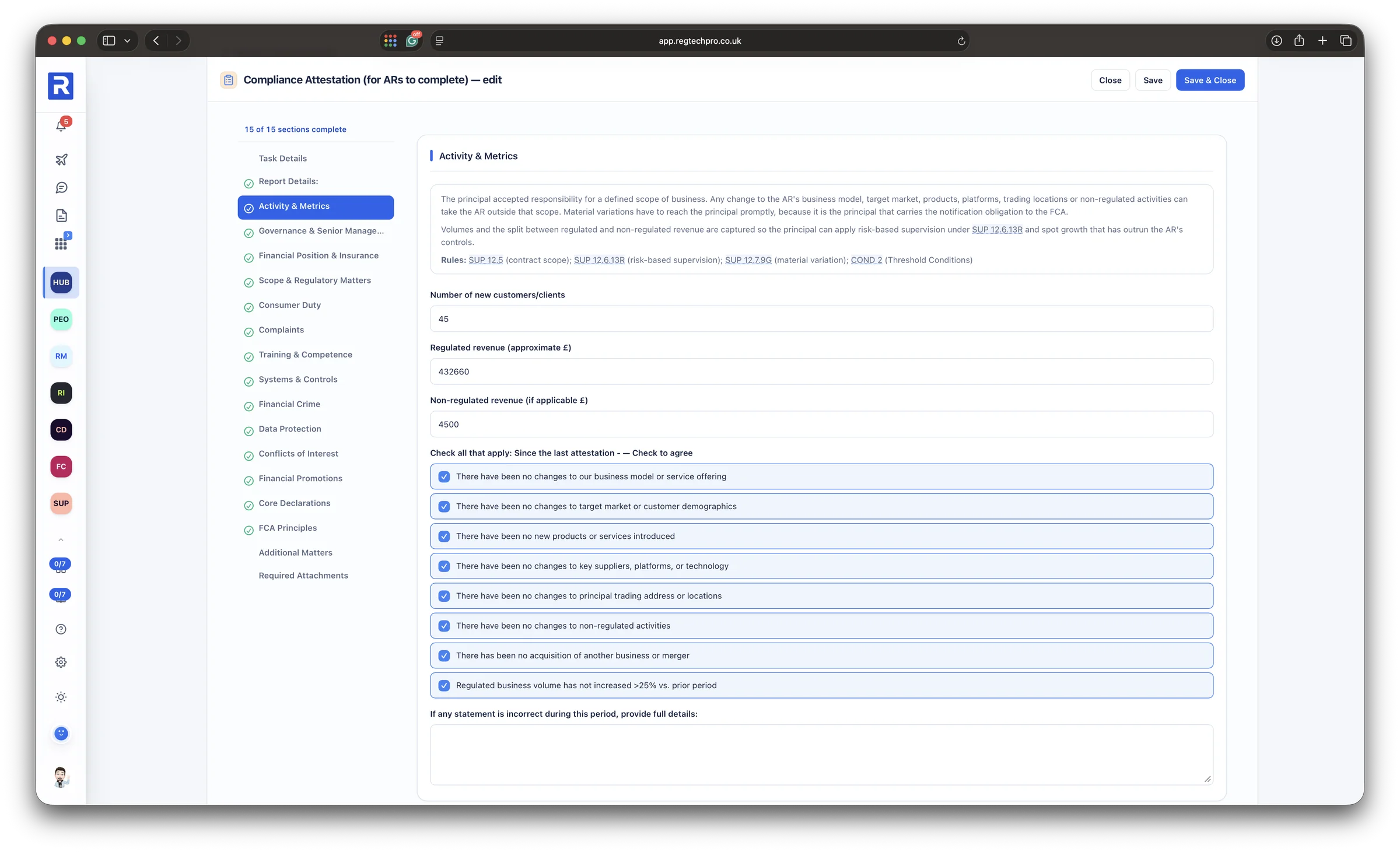
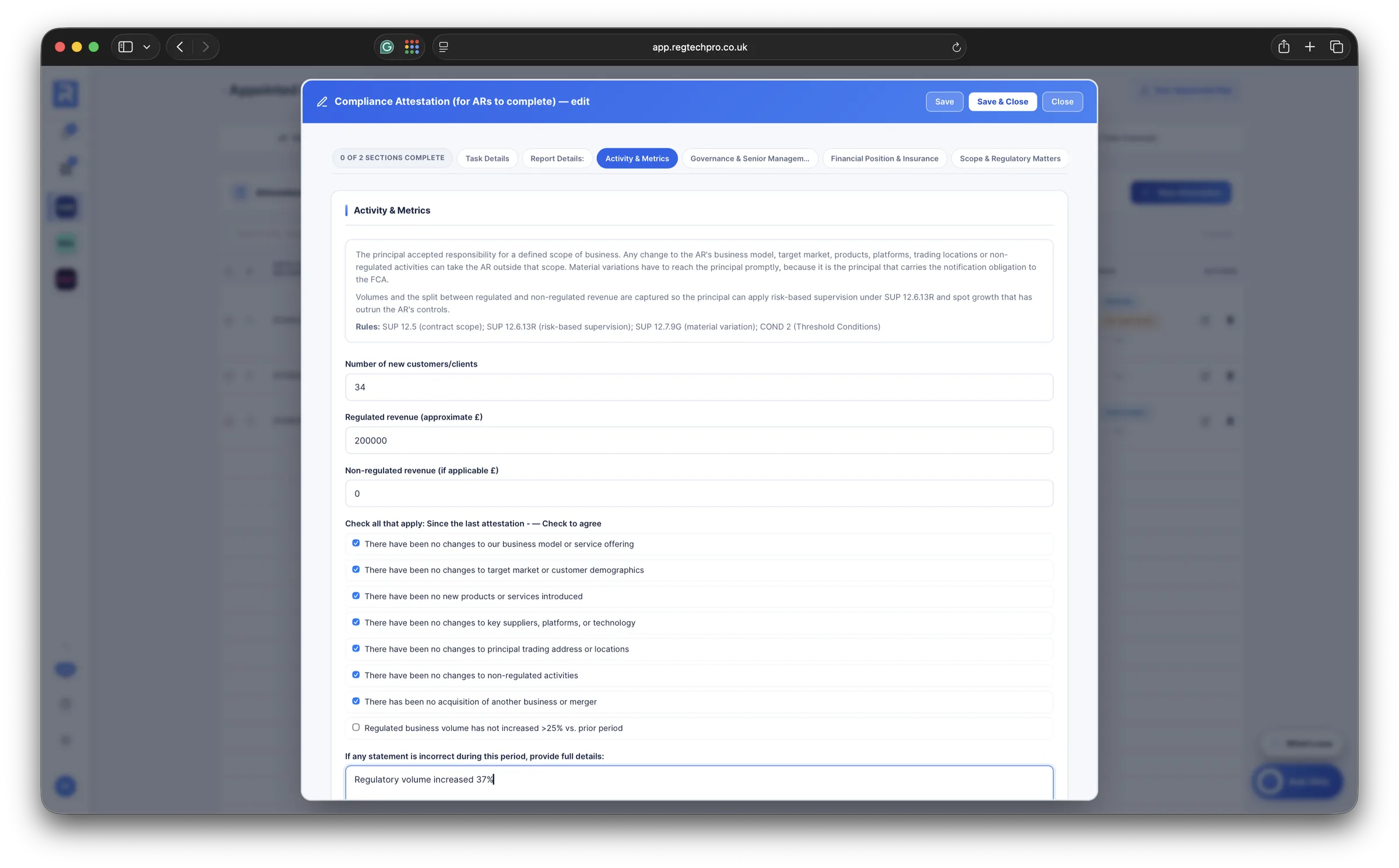
An appointed representative Compliance Attestation open on its Activity and Metrics section: the section guidance with its SUP and COND rule references, the figures for the period and the declarations to confirm
Inside an attestation. Section by section, with the guidance and the rules behind each one alongside the questions.
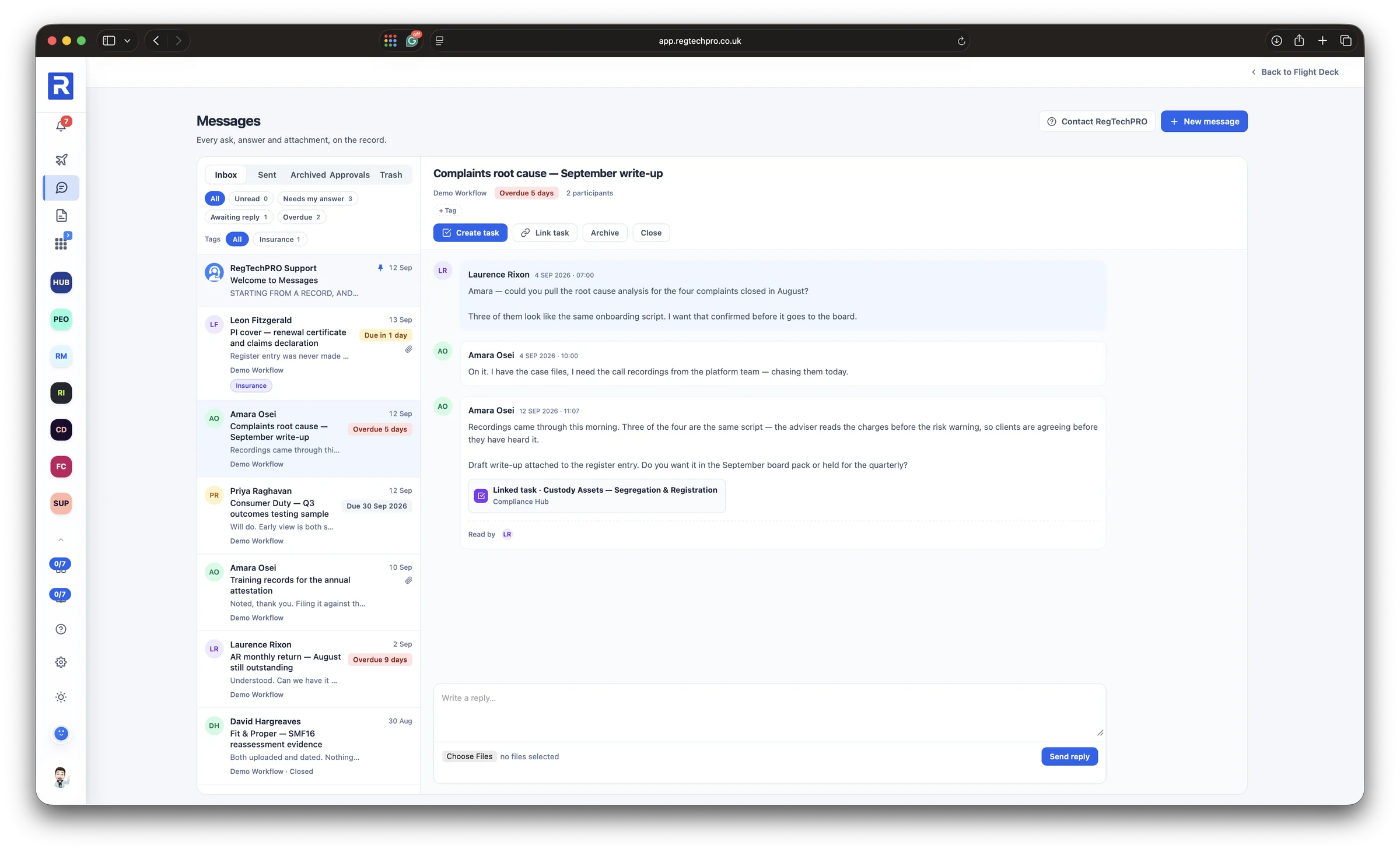
The Messages module: an inbox of conversations with due dates and tags, and an open conversation linked to a monitoring task, with read receipts and a reply box
Messages. Every ask, answer and attachment on the record, linked to the work it is about; only the people on a conversation can see it.
4 People

Every person, evidenced under the regime that applies to them

People Compliance holds a record for every member of staff, typed to their regime: senior manager, certified person or other staff. The page opens on the headline numbers a supervisor asks for first: how many senior managers and certified persons, how many fit and proper reviews are outstanding, and how much of the vetting is complete.

Open a person and everything about them sits in one record: their statement of responsibilities, the Fit and Proper assessment, the due diligence held on them, their CPD and, where it applies, their personal account dealing. When the FCA asks who is accountable for what, and whether they remain fit and proper, the answer is on one page.

Start a record with a person’s IRN and their roles arrive from the FCA Register, beside any disciplinary history it holds and the firms they have held roles at in the last six years, ready for their references.
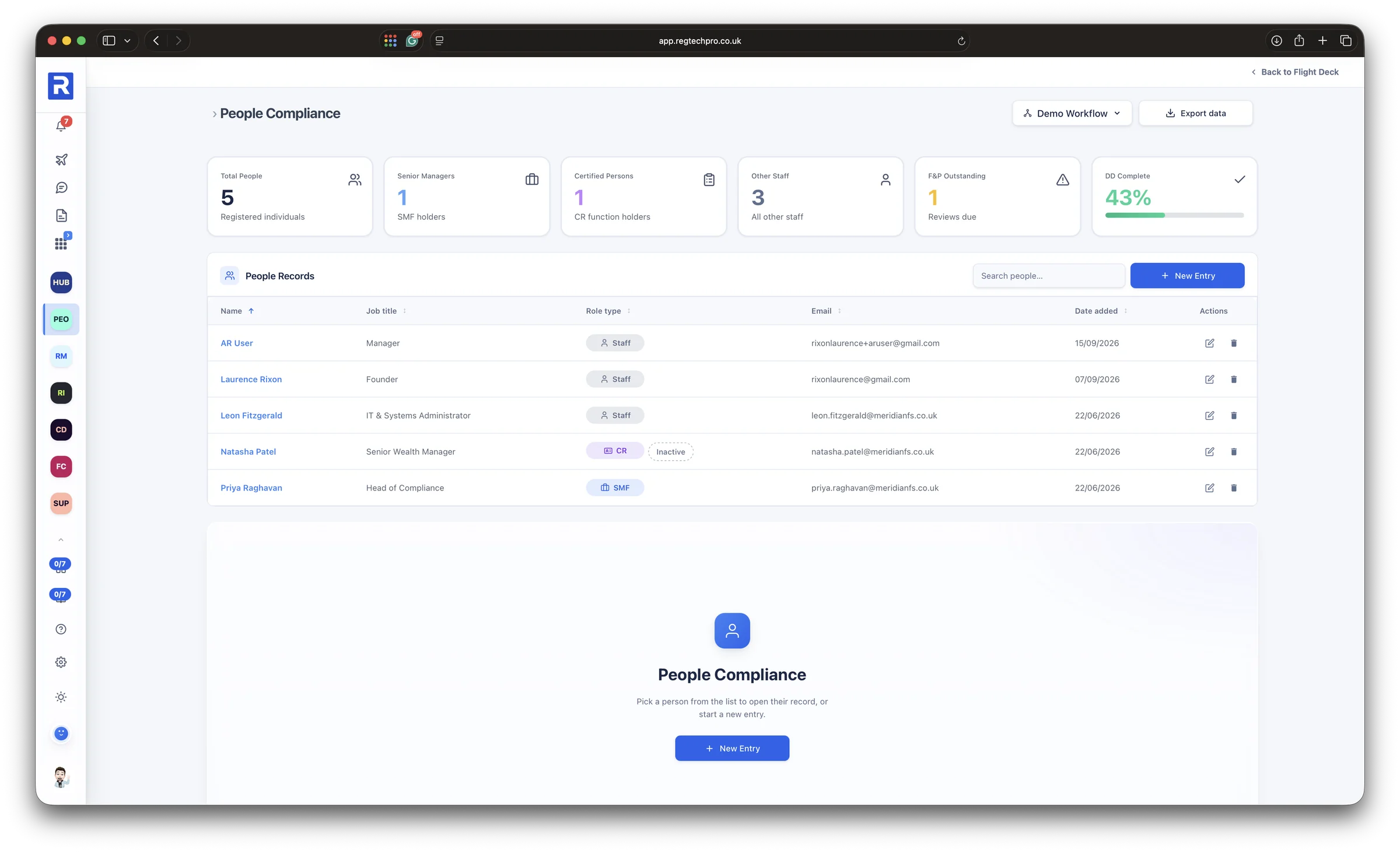
Senior managers, certified persons and staff Fit and proper and vetting, at a glance One record per person, every obligation
The People Compliance register: total people, senior managers, certified persons, other staff, fit and proper reviews outstanding and due diligence completion, above the list of people records with job title and role type

People Compliance. Senior managers, certified persons and staff, with fit and proper and vetting progress at a glance.
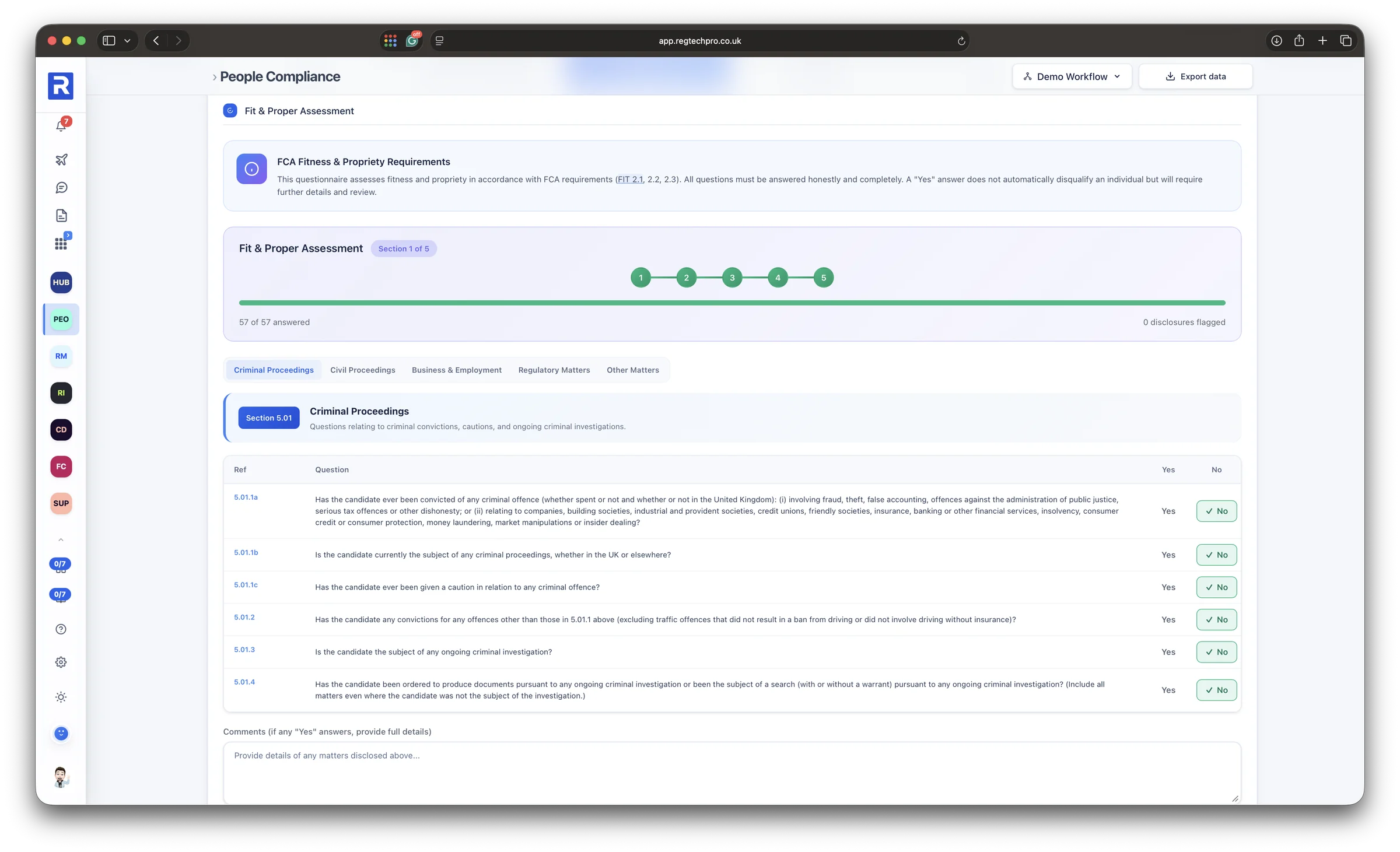
A person's Fit and Proper assessment: criminal, civil, business, regulatory and other matters in five sections, every question answered, with disclosures counted and the FIT rules cited
Fit and Proper. Every question across five sections, with a count of disclosures and the FIT rules behind it.
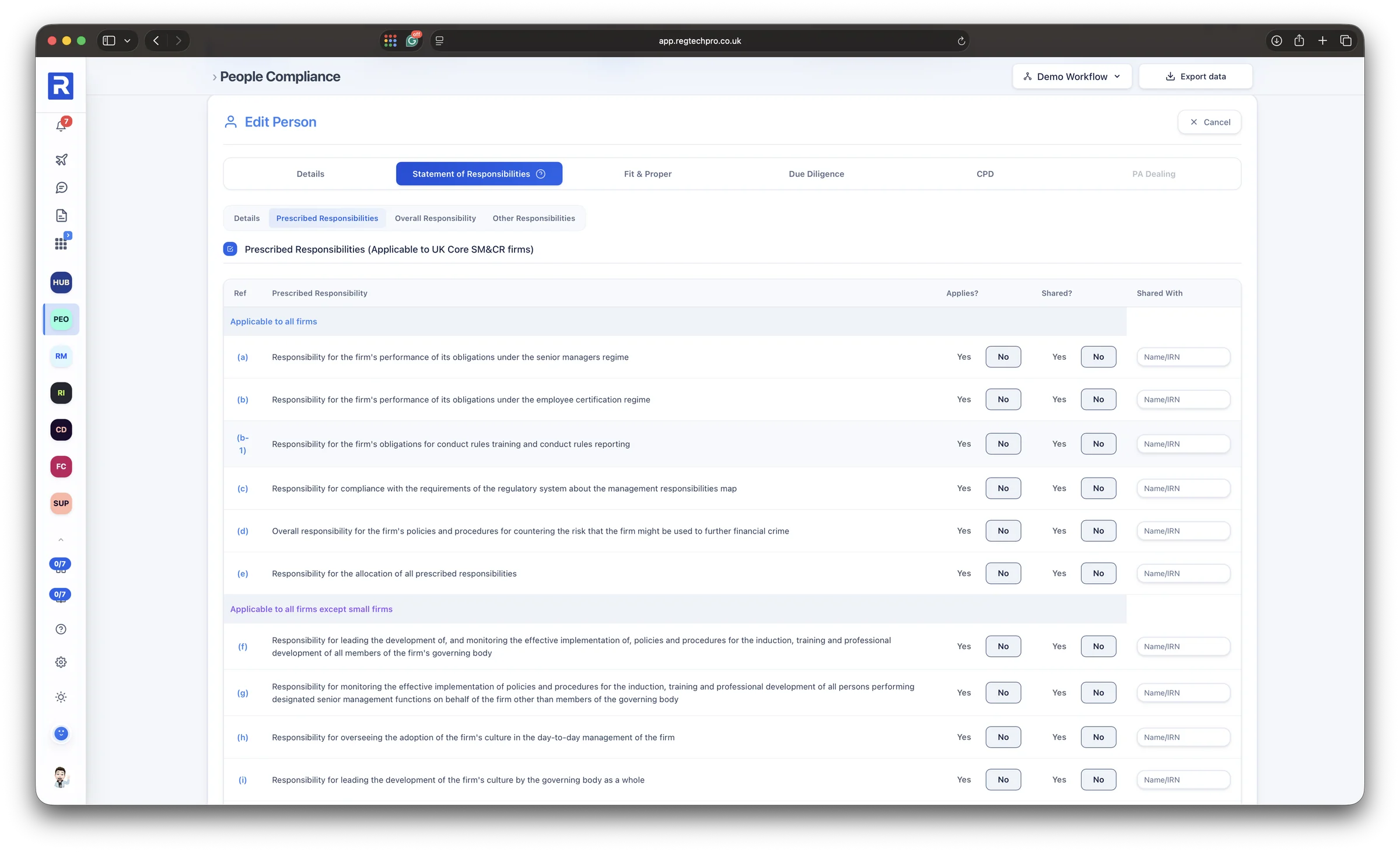
The Statement of Responsibilities tab: each prescribed responsibility grouped by the firms it applies to, recorded as applying or shared and who it is shared with
Responsibilities. Each prescribed responsibility marked as applying or shared, and with whom, per senior manager.
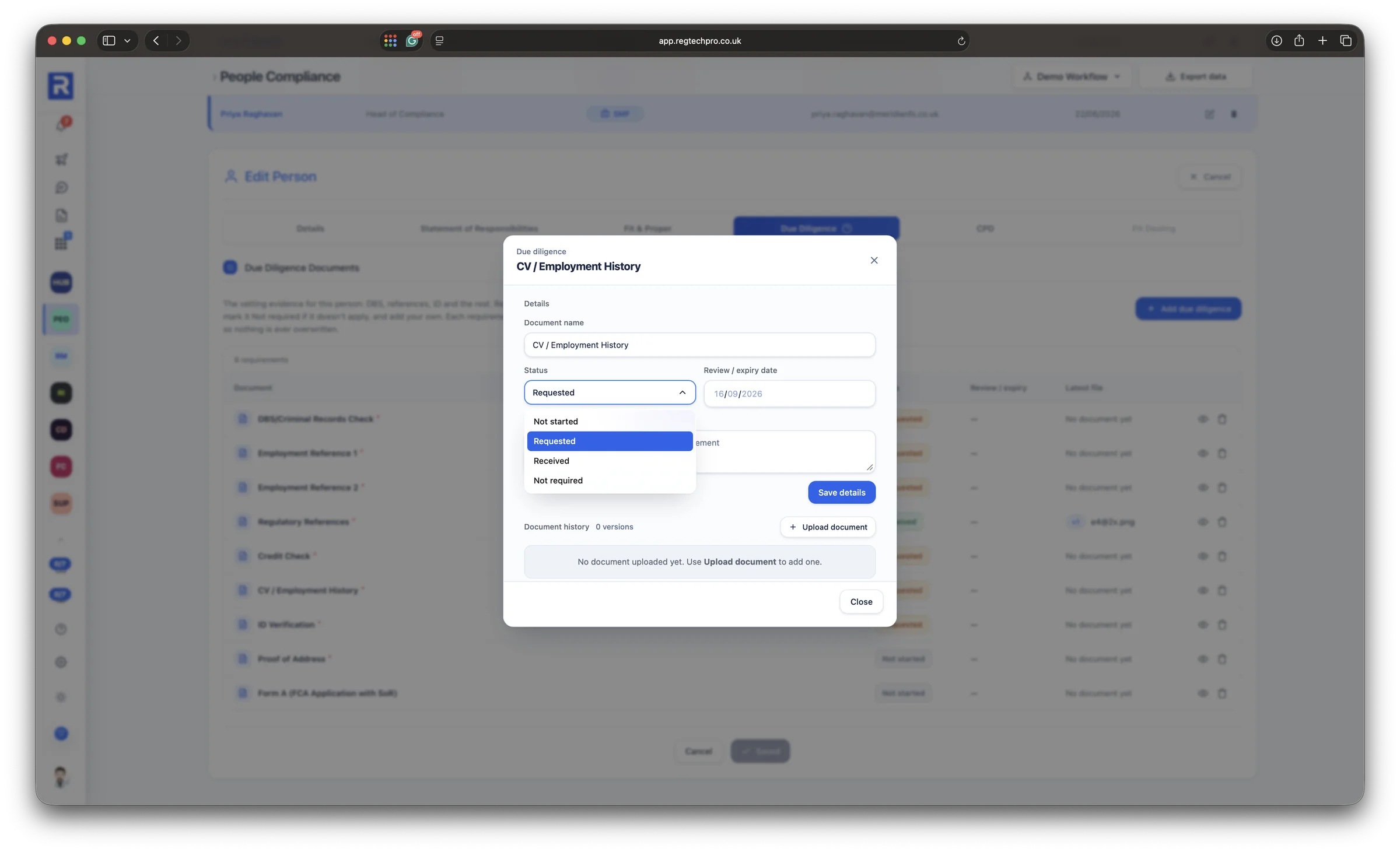
A person's due diligence document open: its status set to not started, requested, received or not required, a review or expiry date, and every uploaded version kept
Due diligence. DBS, references, ID and the rest, each tracked from requested to received, with a review date and every version kept.
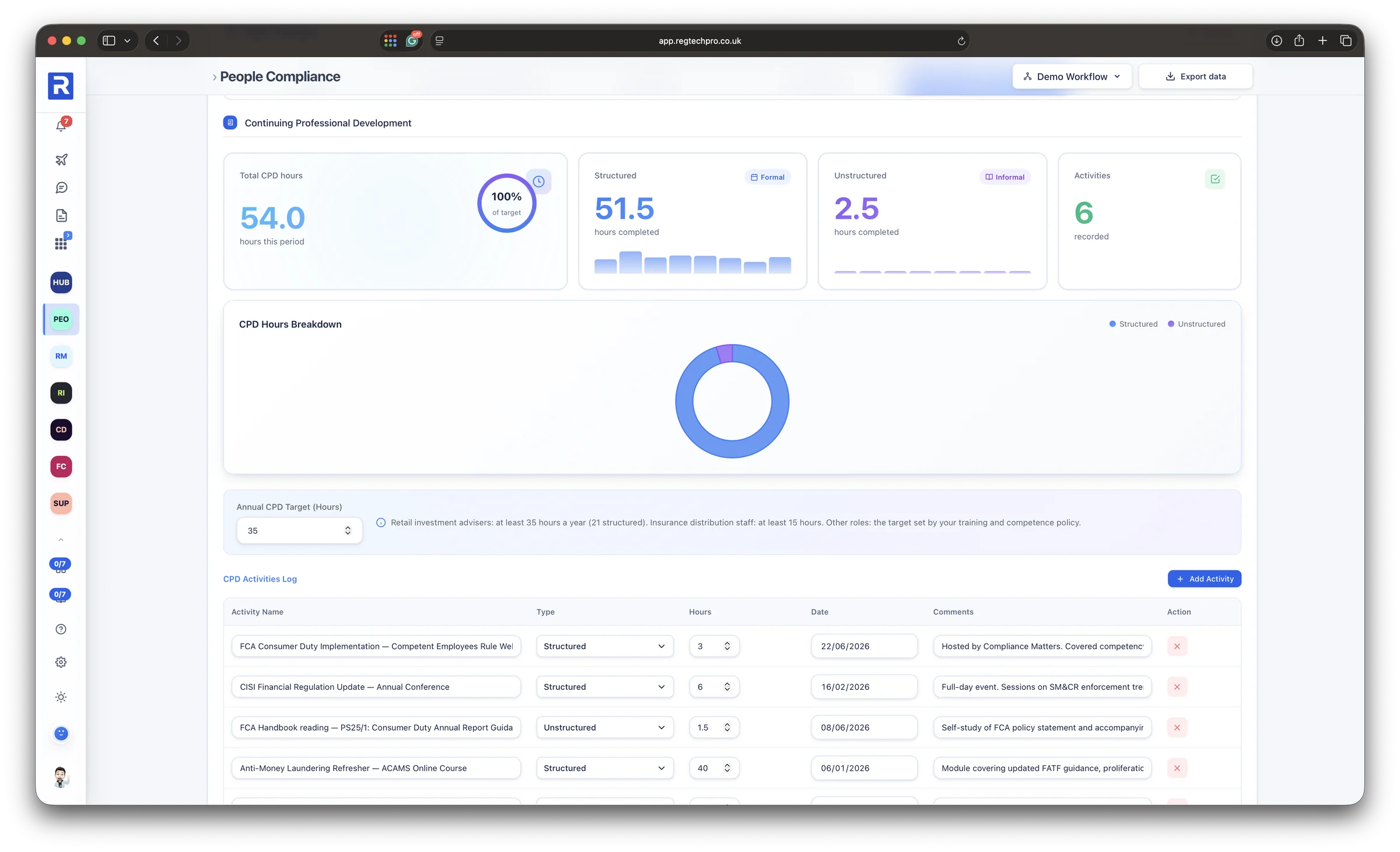
A person's CPD record: total hours against the annual target, the structured and unstructured split, and the log of each activity
CPD and training. Hours against the annual target, structured and unstructured, with every activity logged.
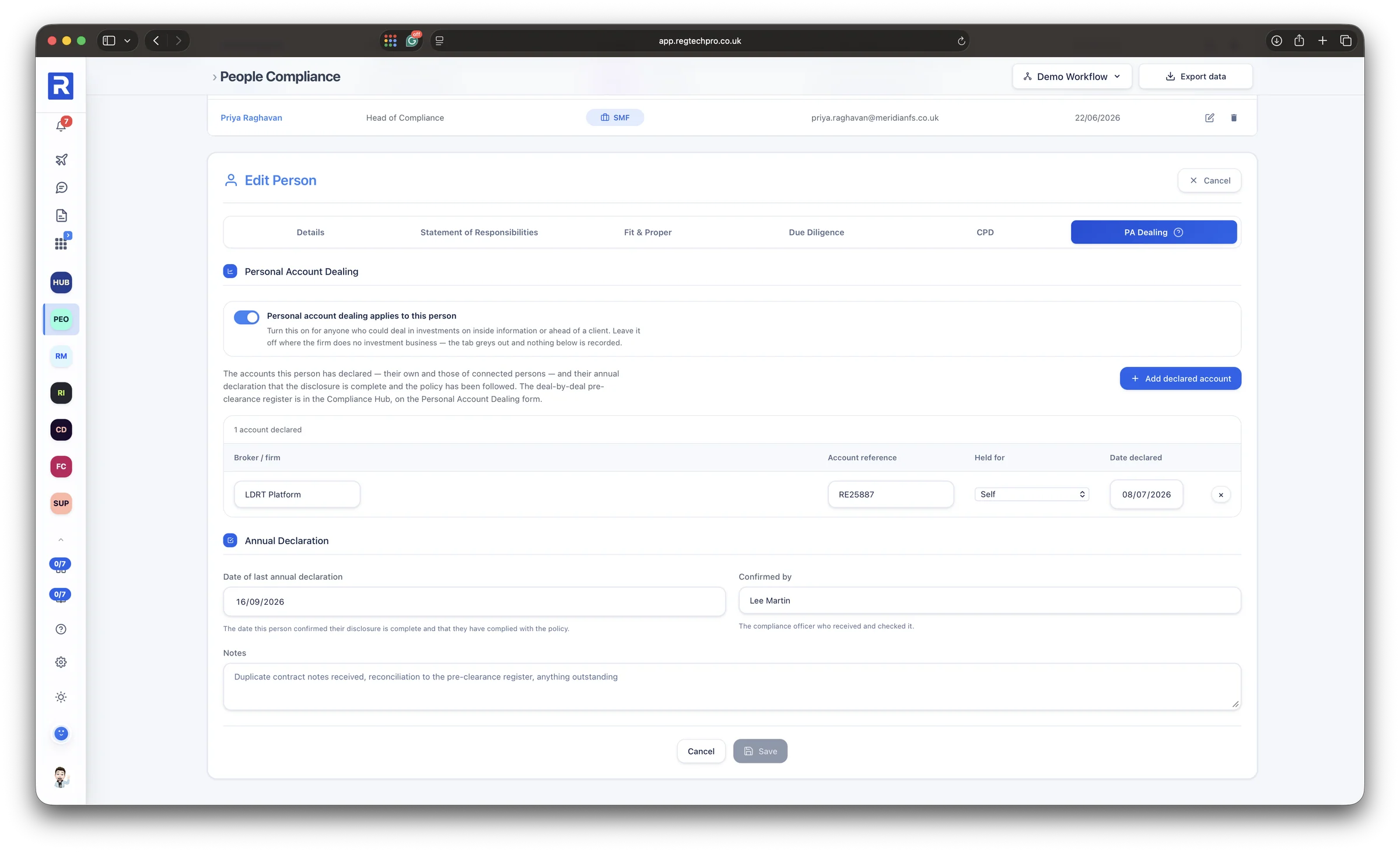
A person's Personal Account Dealing tab: the accounts they have declared, their own and those of connected persons, and the annual declaration with who confirmed it
Personal account dealing. Declared accounts, including connected persons, and an annual declaration confirmed by compliance.
5 Specialist apps

A specialist app for every regime that needs one

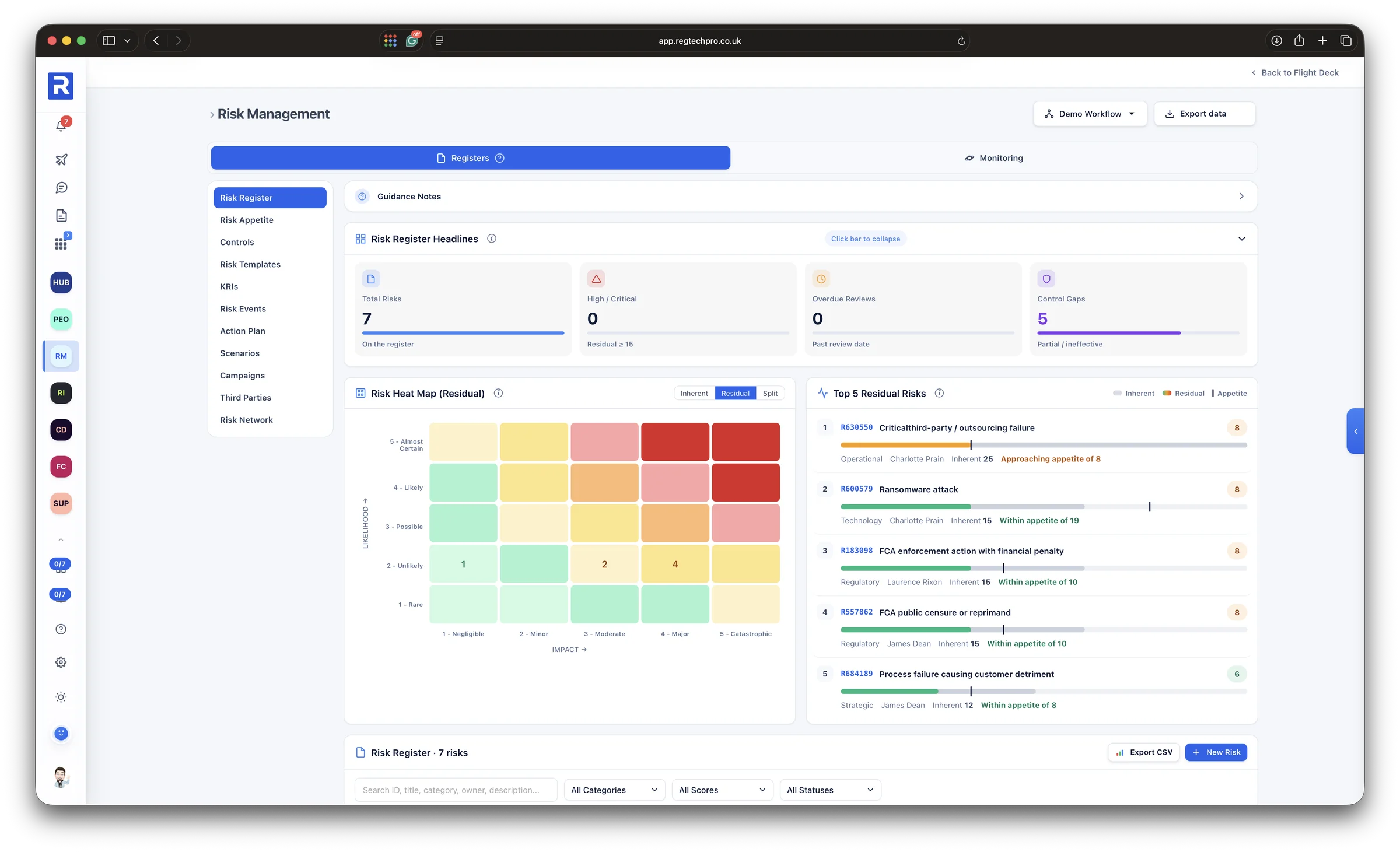
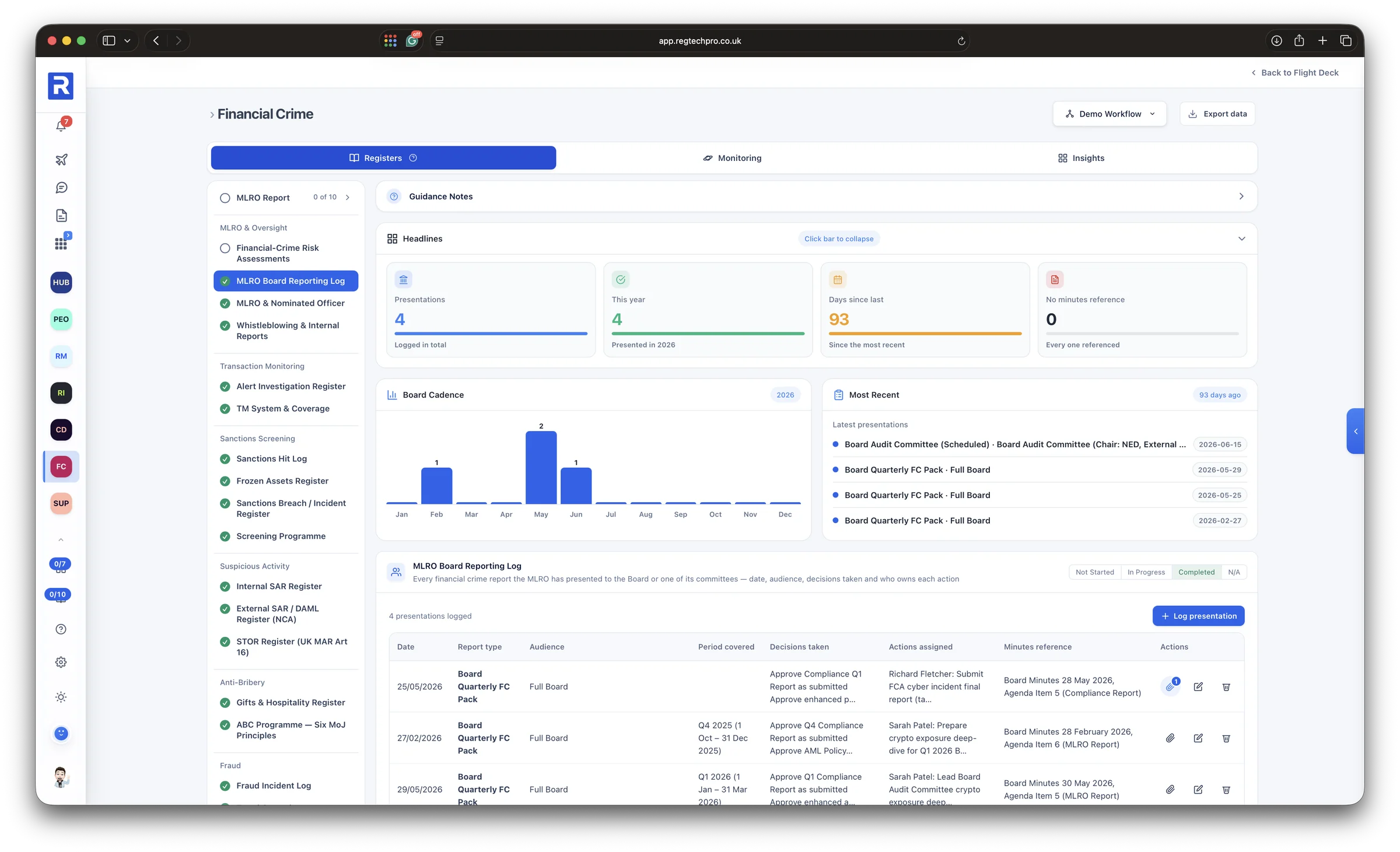
Beyond the Compliance Hub, each specialist regime has an app of its own: Risk Management, Consumer Duty, Financial Crime, Operational Resilience, Due Diligence, Data Protection and CASS. Each is built the way a specialist in that regime works, with the registers the rules call for, grouped the way the rules are.

Every app follows the same pattern, so a firm learns it once. Guidance notes sit at the top, headline figures show where the gaps are, the registers hold the evidence, and a monitoring tab carries the checks for that regime from the monitoring plan.
The registers each regime calls for Headline figures that show the gaps One pattern, learned once
The Risk Management app: risk register headlines, a residual heat map and the top five residual risks against appetite, with the risk register, appetite, controls, KRIs, scenarios, campaigns and third parties alongside

Risk Management. The residual heat map and the top risks against appetite, beside the full risk register.
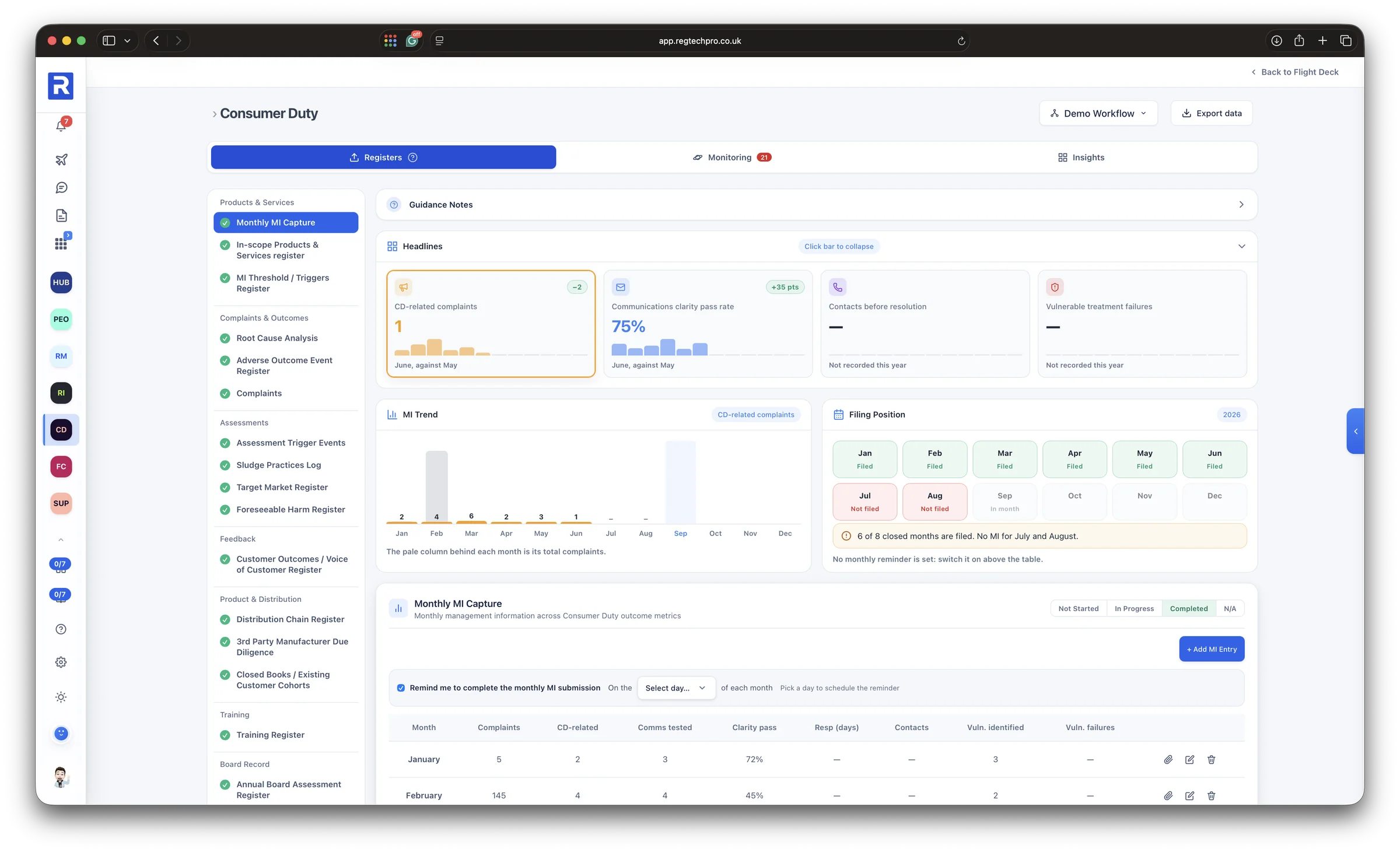
The Consumer Duty app: monthly MI headlines, the MI trend, the filing position for the year and the monthly MI capture table, with registers for products, outcomes, assessments, feedback, distribution, training and the board record
Consumer Duty. Monthly MI, its trend and the filing position for the year, beside the registers for products, outcomes and the board.
The Financial Crime app: the MLRO board reporting log with presentations, board cadence and the most recent reports, and registers for MLRO oversight, transaction monitoring, sanctions, suspicious activity, anti-bribery and fraud
Financial Crime. The MLRO's reporting to the board, beside sanctions, suspicious activity, anti-bribery and fraud registers.
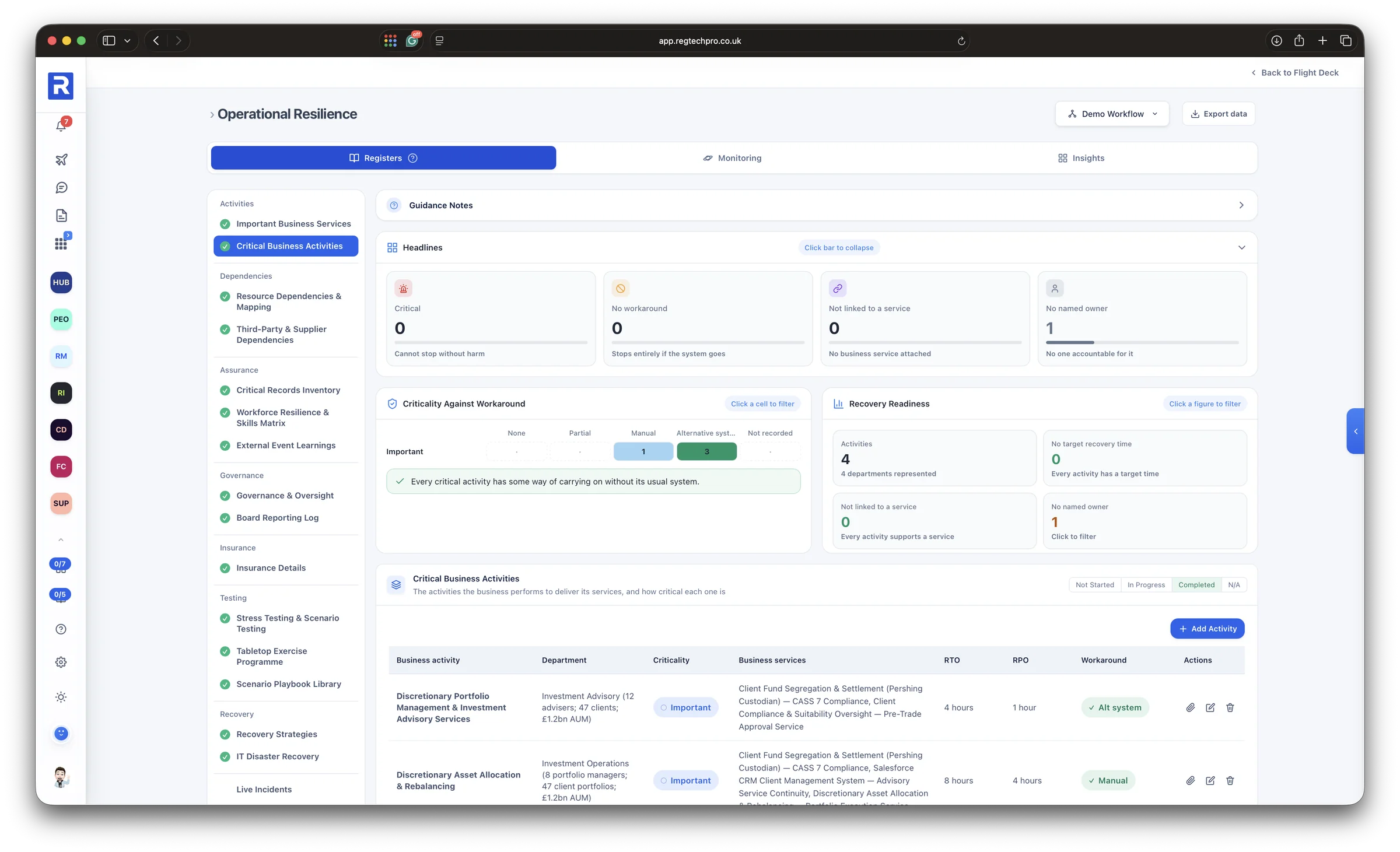
The Operational Resilience app: critical business activities with criticality against workaround and recovery readiness, and registers for dependencies, assurance, governance, insurance, testing and recovery
Operational Resilience. Important business services and the activities behind them, tested for workarounds and recovery readiness.
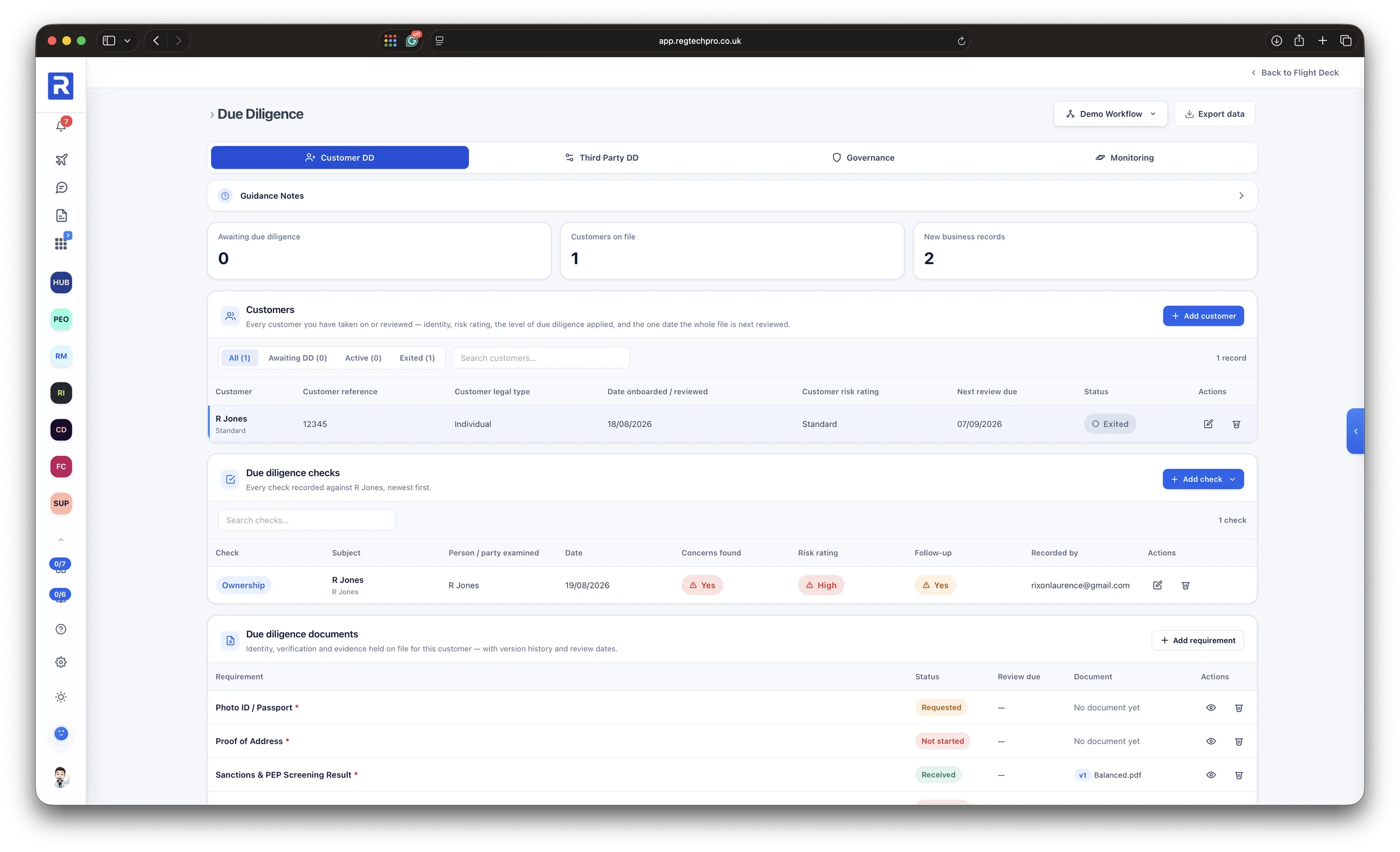
The Due Diligence app: customers on file with their risk rating and next review date, the due diligence checks recorded against a customer, and the documents held on file
Due Diligence. Each customer and third party with their risk rating, the checks carried out and the documents held on file.
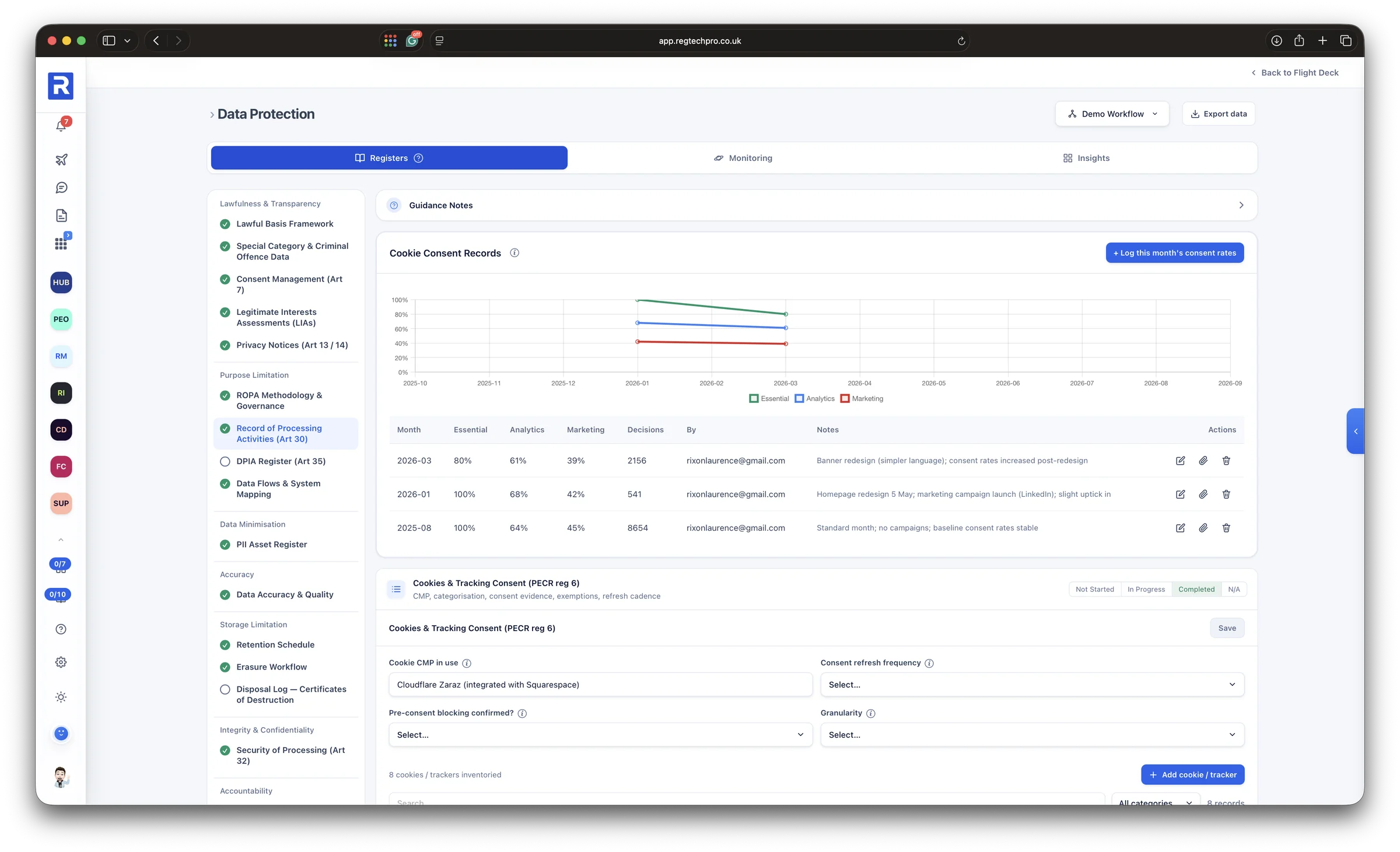
The Data Protection app: cookie consent records charted month by month and the cookies and tracking consent register, with registers organised under the UK GDPR principles
Data Protection. Registers organised under the UK GDPR principles, from lawful basis and the record of processing to retention.
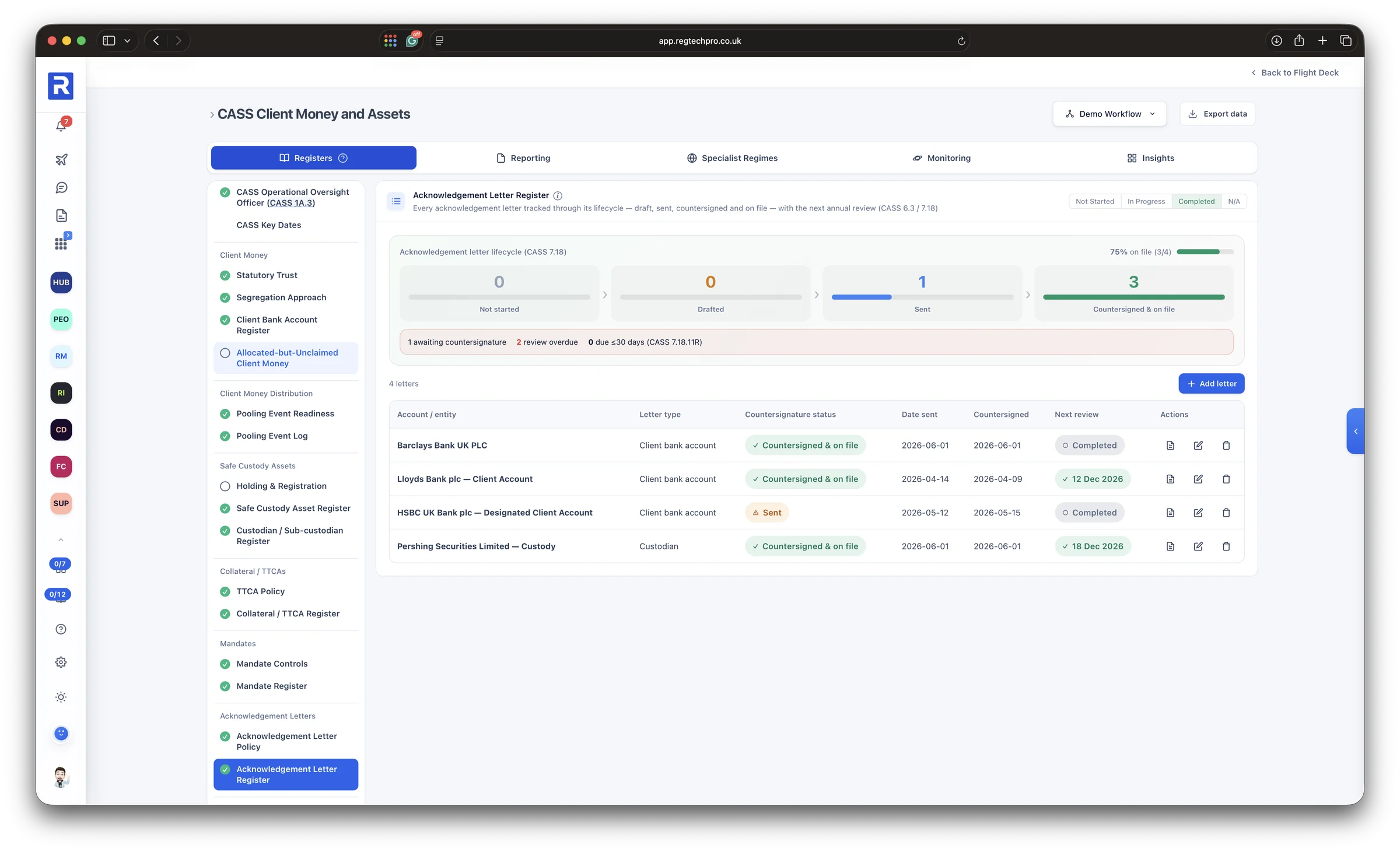
The CASS Client Money and Assets app: the acknowledgement letter register with each letter tracked from draft to countersigned and on file, and registers for client money, custody assets, collateral and mandates
CASS. Client money, custody assets and mandates, with every acknowledgement letter tracked from draft to countersigned.
6 Regulatory Intelligence

Every regulatory change, found, read and acted on

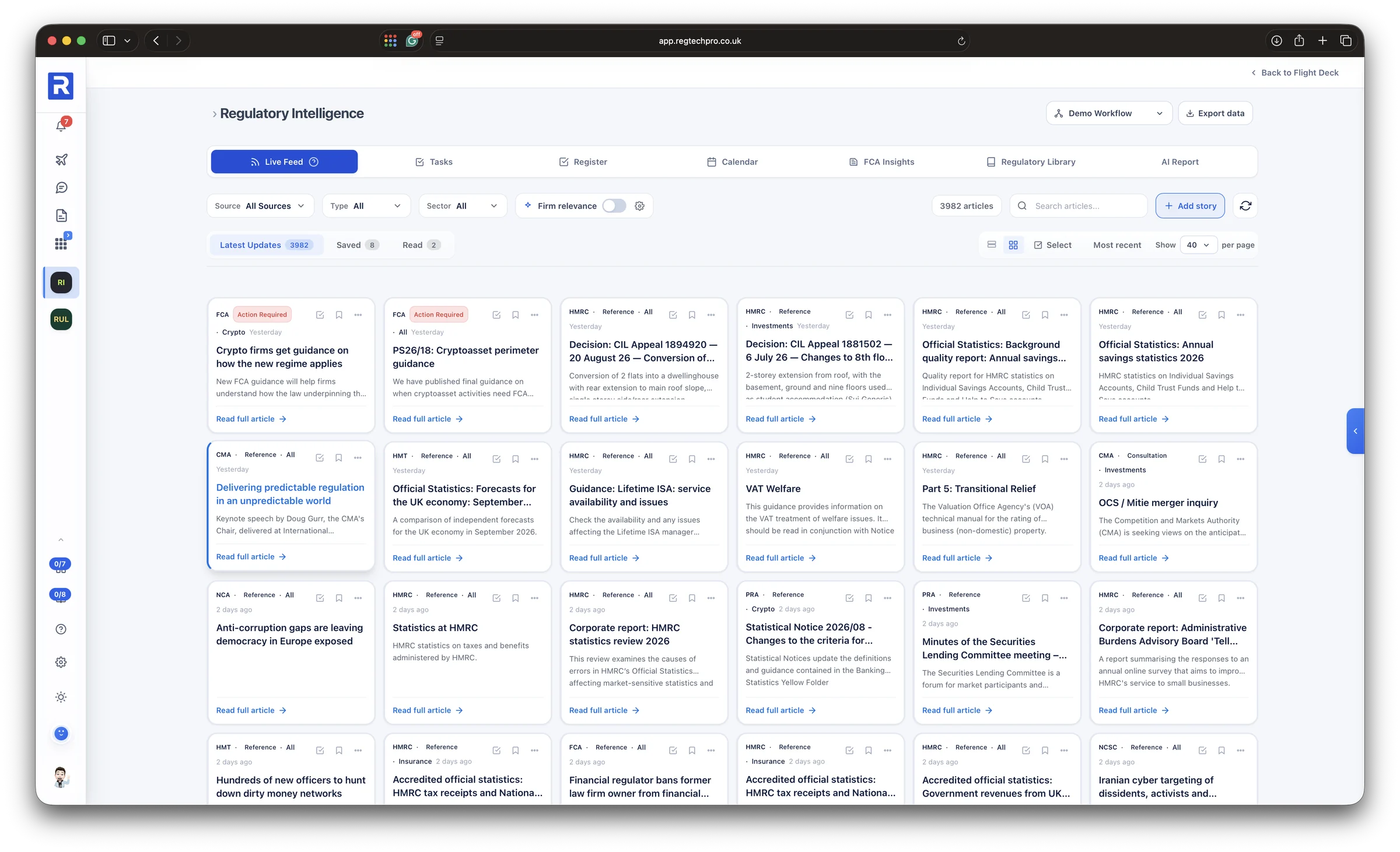
Regulatory Intelligence brings the publications of the FCA, the PRA, HMRC, the CMA and the other bodies a firm answers to into one live feed. Filter it by source, type and sector, switch on firm relevance to see what applies to you, and save, mark read or assign each item, so the horizon scan is a record rather than an inbox.

Rule Map reads the FCA Handbook every day and suggests the chapters that come with each firm’s permissions, which can arrive straight from the FCA Register. Every rule sits beside the checks that test it, and a change shows its wording before and after, the date it takes effect and the work it touches. Saved items become a report in a click, with what each means for the firm and the actions to take.
One feed across every regulator Rule changes shown before and after Changes mapped to your monitoring plan
The Regulatory Intelligence live feed: publications from the FCA, PRA, HMRC, CMA, NCA and others, filtered by source, type and sector, with firm relevance and saved and read views

The live feed. Publications from every regulator, filtered by source, type, sector and relevance to your firm.
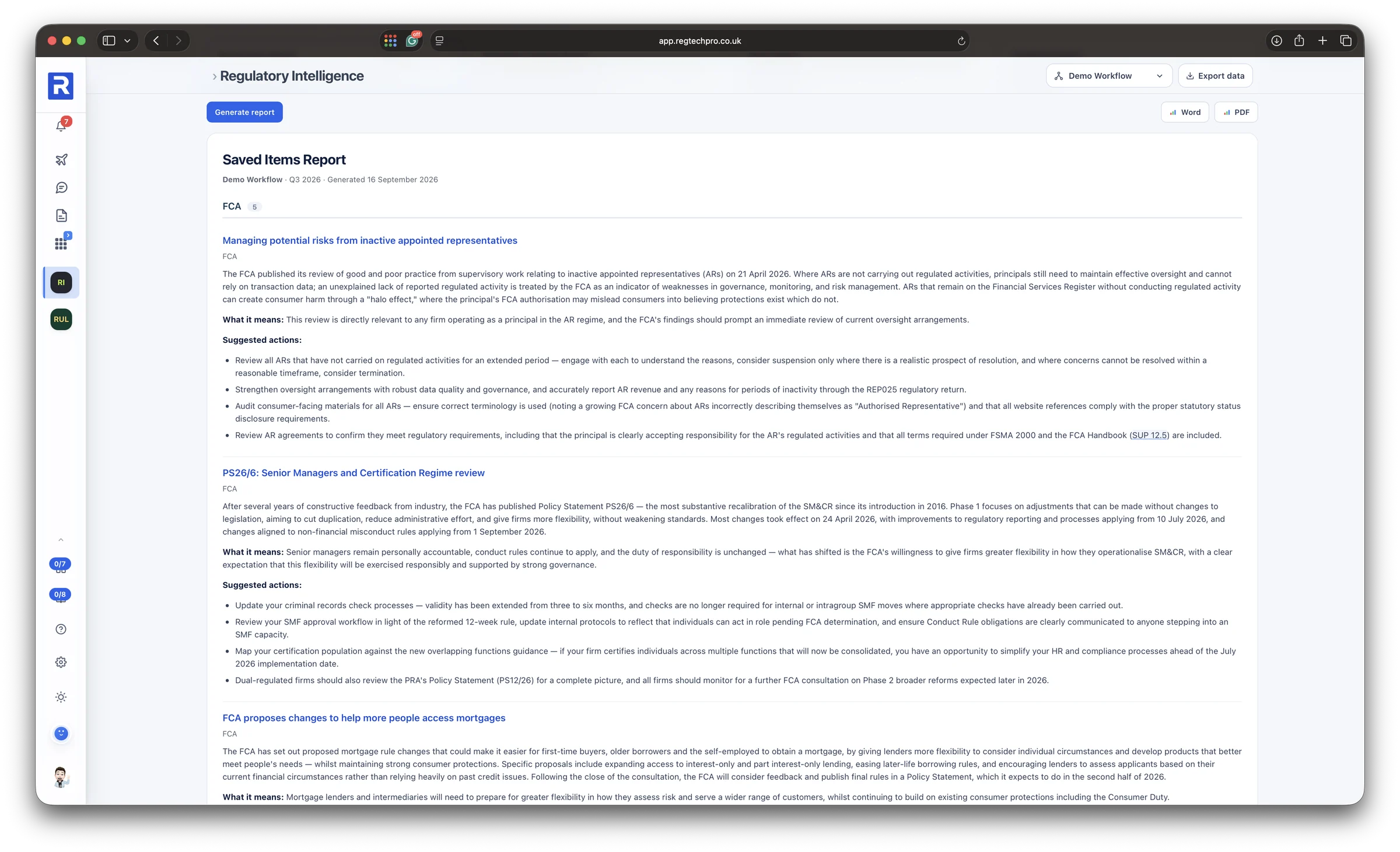
The Saved Items Report: each saved publication summarised, with what it means for the firm and suggested actions, exportable to Word and PDF
Saved Items Report. Each saved publication summarised, with what it means for the firm and the actions to take, in Word or PDF.
7 Policy Studio, Templates & Documents

Policies that are written, adopted and actually followed

Policy Studio takes a policy from set-up to approval in five steps: set it up, import your own or start from ours, edit it in Google Docs, operationalise it and approve it. Every document shows its owner, its status and how far through that journey it is.

Otto can assess a policy and add what is missing, or rewrite it chapter by chapter for your firm. It then reads the finished policy for the commitments inside it and suggests the tasks that deliver them, each with a frequency, so a policy becomes work on the plan rather than a file on a drive. Behind it sit the Template Vault of ready-made policies, registers and monitoring plans, and a Document Library that holds every piece of evidence in one place.
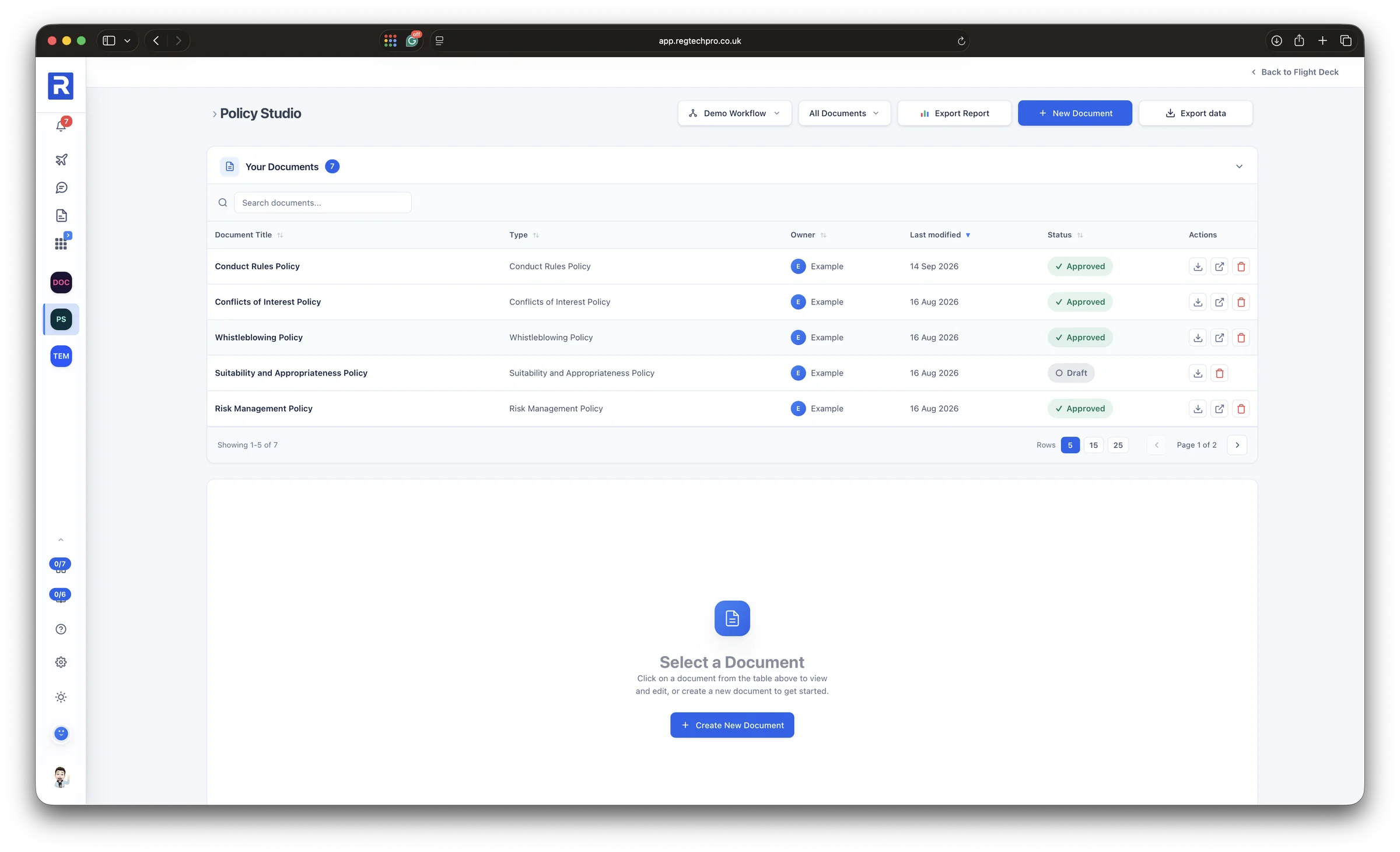
From set-up to approval in five steps Commitments turned into tasks Every document and piece of evidence in one library
Policy Studio: the firm's documents with their type, owner, last modified date and approval status

Policy Studio. Every policy with its owner, last change and approval status.
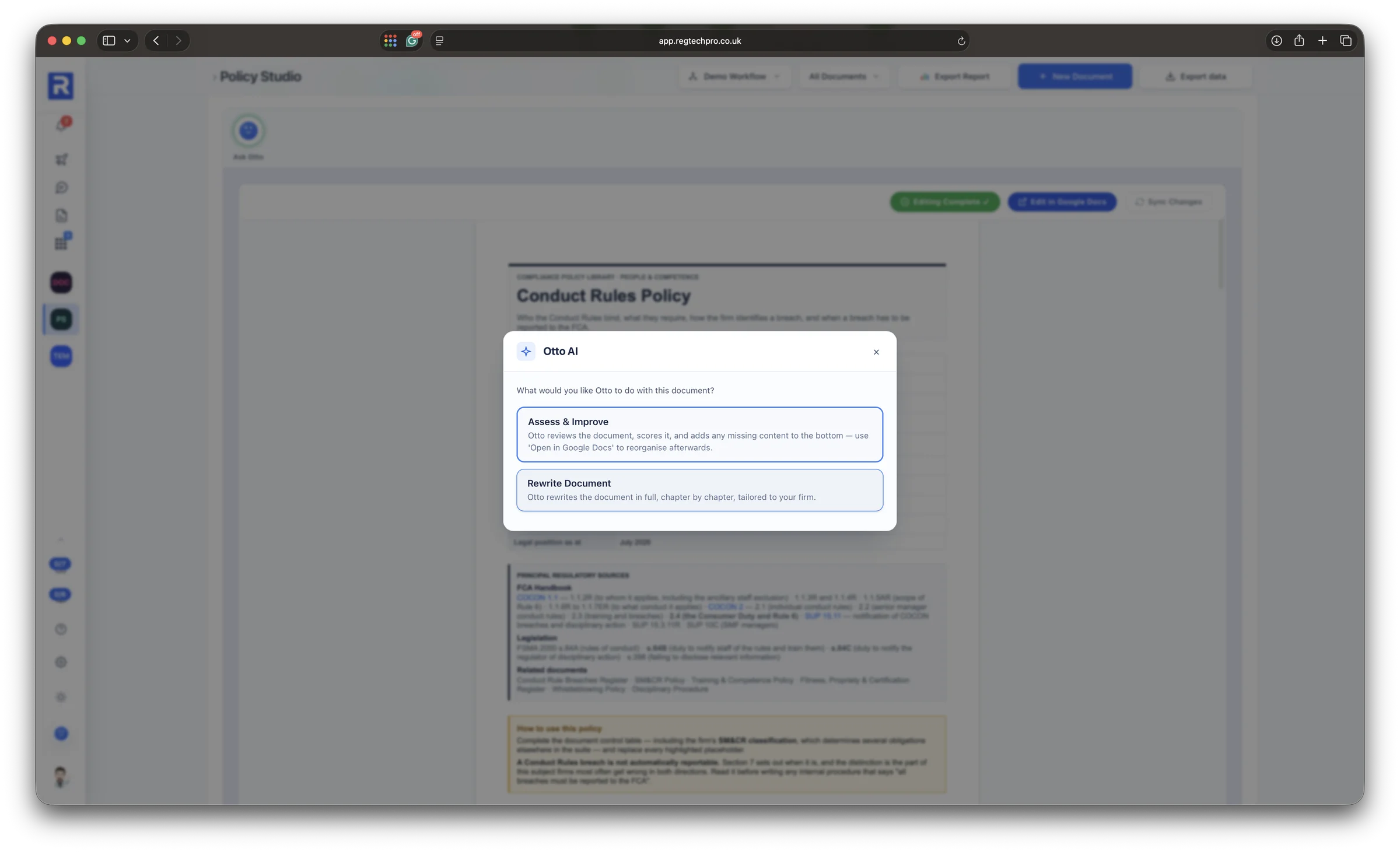
Otto AI open on a Conduct Rules Policy, offering to assess and improve the document or rewrite it in full for the firm
Assess or rewrite. Otto scores a policy and adds what is missing, or rewrites it chapter by chapter for your firm.
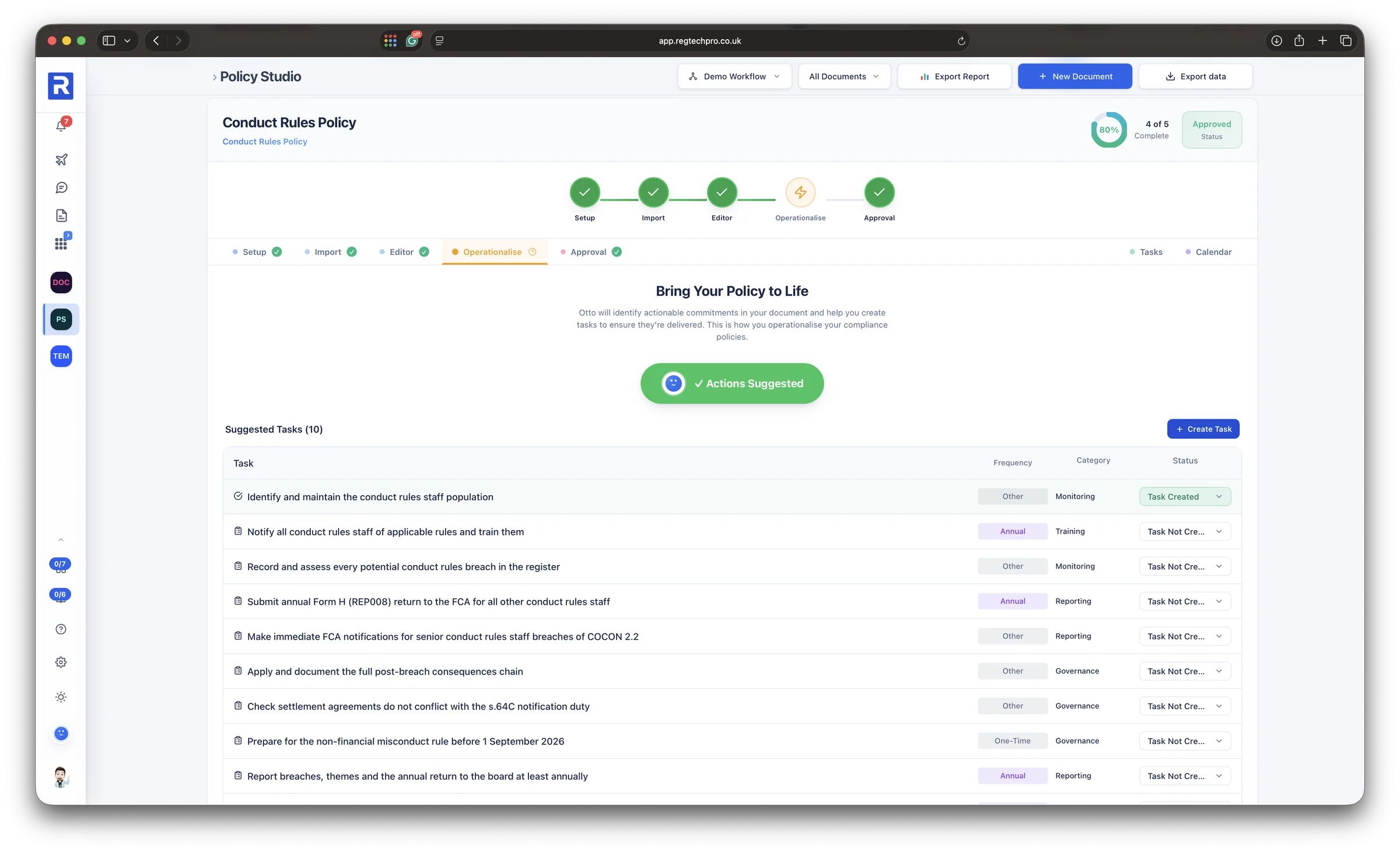
The Operationalise step of a Conduct Rules Policy: the tasks Otto has suggested from the policy's commitments, each with a frequency, category and whether the task has been created
Bring it to life. The commitments inside a policy, turned into tasks with a frequency and a category.
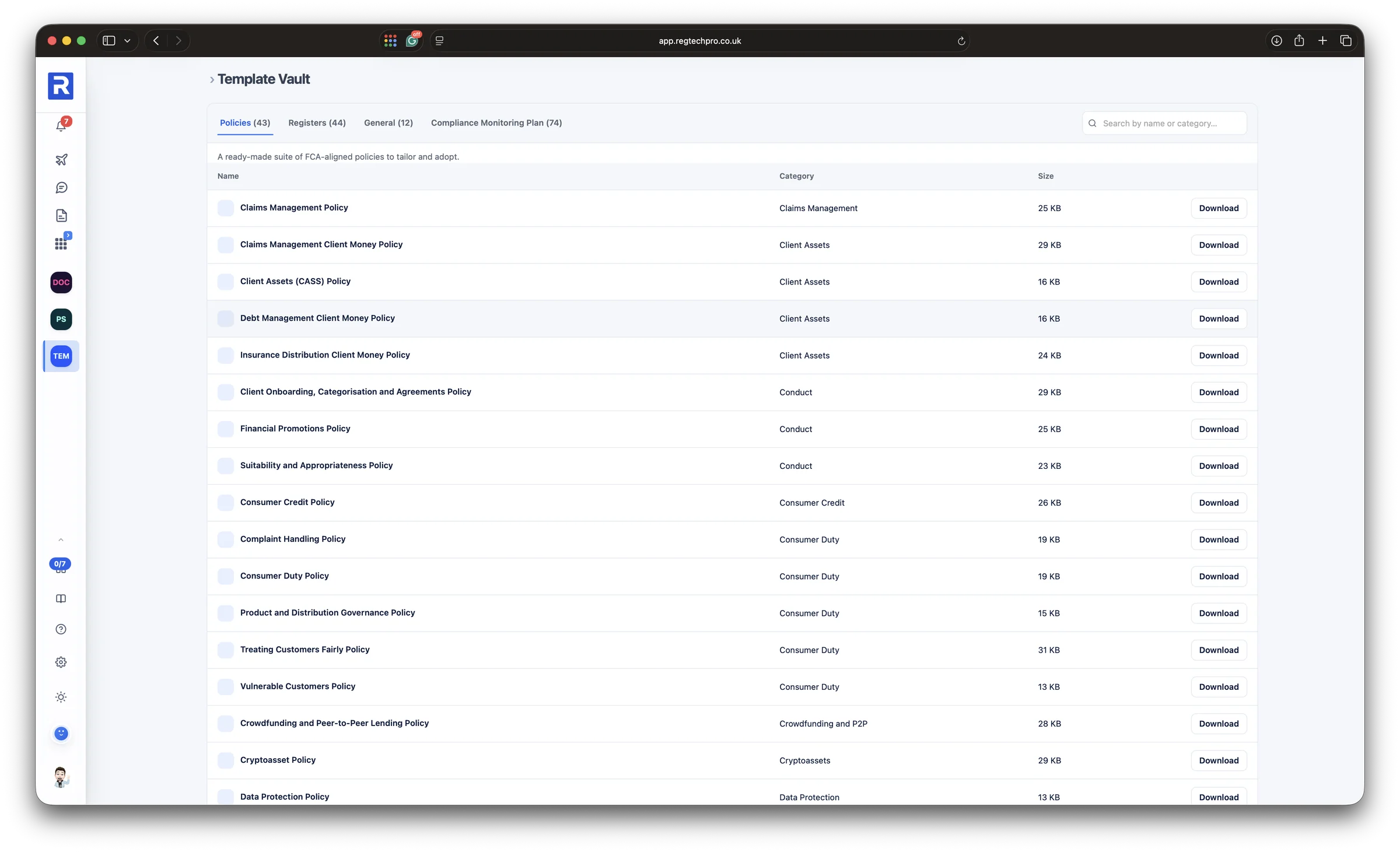
The Template Vault: ready-made policies listed by category, with tabs for registers, general documents and compliance monitoring plans, each ready to download
Template Vault. Ready-made policies, registers and monitoring plans to tailor and adopt.
The Document Library: folders and files for the workflow, with every document grouped by the module it came from, recent items and an AR Library tab
Document Library. Every document and piece of evidence, grouped by the module it came from, with a separate library for ARs.
8 Reports

The report the regulator actually reads

The Reports module holds every regulatory report the firm needs, built from the records already entered: the Compliance Position, an Overall Readiness view, the MLRO annual and REP-CRIM return, the SUP 12 report, the Consumer Duty board report, the DPO annual and ICO accountability pack, the CASS annual and CMAR, the Risk Committee report, the Compliance Monitoring report, and an FCA Readiness report for each area.

The figures are calculated from the data. Otto writes the executive summary and the commentary, at the depth you choose, and says plainly where evidence is missing rather than padding. Export to PDF or Word, or re-run it the moment the records change. Otto is grounded in 150+ expert-authored documents, the FCA Handbook and 28 years of compliance practice. It drafts. A person reviews and decides.
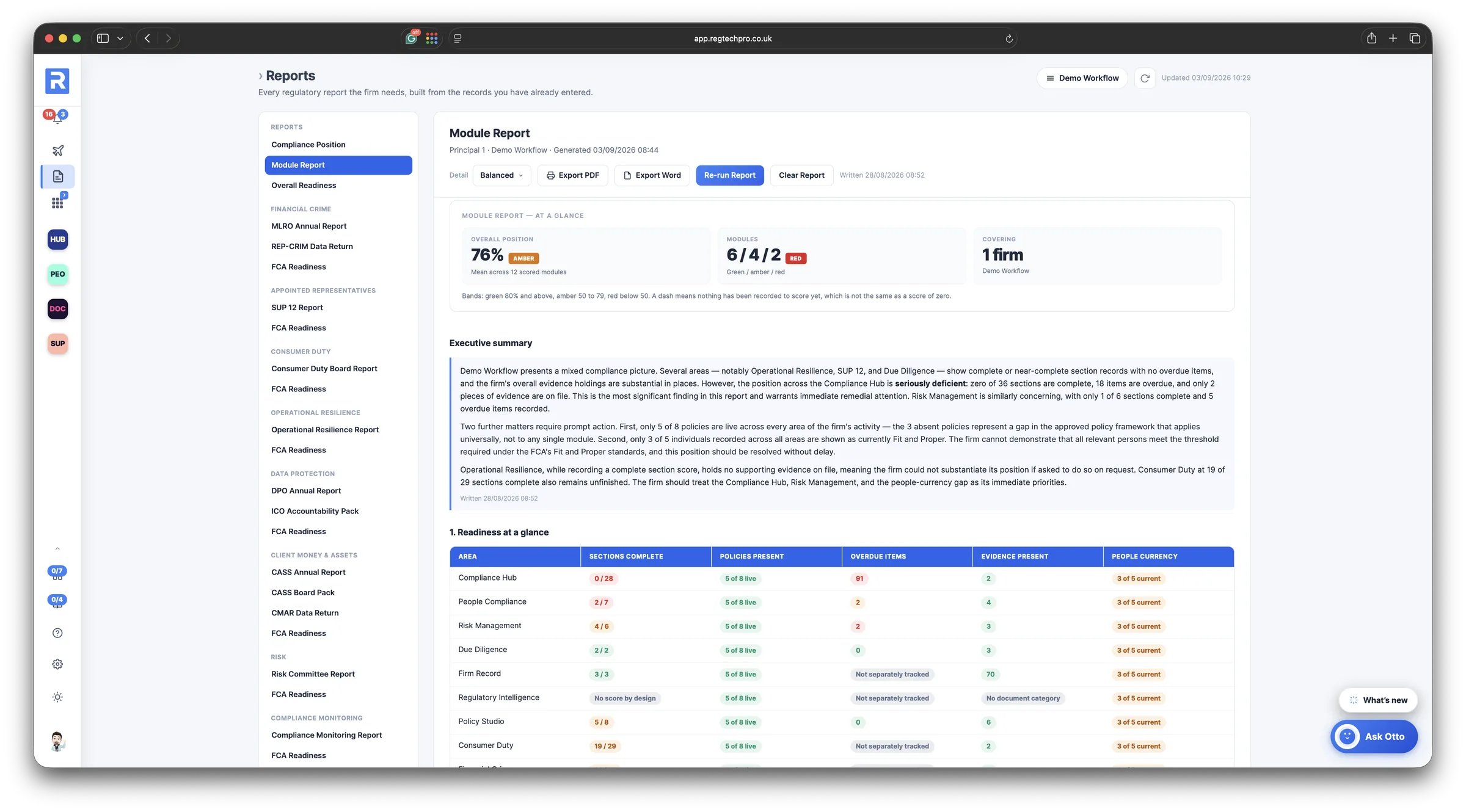
Every regulatory report, from live data Gaps called out, never padded Otto drafts, you decide
The Reports module: the catalogue of regulatory reports on the left, and a generated Module Report on the right with the overall position, a readiness table by area and Otto's executive summary

Reports. The catalogue of regulatory reports, each built from live data with Otto’s commentary.
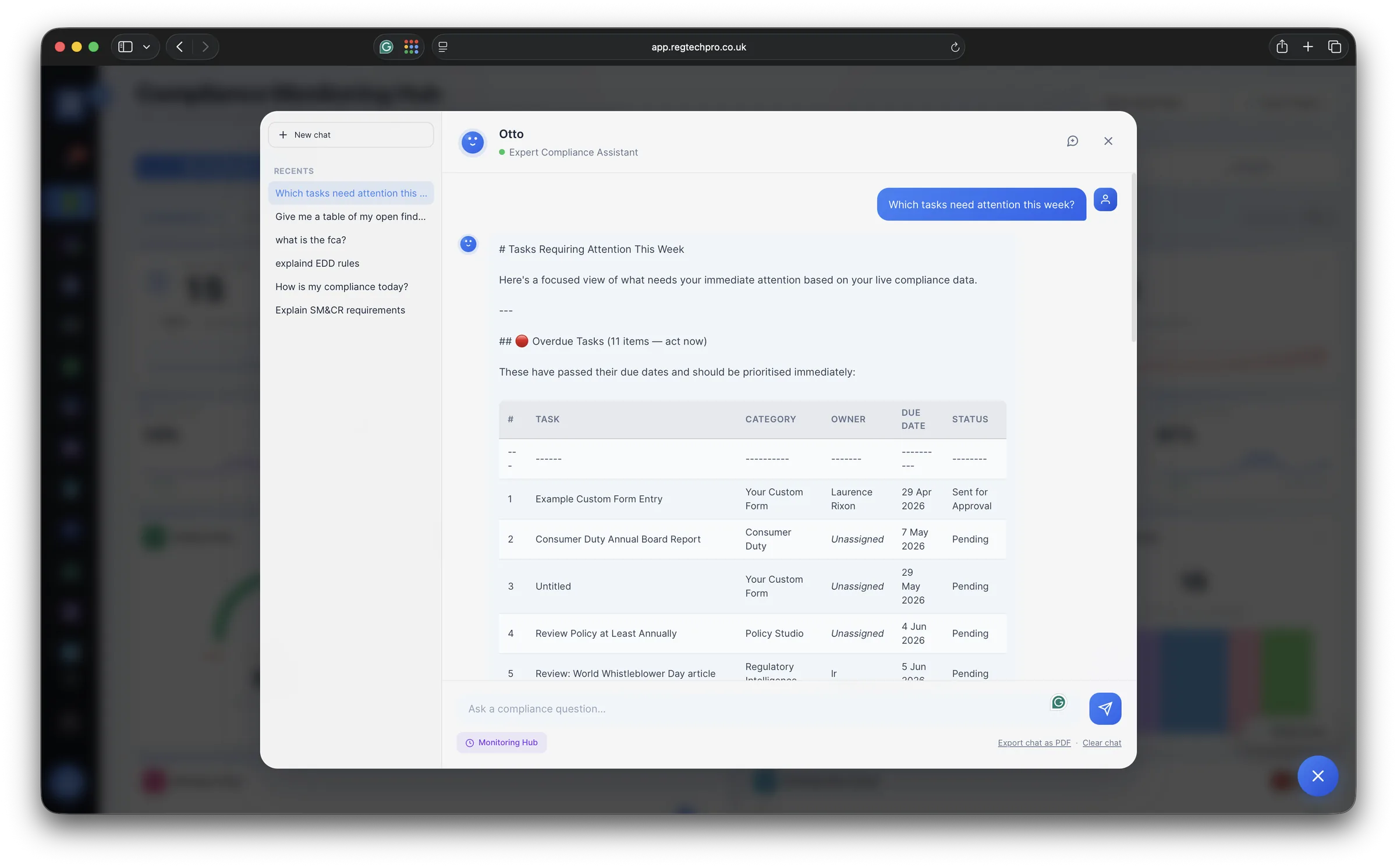
The Otto assistant open on the Compliance Hub, answering which tasks need attention this week with a table of overdue items by category and owner
Ask Otto. On every page, reading your live data: here, the overdue tasks by category and owner.
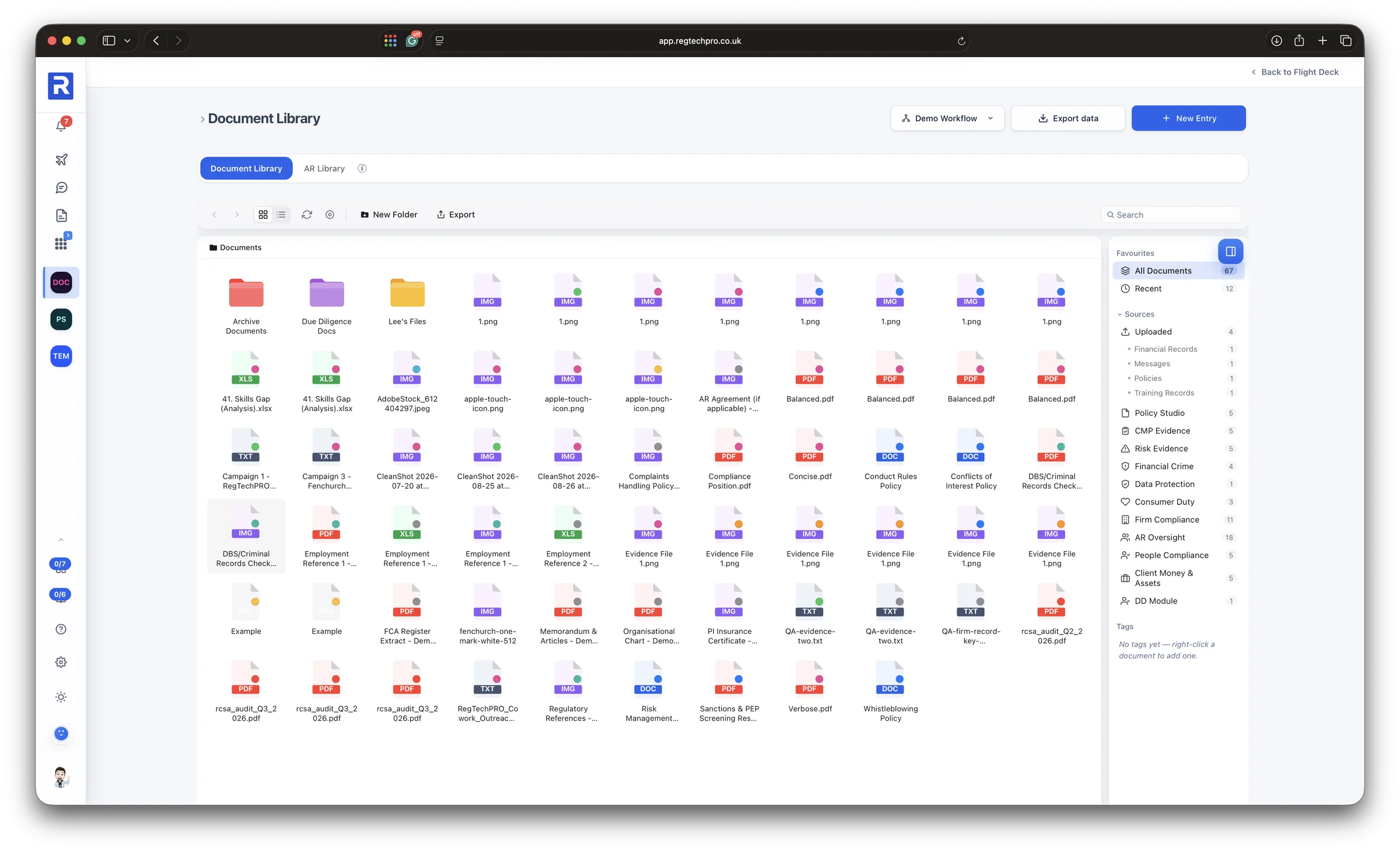
The Flight Deck in dark mode: overdue, scheduled and waiting items across every workflow, with the list of scheduled items by module, status, owner and due date
Dark mode. The whole platform, in the mode your team prefers.
9 Access control

Segregated, controlled, accountable

Every firm, appointed representative or user group you look after is its own workflow with its own isolated records, switched from the top of every page. Access is granted per person and per form: this screen shows one person with 83 of 93 forms enabled, module by module, so an AR user or a junior colleague sees exactly what they should and nothing else.

Approvals are enforced on the server, sign-in is a one-time code with no password to leak, and every record carries who touched it and when. That is the control environment a supervisor expects to find, built in rather than bolted on.
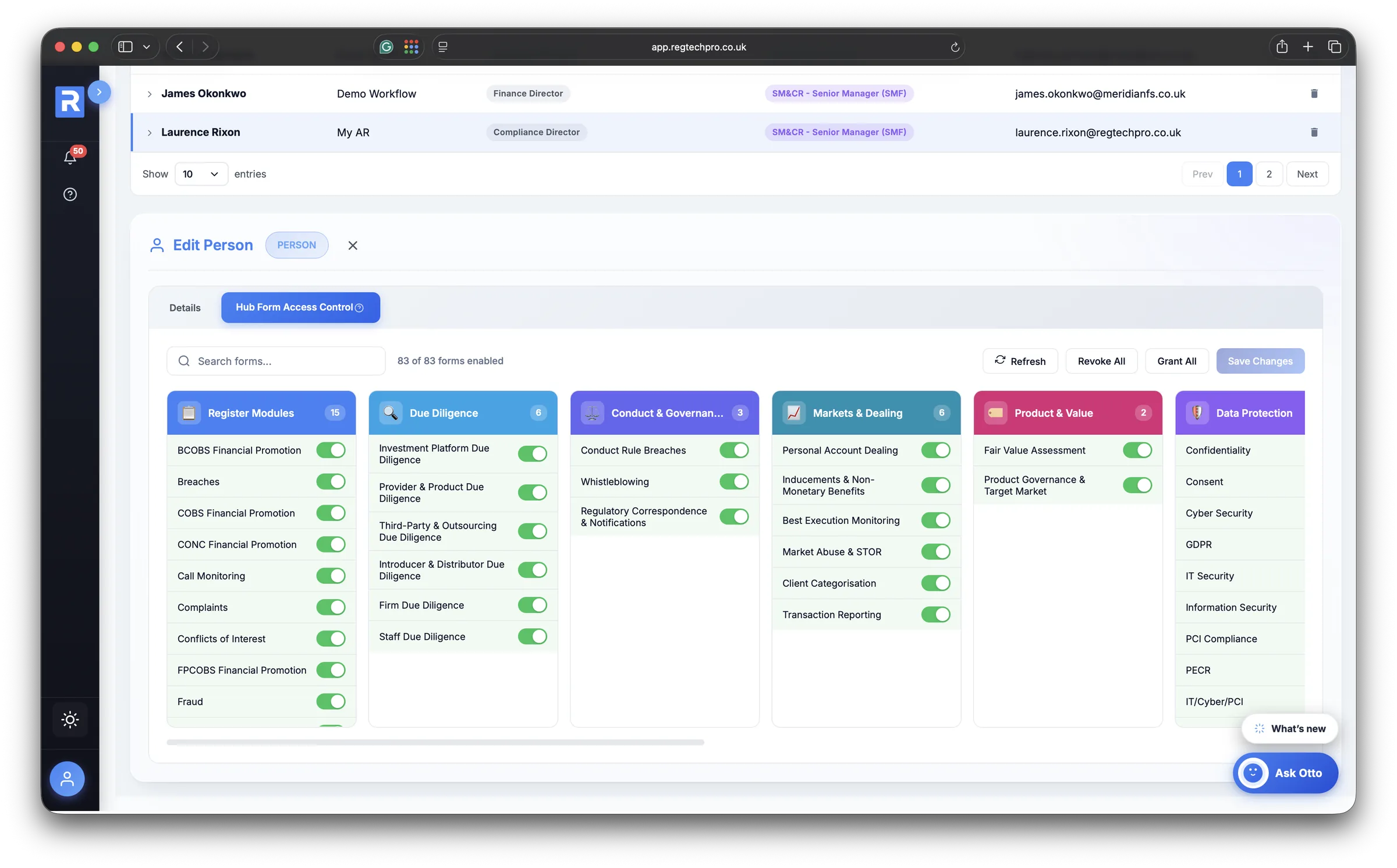
A workflow per firm, AR or user group Access granted form by form Approver roles enforced server-side
A person's form access grid in Platform Administration: 83 of 93 forms enabled, grouped by module, with a toggle per form

Form access. Exactly which forms each person can reach, set module by module.
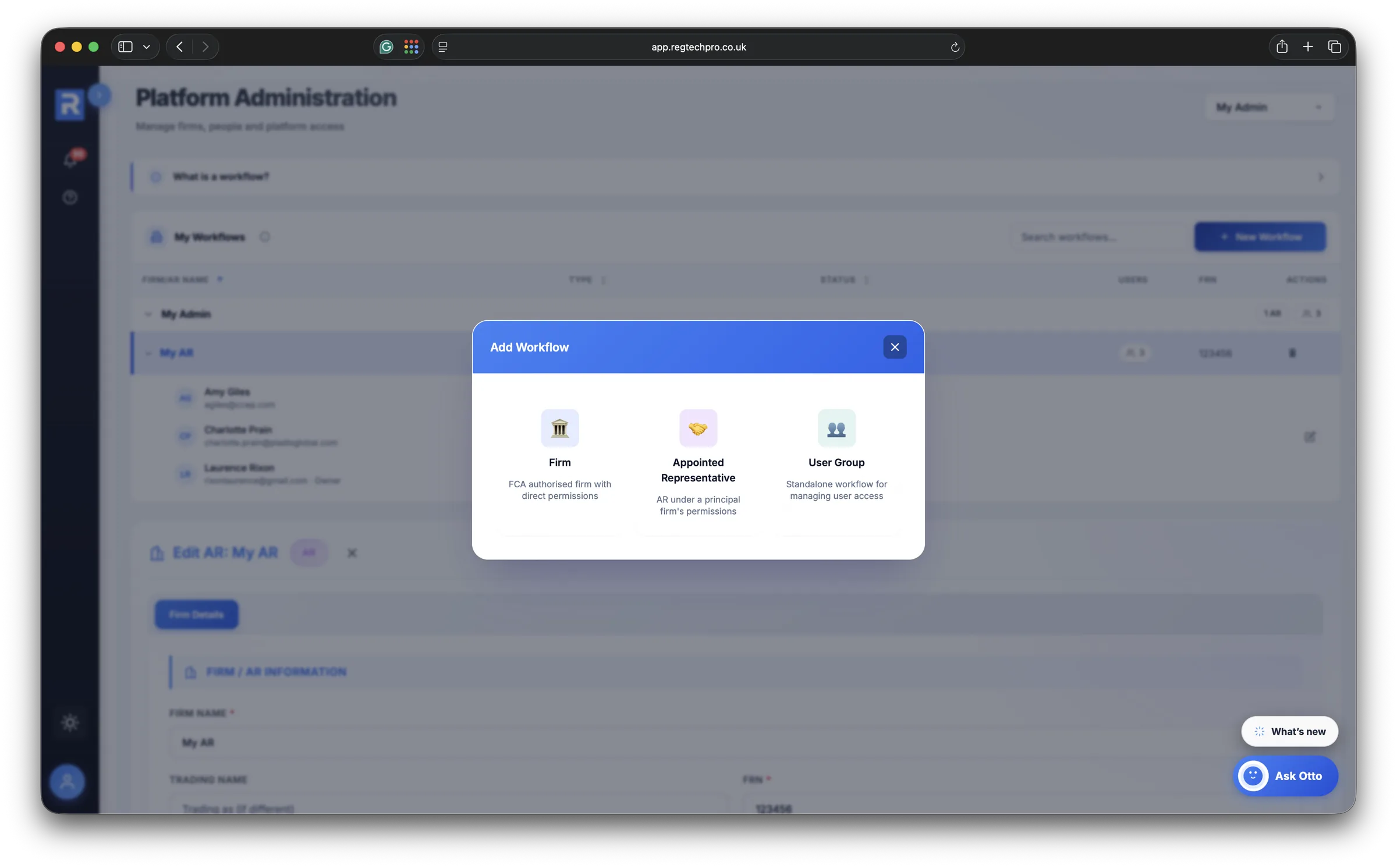
The Add Workflow dialog offering three types: Firm, Appointed Representative and User Group
Workflows. A firm, an appointed representative or a user group, each with its own segregated records.
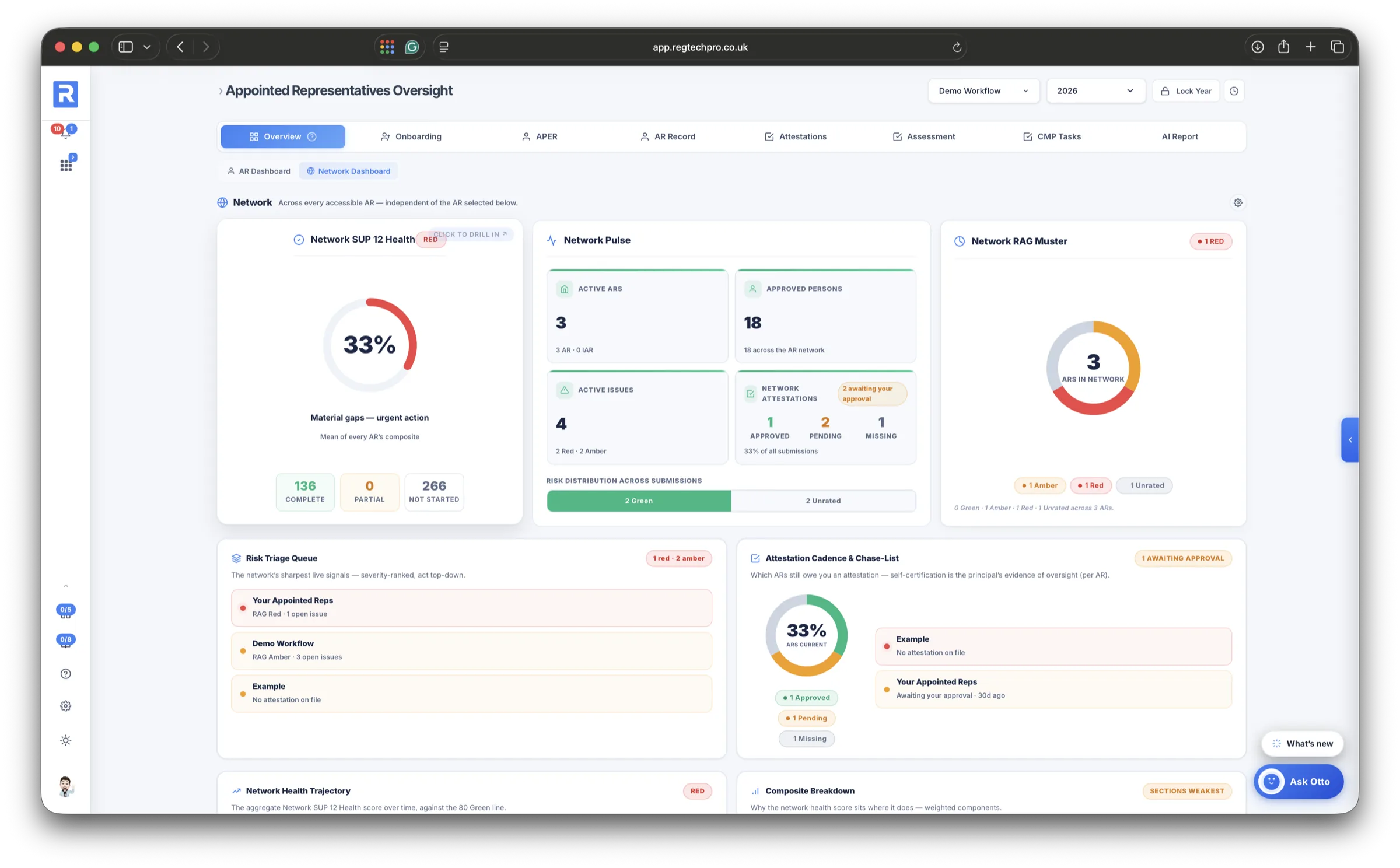
The SUP 12 Network Dashboard: aggregate health, RAG muster, triage queue and attestation chase-list across every appointed representative
The network. For principals, every AR rolled up into one dashboard. Stop 10 takes it further.
10 Principal firms

Every AR in one view, with a rating each

Principal firms get a further layer: each appointed representative runs as its own workflow, with its own dashboard, registers, attestations and people, and the Network Dashboard rolls the lot up. Aggregate health, a RAG muster, a severity-ranked triage queue and an attestation chase-list that names which ARs still owe you one.

Every AR's rating explains what drove the colour, a defensibility radar names the weak flank in plain English, and the SUP 12 report builder produces the full fourteen-section report or an FCA dry run on demand.

Each AR gets its own portal. Behind its own secure login, an AR sees only its own monitoring plan, attestations, registers and task calendar. The principal sends what it needs completed; the AR completes it, attaches the evidence and sends it back; and every attestation, document and record the AR files lands on the principal's side for approval. Information moves both ways, and the principal never chases by email.

A dashboard per AR and one across the network Why this RAG, on every rating SUP 12 report and FCA dry run A portal per AR, both ways
See the principal-firm homepage
The SUP 12 Network Dashboard for principal firms: aggregate health, network pulse, RAG muster, risk triage queue and attestation chase-list across every appointed representative

The network view. Health, RAG and a triage queue across every appointed representative.
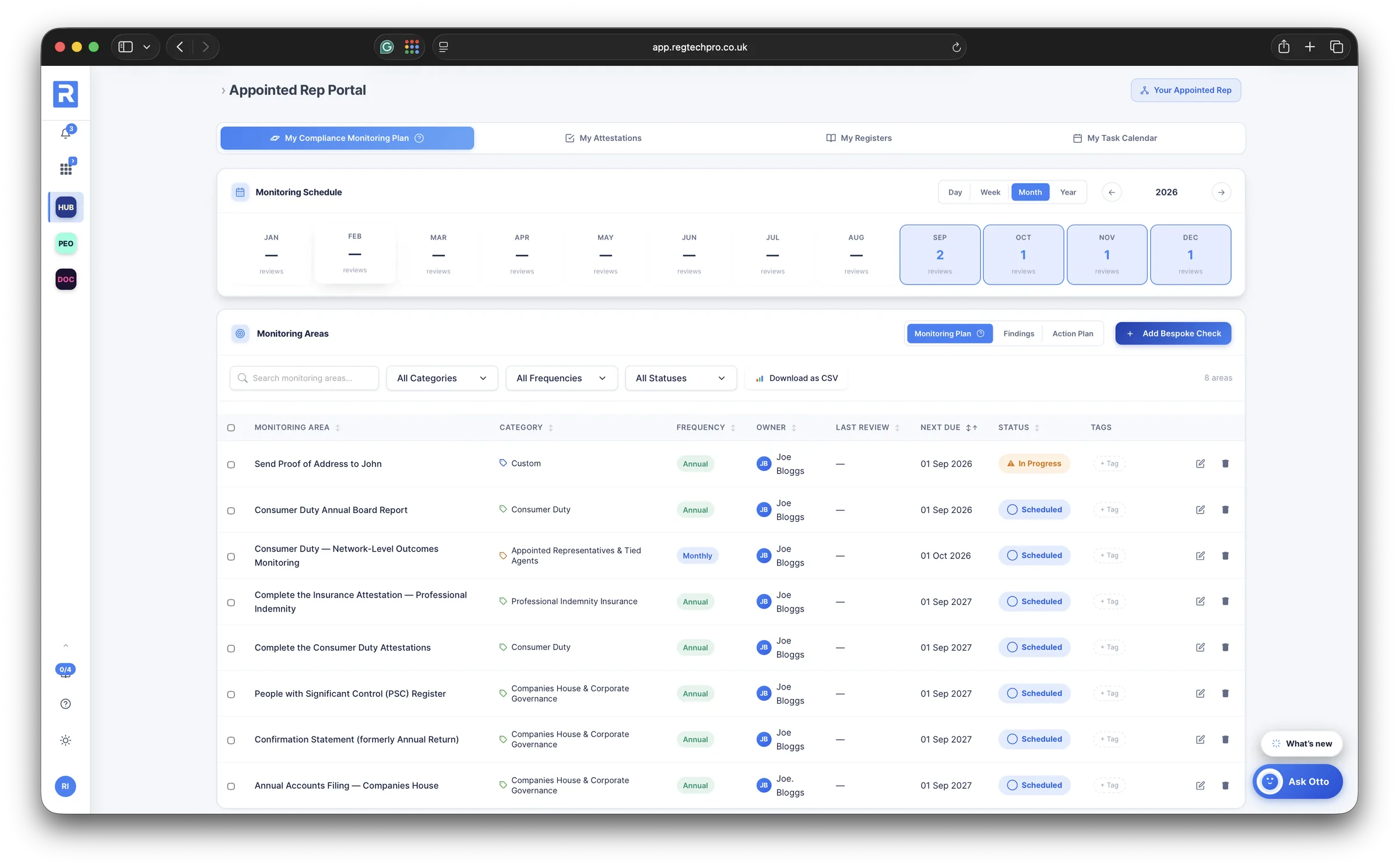
The Appointed Rep Portal: the AR's own monitoring plan with a schedule and its monitoring areas, plus tabs for My Attestations, My Registers and My Task Calendar
The AR's portal. Its own monitoring plan, attestations, registers and calendar, and nothing belonging to anyone else.
An AR completing its Compliance Attestation in the portal: the guidance, the figures for the period and the statements to confirm
Sent, completed, returned. The AR completes the attestation the principal asked for, with the evidence attached, and sends it back.
The AR's My Attestations tab: each submission with its approval status, RAG and task status
Approval, both sides. What the AR has filed and whether the principal has approved it, visible to both.

Built to hold regulated data.

The things that matter when the data is your firm's compliance records.

Verified sign-in

Signing in on a new device or browser asks for a 6-digit code sent to your email. There is no password to create, reuse, phish or leak — the code is the whole of it. Devices you already trust aren't asked again.

UK & EU hosted

Bank-grade encryption on infrastructure with SOC 2 and ISO 27001 pedigree, run in the UK / EU by an ICO-registered company that has been active since 2017.

Subscribe today. We'll get you set up.

No procurement dance, no waiting list. Choose the plan that fits your firm and subscribe online — then our team will contact you to help you get set up. Rather talk it through first? A consultation is there if you want one — but it's entirely optional.

Optional

Book a consultation

Want to see it on your own firm first? A 30-minute walkthrough — the plan that fits, and how RegTechPRO proves your compliance in a few clicks. No obligation, no slide deck. Skip it entirely if you'd rather just get started.

Book a consultation
1
Start here

Subscribe

Pick Starter, Growth or Pro and subscribe online in a couple of minutes. Every plan starts with a 14-day free trial — simple monthly pricing, unlimited users, and you can move up a plan as you grow.

2
Guided setup

We'll get you set up

Our team will contact you to help you get set up — your firm's workflow, registers, monitoring plan and users, configured with you. Then sign in with a one-time code sent to your email; there's no password to create and nothing to install.

See what's inside

14-day free trial  ·  Monthly billing

See it on your own compliance.

Start your 14-day free trial today — or book a 30-minute walkthrough first and we'll show you RegTechPRO on your own firm.

Prefer email? Send us a message

Contact Us

Thank you!

We've received your enquiry and will be in touch shortly.