
DOCUMENT LIBRARY · CROSS-MODULE EVIDENCE VAULT · GOOGLE DOCS LIVE

Not a document folder.
An evidence vault.

Every file attached anywhere on the platform — Risk evidence, CMP completion notes, AR due diligence, People Compliance DD, Policy Studio outputs — auto-surfaces here, source-tagged and provenance-preserved. The compliance officer’s FCA audit-response surface, not a filing cabinet.

Trusted by 250+ UK-regulated firms · Built by compliance professionals to make your life easier.

Book a Consultation
Auto-Centralised
11 Source-Module Filters
Google Docs Live
Full Revision History
Soft-Delete by Architecture
No Workspace Subscription

A folder of PDFs isn't an evidence vault.

Scattered evidence is a governance risk before it's an audit one — you can't sign an SMF attestation on documents you can't locate, version or prove.

Evidence scattered across six systems

DBS checks on SharePoint. Risk evidence in Dropbox. Policies in an inbox. CMP notes on a desktop. No SMF16 can answer “where's the evidence for X?” with confidence.

DBS_JohnSmith_FINAL.pdf
Risk_Evidence_Q1_v7.xlsx
FairValuePolicy_draft_v3.docx

No canonical version. No defensible record.

Policy_v3.docx. Policy_v3_FINAL.docx. Policy_v3_FINAL_FINAL.docx. The board approves a policy; you can't prove which version was in force on a given date.

Fair_Value_FINAL.docx v?
Fair_Value_FINAL_FINAL.docx v?
Fair_Value_USE_THIS.docx v?

No provenance. No governance chain.

Files land with no owner, no source, no link to the risk or client they evidence. Twelve months on, the context — and the ability to defend the decision — is gone.

? source
Untraceable provenance.

Executive time spent hunting for files

Every hour an SMF spends hunting for evidence before a board meeting, review or DD request is time not spent on the decisions you pay them for.

Risk R-174 evidence: searching…
Fair Value policy: three versions?
DBS (J. Smith): SharePoint or Inbox?

If evidence is scattered, unversioned and unsourced, the Library is the governance fix. Not another system to add, but the single index the rest of the platform already feeds.

Built around your audit posture

Different obligations. Same evidence vault.

FCA supervisors and internal auditors ask different questions. The same provenance trail underneath — auto-centralised, source-tagged, version-historied, soft-deleted — stands up to either.

If you're FCA-regulated

Your FCA audit-response surface, not a filing cabinet.

The FCA asks “show us the evidence” — filter to Risk Documents in one click and every file attached to every risk record is on screen, source-tagged and dated. Soft-delete means you can prove nothing was ever destroyed.

  • 11 source-module filters — one for every module that feeds the vault
  • Soft-delete preserves the record — nothing destroyed, audit trail complete
  • SYSC-grade provenance preserved on every cross-module document
If you're any other UK firm

Google Docs as your compliance backbone, hosted for you.

Every firm needs version history, co-edit and an audit trail — for the ICO, HMRC, Companies House or its own Board. RegTechPRO hosts Google Docs centrally, so you skip the £3,500–£8,500/year Workspace subscription.

  • No Workspace subscription required — Google Docs hosted in the platform
  • Real-time co-editing, full revision history, one-click .docx / .pdf / ODT export
  • Permissions inherited straight from Drive — nothing custom to misconfigure
The Document Library Edge

An evidence vault, not
a folder of PDFs.

Storage is everywhere. What's rare: every document — uploaded or generated anywhere on the platform — lands here automatically, opens as a live Google Doc, and stays audit-ready.

Step 1
Attach
Attach evidence to any risk, CMP task, person record or policy anywhere on the platform
Step 2
Centralise
Auto-surfaces here, tagged by source module, categorised and searchable with provenance intact
Step 3
Retrieve
Filter by source module, open as a live Google Doc, or export the full inventory as a CSV

Platform-generated documents land here automatically — no manual upload, source context intact.

Every document, every module, one place.

A live index over 11 modules, not a folder you upload to. Every module's evidence auto-centralises here, tagged by source and category — one filter per module.

Cross-module index · 11-module ingestion

Every editable doc is a live Google Doc.

Not a proprietary editor — editable documents open in the real Google Docs: co-edit, suggesting mode, comment threads and full revision history with one-click rollback. No download-reupload cycle, no Workspace subscription, and export to .docx, .pdf or HTML on demand.

Version history · No reupload cycle · Customer-owned exports

The evidence layer a board can stand behind.

Filter by source, search by record or owner, open the live document or export a CSV inventory for the board pack. Source tags stay on every row, permissions inherit from Drive, and deletes soft-flag rather than destroy — so when the FCA asks what happened to a document, you have the full history.

SYSC 9 · Soft-delete · Audit-grade by construction
The Solution

Eleven modules. One library. No uploads.

Every attachment, auto-centralised and source-tagged. Every editable doc live in Google Docs, full revision history — no Workspace subscription.
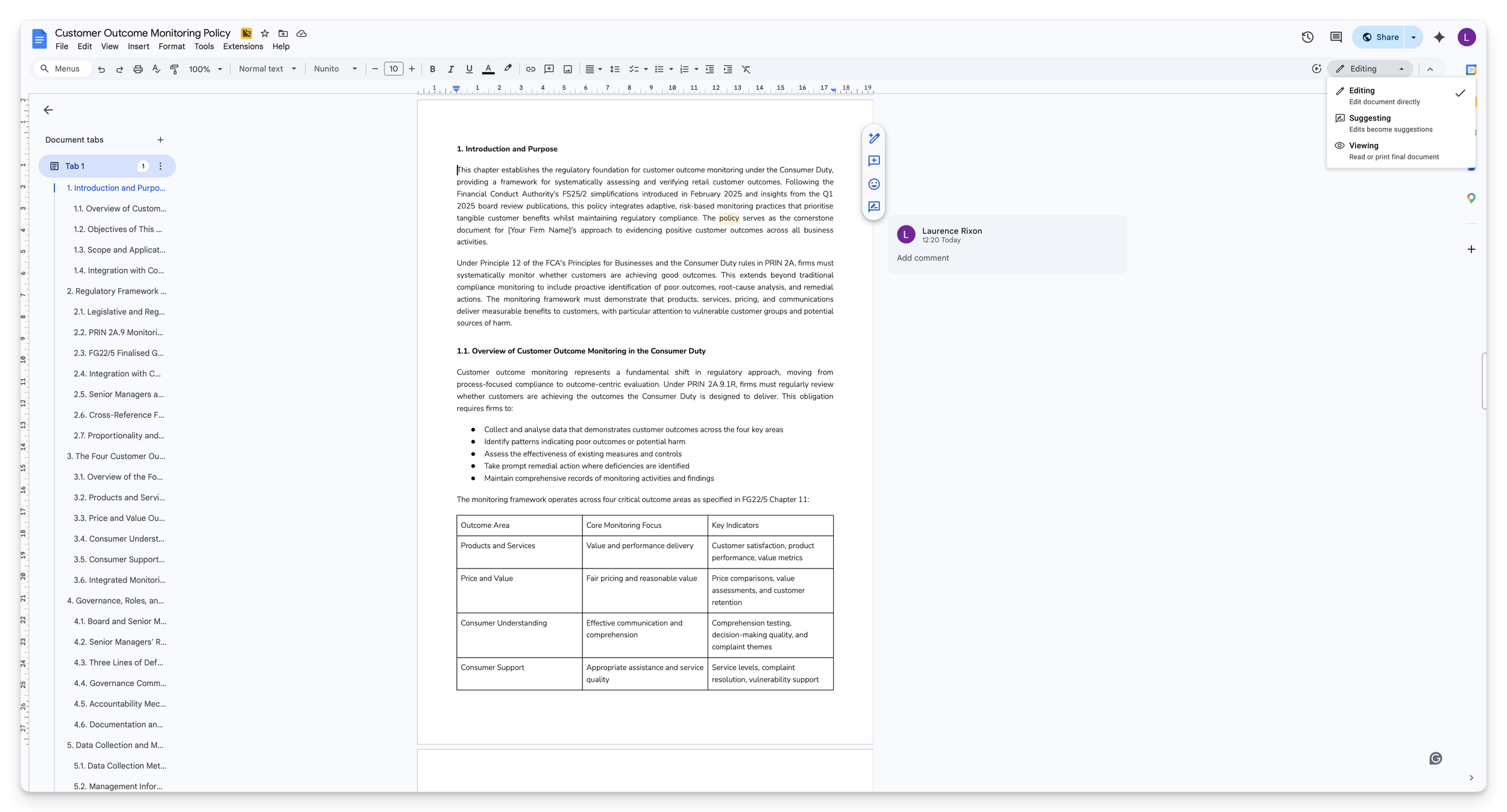
Document Library — live Google Docs editing, revision history, source-module provenance

One vault for every platform document. Grid or list, folders, 11 categories, bulk upload, audit-safe soft-delete — each row tagged by source and one click from Google Docs.
Document Library source-module filters — Policy Studio, CMP, Risk, Custom Forms, Other

11 source-module filters with live counters, colour-tagged by origin. Toggle any combination to narrow the view.
Document Library — Google Docs edit-in-docs round trip with full version history

Click any editable document and it opens live in Google Docs — real-time co-edit, comments, suggesting mode and complete revision history. Auditable by design.

The document engine

Google Docs for compliance. Every editable document on the platform is a live one.

Not a proprietary editor — the real Google Docs your board already trusts, with a compliance index over the top. Co-edit, suggest, comment, full revision history; every attachment from 11 modules auto-centralised by source.

Best-of-class editor. Compliance index on top.

Every editable document — policies, board papers, attestation packs, form submissions — is a real Google Doc. Static evidence like DBS checks, scans and certificates stays untouched in Drive. Enterprise editing with no per-seat fee, because we host it for you.

No
Workspace subscription needed
11
Source modules auto-ingesting
Full
Revision history per doc
6+
Export formats on demand
1
Real-time co-edit: two SMFs, one document, live cursors
Collaboration
2
Forensic revision history: every keystroke, every author, one-click rollback
Audit trail
3
Suggesting mode and named comments close the review in-document
2LoD review
4
Export to .docx, .pdf, .html, .txt, ODT, EPUB from the editor’s own menu
No lock-in
5
Permissions come straight from Google Drive — no separate access layer to get wrong
Data isolation
6
Auto-centralisation from 11 modules into one register, one filter row, source-tag preserved
Cross-module
7
No Workspace subscription needed; Drive hosted centrally, opens in your own Google account if signed in
No add-on subscription
8
Static evidence (PDFs, scans, certificates) stays exactly as uploaded — the right compliance default
Integrity
9
An evidence vault an executive can stand behind. Filter, search, export, hand to the board in seconds
Board-ready
Live feed · auto-ingestion from 11 source modules

Upload there. Surface here.

Attach evidence to any record in any module and it surfaces here automatically, tagged with the module it came from. The source tag is set by the module, not typed by hand — so provenance is reliable every time.

Uploader What arrived in the Library When Action
Priya Ramalingam
Policy Studio
Fair Value Assessment Policy. Arrived as a live Google Doc, tagged Policy Studio — opens straight into Docs to edit. Apr 10, 2026 Edit in Docs
Siobhan O’Connor
People Compliance · SMF DD tab
DBS check for John Smith. PDF tagged Due Diligence, stored untouched — opens in the Drive viewer. Apr 09, 2026 View
CMP Engine
Monitoring-area completion
A8.3 completion note. Auto-attached when the monitoring area closed, tagged CMP — linked back to its source area. Apr 07, 2026 Auto-linked
Risk Register
R-174 control evidence
Control walkthrough evidence pack, tagged Risk — surfaces here because it carries an attached file. Apr 05, 2026 Ingested
Daniel Kowalski
Document owner · admin delete
Superseded DBS certificate soft-deleted. Disappears from every view but is retained and recoverable for audit. Apr 03, 2026 Soft-deleted

One editor. One revision history. One permissions model.

We host Google Drive for you — no Workspace subscription to buy. Editable content opens as a true Google Doc with real-time collaboration and full revision history; uploaded PDFs and images stay exactly as they were. The right default for evidence.

1 · Document engine
v7 · history 3 collaborators
Every editable doc is a Google Doc
Real-time co-edit · suggesting mode · named comments · full revision history · export to .docx / .pdf / .html from Google’s own menu
Edit in Docs
2 · One organised library
PDF DOC
Folders and files, one place
Organise with colour-tagged folders — 7 colours, nest as deep as you like. Everything lives in one searchable library under a single permission scope.
One index
3 · Audit-safe delete
Soft-deleted · recoverable
Nothing is ever truly deleted
Deleted documents drop out of every view but are retained and recoverable by an admin — the right answer when a regulator asks whether evidence was ever purged.
Recoverable
No Google Workspace subscription required. We host Drive for you. Signed into your own Google account? Documents open there — comment under your name, save your own copy. If not, secure shared-link access still works. And the whole library exports to a CSV inventory for your board-pack evidence appendix.

Evidence, found.

From single-firm compliance officers to principal firms running AR networks, how teams replaced shared-drive chaos with a cross-module evidence index.

5.0

We replaced four separate document repositories (SharePoint, Dropbox, a shared inbox and a “master” folder on my laptop) with one indexed layer that every module on the platform feeds into. The board now reviews evidence with source-module provenance, revision history and a live CSV inventory in the committee pack. That governance discipline is worth the platform fee on its own.

Christopher Morgan
Christopher Morgan Head of Compliance, Wealth Management Firm
4.7

We oversee 32 ARs across the network. Before RegTechPRO, the evidence for each AR lived in a different folder of a shared drive, with provenance gone the moment a DBS landed in an inbox. Now every document is isolated to the right firm from day one, tagged with its source module, and lives in a Google Doc with full revision history. The AR network compliance bar lifted overnight.

Ahmed Al-Rashid
Ahmed Al-Rashid Network Principal, AR Network

Document Library Questions Answered

Cross-module centralisation, Google Docs under the hood, version history, provenance, deletion, and how the Library fits the rest of RegTechPRO.

What do you mean by "cross-module centralisation"?
Most compliance platforms treat the document library as a silo: a separate upload destination. RegTechPRO's Document Library is a live view over every file attached anywhere on the platform. Upload a DBS to an SMF's Due Diligence tab in People Compliance → it surfaces here. Attach evidence to a Risk record → here. Close a CMP task with a completion pack → here. Draft a policy in Policy Studio → here. The Library is the evidence index, not a parallel storage layer.
Which modules currently feed into the Library?
Ten modules feed the Library automatically: Policy Studio, Compliance Monitoring Plan, Risk Management, Custom Forms, Financial Crime, Data Protection, Consumer Duty, Operational Resilience, AR Oversight (SUP 12) and People Compliance — plus your own direct uploads across 11 categories. Every incoming file keeps a source-module tag set by the module it came from, so you always know where a document originated.
Can I filter by which module a document came from?
Yes, that's the point. A filter for each of the 11 source modules sits at the top of the register, each with a live counter. Toggle any combination — Policy Studio and CMP together for a supervision pack, or Risk-only for a risk review — then layer free-text search and the 11 category filters to pinpoint exactly what you need.
If I click the POLICY STUDIO chip on a document, does it take me back to the source?
The source chip shows you where every document came from today. A planned enhancement makes it a click-through link — jump straight back to the originating policy, risk record, AR due-diligence tab or monitoring area — so the Library becomes somewhere you navigate from, not just an archive.
Is every document really a Google Doc?
Every editable document is: policies, custom forms, board papers, anything platform-generated. These open live in Google Docs with real-time co-edit, suggesting mode, comment threads and complete revision history. Static evidence (PDFs, scans, images) stays in its original format in Drive, viewable but never converted — the right compliance choice, because you don't want evidentiary documents silently reformatted.
Do I need a Google Workspace subscription to use this?
No. We host the Drive for you — nothing to buy on your side. Documents are securely link-shared and scoped to your firm. Bonus: if you're signed into your own Google account, every document opens there, so your comments carry your name and you can save copies to your own Drive. Full collaboration without the spend.
Where is version history surfaced?
Every editable document has Google Docs' full revision history one click away. Open in Docs, File → Version History, see every keystroke, every author, every timestamp, one-click rollback. The Library will also surface a version-counter chip on each card so you can see activity at a glance. When the FCA asks "which version was in force on 12 April 2024?", the answer is provable, timestamped and exportable.
What about collaborative editing when two people edit the same policy?
Works natively. Google Docs handles real-time co-edit, comment threads, suggesting mode, @-mentions, email notifications and conflict resolution. Two compliance officers can review the same DBS or edit the same policy simultaneously, with RegTechPRO controlling who sees it (scoped to your firm). Most compliance DMS tools force a download → edit → re-upload loop that destroys this. You don't have that problem here.
Is my data stuck on Google Drive if I leave?
No. Every Google Doc is exportable to .docx, .pdf, .txt, HTML, ODT, EPUB through Google's own File → Download menu. Native files (PDFs, scans) were always yours in their original format. On exit, RegTechPRO can hand over the full Drive contents as a zip or a shared folder. You keep your evidence estate, editable and exportable, owned by you.
How much does the Document Library cost?
£0 as a separate line item. The Document Library is included with every RegTechPRO subscription. You get unlimited document storage, cross-module centralisation from 11 platform modules and Google Docs as the document engine — all bundled in.
Is storage really unlimited?
Yes for normal compliance workloads. Files are stored in Google Drive, comfortably covering a small or mid-sized firm for years. For very large estates we monitor capacity and will flag it well before it ever becomes a constraint.
How long does setup take?
Zero. The Document Library is live on day one of your subscription. Pick a workflow, drag and drop your existing files, choose categories, and start uploading. Folders are optional; the 11 source-module filters light up automatically as other modules post in. No migration project, no lengthy taxonomy-design phase.
Does GDPR / UK data residency work here?
Files are stored in Google Drive on Google's UK-region infrastructure, with access scoped to your firm. Records are UK-hosted, and soft-delete keeps every document recoverable for audit. Full DPA available at regtechpro.co.uk/legal.
What actually happens when I delete a document?
The record stays in the index but is hidden from the register — recoverable if needed. For an FCA-regulated firm, this is the right default: "did you delete that evidence?" becomes a provable no, here it is. One-click admin restore is on the near-term roadmap.
What does the FCA see when they ask for an evidence inventory?
The Export button produces a CSV inventory of every document in the active filter view — name, owner, type, upload date, category and a direct link to each file. Filter to Risk evidence, click export, and hand the supervisor a complete inventory in seconds.
Are historical documents reproducible after delete or edit?
Yes on both counts. Edits to editable documents are captured in Google Docs revision history with named authors and timestamps, one-click rollback, indefinite retention. Deletes are soft, so the record and its file URL remain recoverable. When an s.166 review or a historical FCA query lands, you can reproduce who saw what, when, and what they changed, per document, to the minute.

Book a consultation

See how RegTechPRO can organise your compliance evidence — and find any document in seconds.

Book a Consultation

Message Us

Thank you!

We've received your enquiry and will be in touch shortly.